
Knowledge, WordPress SEO
Why Your WordPress Sitemap May Fail on the WWW Version but Work on the Non-WWW Version
Jul
Sitemaps are an important part of technical SEO. They help search engines discover your important pages, products, posts, categories, and other indexable content more efficiently.
However, a small redirect issue can sometimes create confusion for search engines such as Google, Bing, or Yandex.
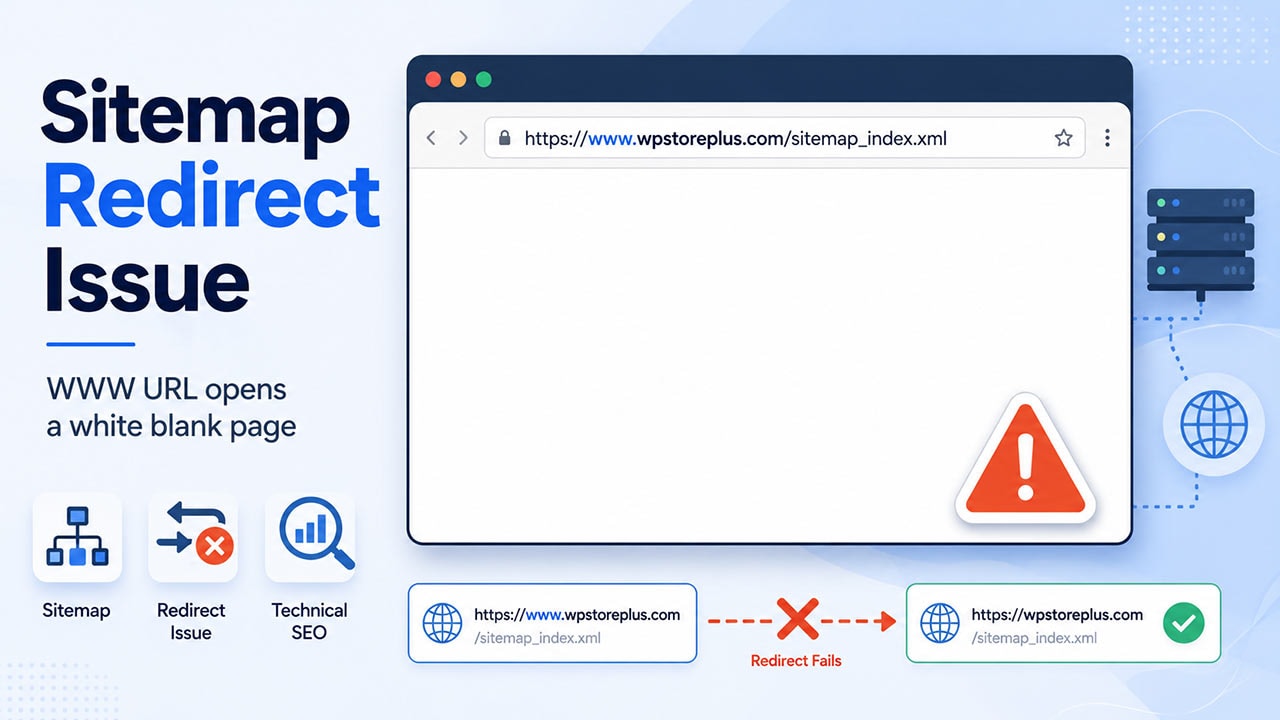
One interesting case is when your main website redirects correctly from the www version to the non-www version, but your sitemap URL does not.
For example:
https://www.example.comcorrectly redirects to:
https://example.comBut this URL:
https://www.example.com/sitemap_index.xmldoes not redirect correctly to:
https://example.com/sitemap_index.xmlThis issue can be easy to miss because the homepage appears to work correctly. But search engine crawlers may still discover or test the www version of your sitemap URL. If that URL fails, it can lead to unnecessary sitemap warnings in webmaster tools.
The Symptoms
In this case, the website was using WordPress with Rank Math SEO.
The correct sitemap URL was:
https://example.com/sitemap_index.xmlThis URL worked properly.
However, some search engine tools reported or tested the sitemap under a different URL:
https://www.example.com/sitemap_index.xmlThe expected behavior was:
https://www.example.com/sitemap_index.xml
→ 301
https://example.com/sitemap_index.xml
But the redirect did not happen correctly for that specific sitemap path.
At the same time, the homepage redirect still worked:
https://www.example.com
→ 301
https://example.com
This means the issue was not simply a DNS or SSL problem. The www hostname was reachable, but the redirect rule did not fully cover every URL path.
Why This Happens
A website can redirect the homepage correctly but still fail to redirect deeper paths.
This usually happens when the redirect setup only handles the root URL, such as:
https://www.example.combut does not properly handle all paths, such as:
https://www.example.com/sitemap_index.xml
https://www.example.com/product/example-product/
https://www.example.com/blog/example-post/
In WordPress, this can become more confusing because SEO plugins like Rank Math generate sitemaps dynamically. The sitemap is not always a physical file stored on the server. Instead, WordPress and Rank Math generate the sitemap through rewrite rules.
A typical Rank Math sitemap rewrite rule may look like this:
# START Rank Math Sitemap Rewrite Rules
<IfModule mod_rewrite.c>
RewriteEngine On
RewriteBase /
RewriteRule ^sitemap_index.xml$ /index.php?sitemap=1 [L]
RewriteRule ^([^/]+?)-sitemap([0-9]+)?.xml$ /index.php?sitemap=$1&sitemap_n=$2 [L]
RewriteRule ^([a-z]+)?-?sitemap.xsl$ /index.php?xsl=$1 [L]
</IfModule>
# END Rank Math Sitemap Rewrite Rules
This rule is normal for Rank Math sitemap handling.
The problem is not necessarily the Rank Math rewrite rule. In many cases, the problem happens before the request reaches WordPress.
If the www version is not redirected globally to the non-www version, a specific URL like this may fail:
https://www.example.com/sitemap_index.xmleven though the homepage redirect works.
Why This Matters for SEO
Search engines treat different hostnames as different URL versions.
For example:
https://example.com
https://www.example.com
are not the same URL from a crawler’s point of view.
If your preferred domain is the non-www version, then every www URL should redirect to the matching non-www URL.
A clean setup should behave like this:
https://www.example.com/sitemap_index.xml
→ 301
https://example.com/sitemap_index.xml
not like this:
https://www.example.com/sitemap_index.xml
→ error or no redirect
When all paths redirect consistently, search engines can better understand the preferred version of your website.
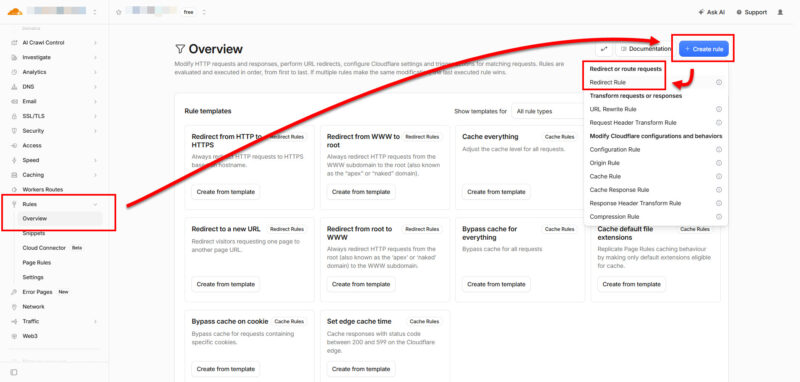
The Correct Fix: Redirect All WWW Paths to Non-WWW
The best fix is to create a redirect rule that covers every path on the www hostname.
If your website uses Cloudflare, you can create a Redirect Rule like this:
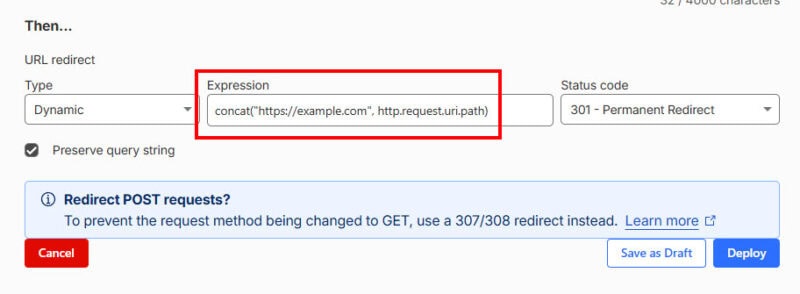
If hostname equals www.example.com
Then redirect to https://example.com/${uri.path}
Status code: 301
Preserve query string: enabled
This ensures that every www URL redirects to the matching non-www URL.
Examples:
https://www.example.com/
→ https://example.com/

https://www.example.com/sitemap_index.xml
→ https://example.com/sitemap_index.xml

https://www.example.com/product/sample-product/
→ https://example.com/product/sample-product/
This is better than redirecting only the homepage because it preserves the full path structure.
Cloudflare DNS Requirement
For Cloudflare Redirect Rules to work, the www hostname must exist in Cloudflare DNS and be proxied.
A common setup is:
Type: A
Name: www
IPv4 address: 192.0.2.1
Proxy status: Proxied
TTL: Auto
The IP address 192.0.2.1 can be used as a placeholder when the hostname only needs to be handled by Cloudflare for redirects.
Alternatively, some websites use a CNAME record:
Type: CNAME
Name: www
Target: example.com
Proxy status: Proxied
TTL: Auto
The important point is that the www record must be proxied through Cloudflare. If the request does not reach Cloudflare, the Redirect Rule cannot run.
Check Your robots.txt File
After fixing the redirect, check your robots.txt file.
For a Rank Math sitemap, the sitemap line should usually point to the sitemap index:
Sitemap: https://example.com/sitemap_index.xmlAvoid leaving an old or incorrect sitemap URL such as:
Sitemap: https://example.com/sitemap.xmlunless that URL is intentionally used and works correctly.
A clean robots.txt sitemap reference helps search engines discover the correct sitemap location.
Check Bing Webmaster Tools and Yandex Webmaster
If Bing or Yandex previously discovered or submitted an old sitemap URL, you may still see old sitemap records for a while.
Check your webmaster tools and make sure the submitted sitemap is:
https://example.com/sitemap_index.xmlIf you see older sitemap entries such as:
https://www.example.com/sitemap_index.xml
https://example.com/sitemap.xml
you can remove them if the tool allows it, or wait for the search engine to update after the redirect is fixed.
The most important thing is that the preferred sitemap URL returns a valid response and any alternate hostname redirects properly.
Final Verification Checklist
After applying the fix, test the following URLs:
https://example.com/sitemap_index.xmlExpected result:
200 OKThen test:
https://www.example.com/sitemap_index.xmlExpected result:
301 Redirect
→ https://example.com/sitemap_index.xml
Also test the homepage:
https://www.example.comExpected result:
301 Redirect
→ https://example.com
If all of these work correctly, your canonical domain structure is much cleaner.
Conclusion
If your WordPress sitemap works on the non-www version but fails on the www version, do not immediately assume that your SEO plugin is broken.
In many cases, the sitemap rewrite rules are working correctly. The real issue is that the www to non-www redirect does not cover every path.
For WordPress websites using Rank Math and Cloudflare, the recommended solution is:
- Keep the correct Rank Math sitemap URL:
https://example.com/sitemap_index.xml- Make sure
robots.txtpoints to the correct sitemap index. - Create a Cloudflare Redirect Rule that redirects all
wwwpaths to the non-wwwdomain. - Verify that:
https://www.example.com/sitemap_index.xmlredirects to:
https://example.com/sitemap_index.xmlA small redirect rule can prevent unnecessary sitemap warnings and help search engines understand your preferred domain more clearly.
At WPStore+, we treat these small technical SEO details seriously because stable indexing, clean redirects, and proper sitemap discovery are important foundations for every professional WordPress website.
Need help fixing WordPress sitemap, redirect, or technical SEO issues?
Small configuration problems such as broken sitemap redirects, incorrect canonical URLs, or misconfigured Cloudflare rules can affect how search engines crawl and understand your website.
At WPStore+, we help WordPress site owners review, troubleshoot, and improve technical SEO foundations — including sitemap setup, redirects, indexing issues, Cloudflare configuration, and WordPress performance checks.
Explore our WordPress solutions or contact WPStore+ for professional support.