

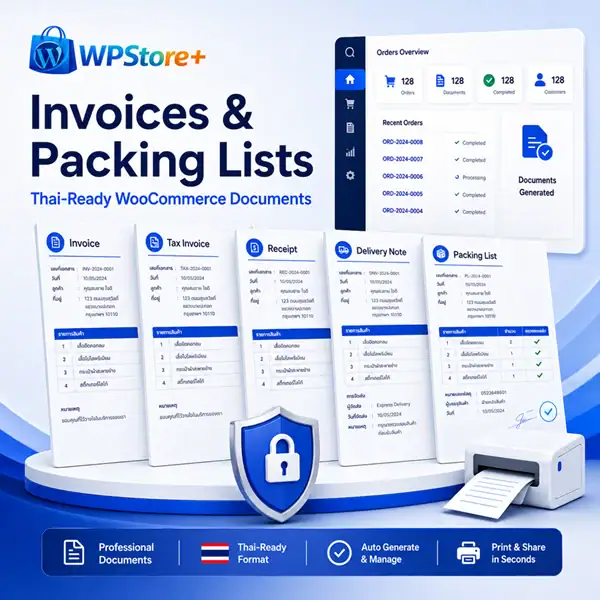
WPStore+ Invoices & Packing Lists for WooCommerce
Original price was: $49.00.$29.00Current price is: $29.00.
Create Thai-ready Proforma Invoices, Invoices, Receipts, Tax Invoices, Refund Notes, Delivery Notes, and Packing Lists directly from WooCommerce. Print individually or in bulk, collect tax details at checkout, add secure My Account access, and automate email attachments with HPOS-compatible order handling.
WPStore+ Invoices & Packing Lists for WooCommerce gives store owners a practical way to create, view, print, and save professional A4 order documents directly from WooCommerce.
Generate seven useful document types from your existing WooCommerce order data: Proforma Invoice, Invoice, Receipt, Tax Invoice, Refund Note, Delivery Note, and Packing List. Every document uses a clean print-ready layout designed for browser printing and Save as PDF, without storing customer documents in a public uploads directory.
The plugin is especially useful for Thai and international stores that need reliable Unicode output. It includes the Sarabun webfont, supports Thai and English text, offers bilingual labels, and can display dates using either the Buddhist Era or Gregorian calendar.
Seven Documents for the Complete Order Workflow
- Proforma Invoice — provide an unpaid-order payment reference with a clear notice that it is not a tax invoice or receipt.
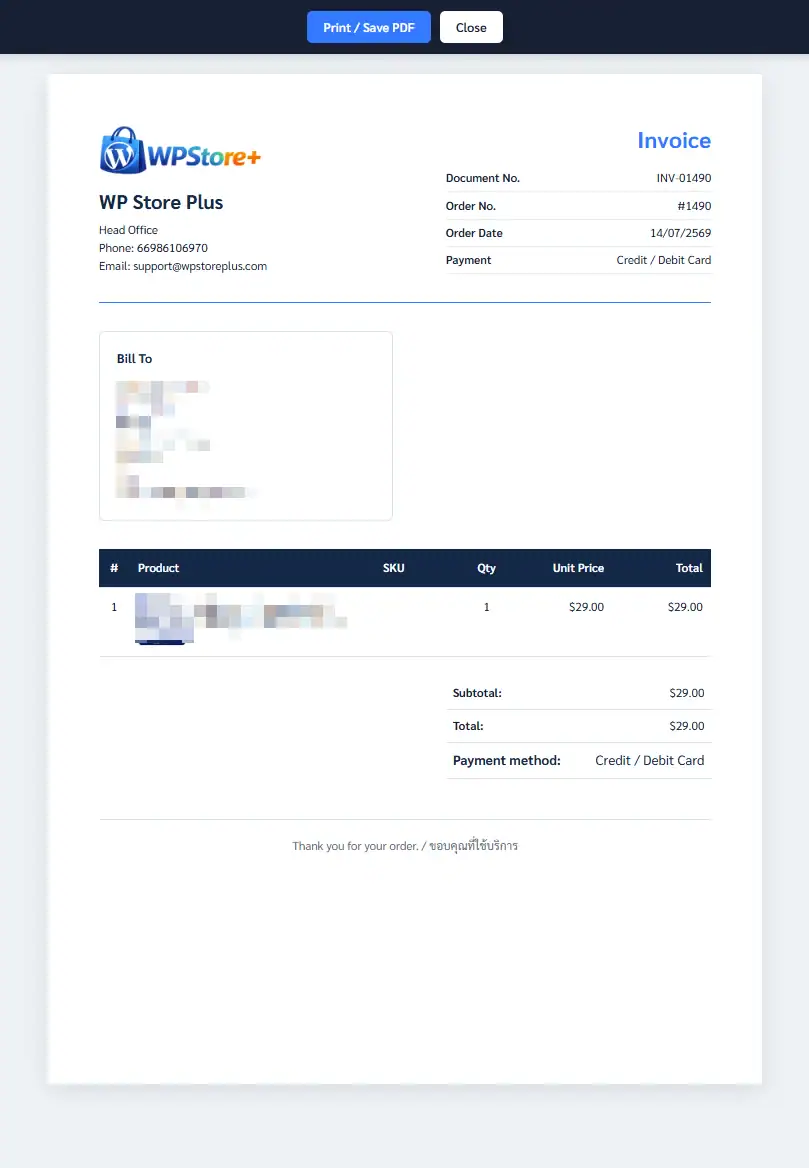
- Invoice — create a professional priced order document with customer, product, payment, tax, shipping, and total information.
- Receipt — document paid orders with payment status and paid date, while unpaid orders receive a visible DRAFT warning.
- Tax Invoice — display seller and buyer tax details, Tax ID, head-office or branch information, and visible warnings when required information is incomplete.
- Refund Note — summarize refunds recorded by WooCommerce, including refunded quantities, amounts, shipping, tax, adjustments, and refund history.
- Delivery Note — provide a price-free shipping document with recipient details, quantities, fulfillment totals, and optional signature fields.
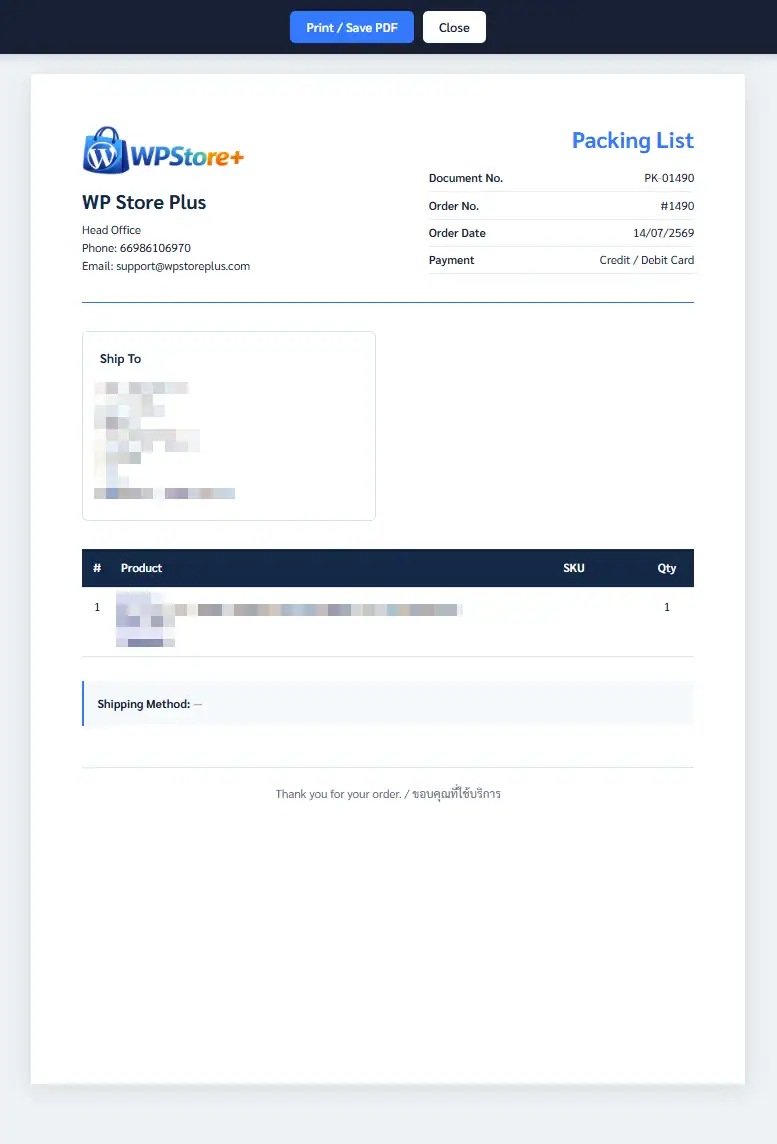
- Packing List — help staff prepare orders using product quantities, SKU, variations, shipping details, and optional warehouse information.
Thai-Ready and Bilingual by Design
The bundled Sarabun font helps Thai names, addresses, vowels, and tone marks display correctly in the browser, print preview, and saved PDF output. Choose Thai, English, or bilingual document labels, and switch between Buddhist Era and Gregorian dates from the settings page.
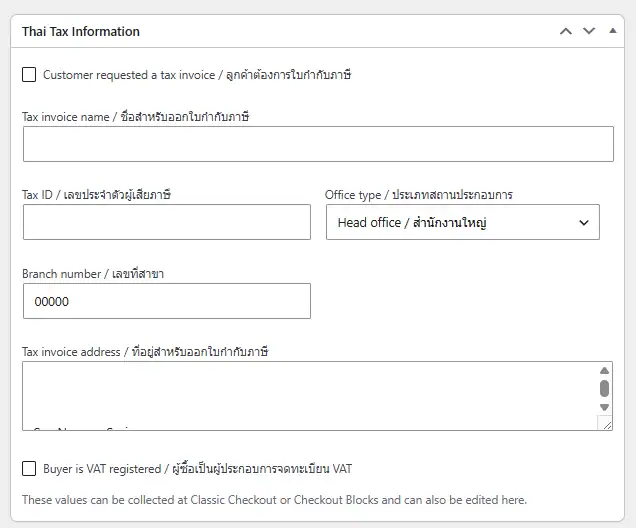
Store and customer tax information can include Thai or English text. The plugin also supports Tax ID, head-office and branch information, customer tax-invoice requests, and VAT-registration details.
Print One Order or Process Orders in Bulk
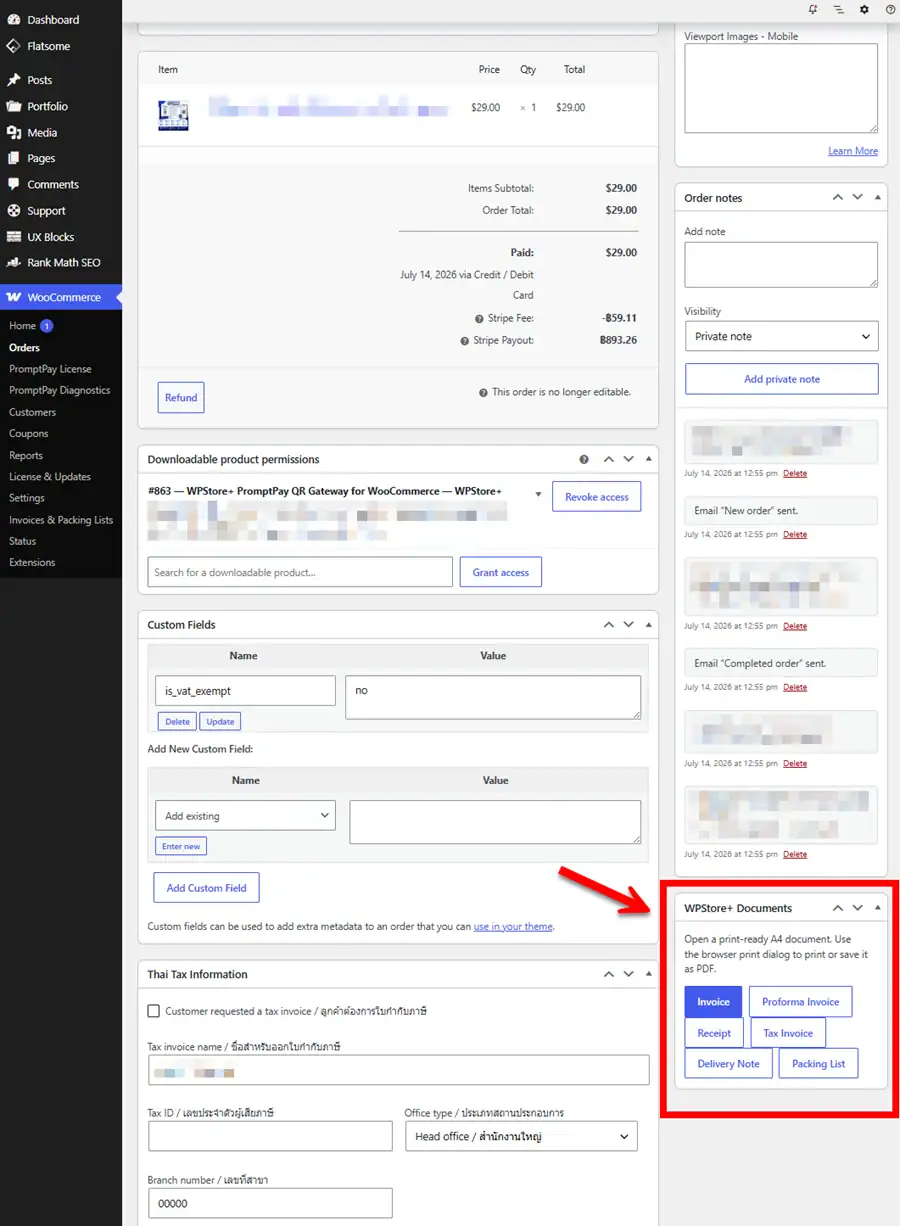
Open documents from the WooCommerce order screen or order-list actions. Premium Mode adds Bulk Print for all seven document types on both legacy and HPOS order screens. Bulk jobs use short-lived, single-use requests and include a 100-order safety limit.
The document toolbar provides Print / Save PDF and Close controls. Print-specific styling removes the toolbar from the printed page and keeps the A4 layout consistent.
Customer and Email Workflows
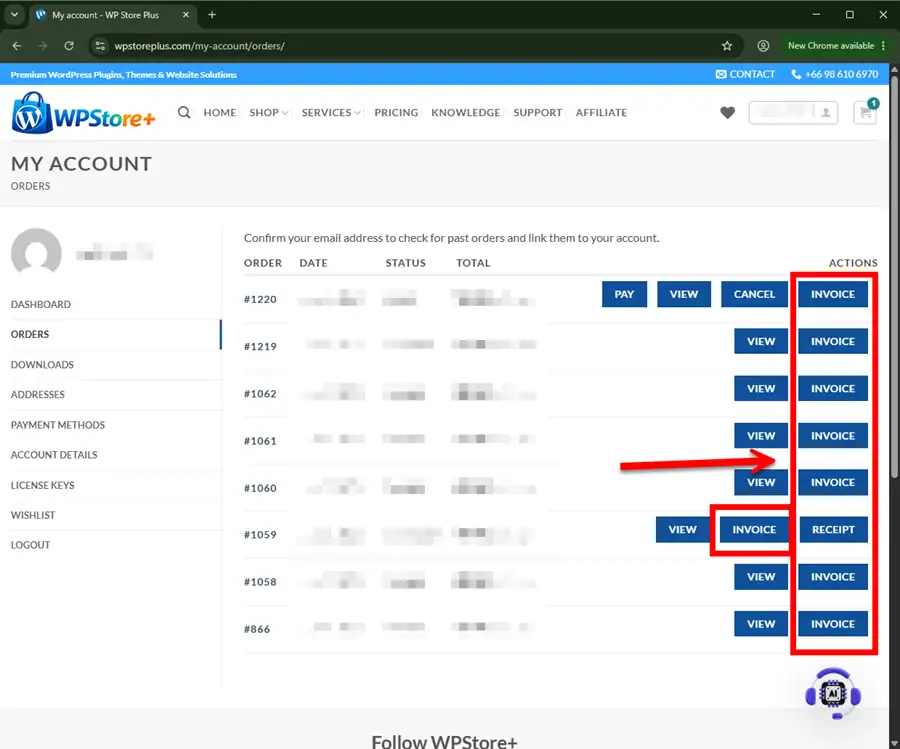
Premium Mode can add secure document actions to My Account so authenticated customers can open eligible documents belonging to their own orders. Per-document controls let the store decide which customer actions are available.
Optional WooCommerce email rules can attach portable, Thai-ready HTML documents to selected customer or administrator emails. The files include embedded Sarabun fonts and are removed from the temporary directory after the email request finishes.
Classic Checkout and Checkout Blocks
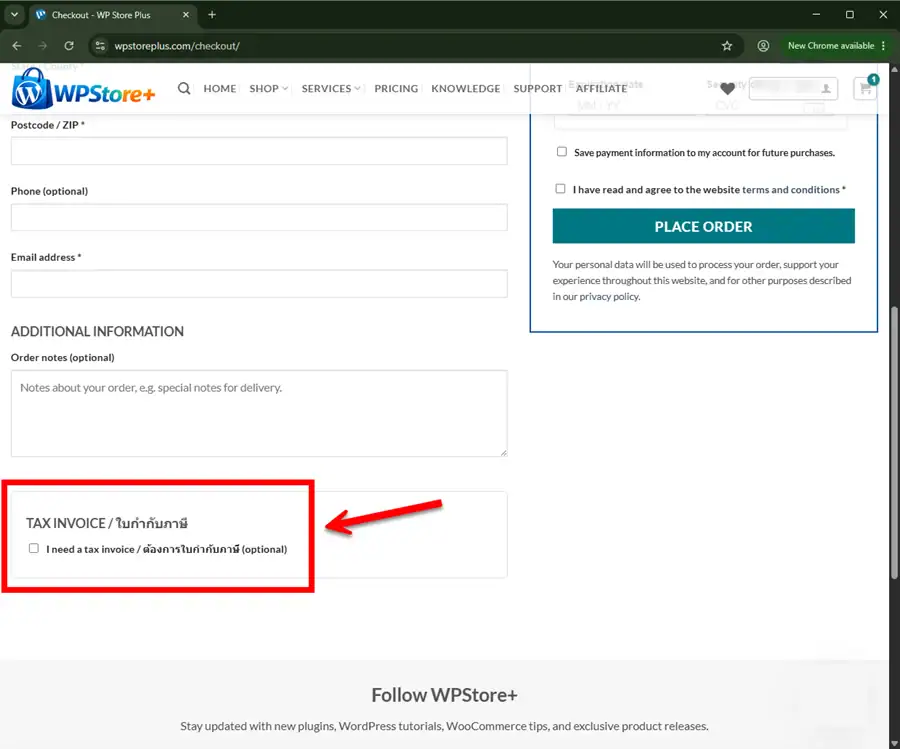
Collect tax-invoice information through either Classic Checkout or WooCommerce Checkout Blocks. Conditional validation can require the tax-invoice name and address, plus a 13-digit Tax ID and five-digit branch number for VAT-registered buyers.
Both checkout systems store the information in one canonical WooCommerce order-meta format. Existing data can be viewed from the order editor, and the plugin integrates with WooCommerce personal-data removal tools.
Flexible Document Appearance
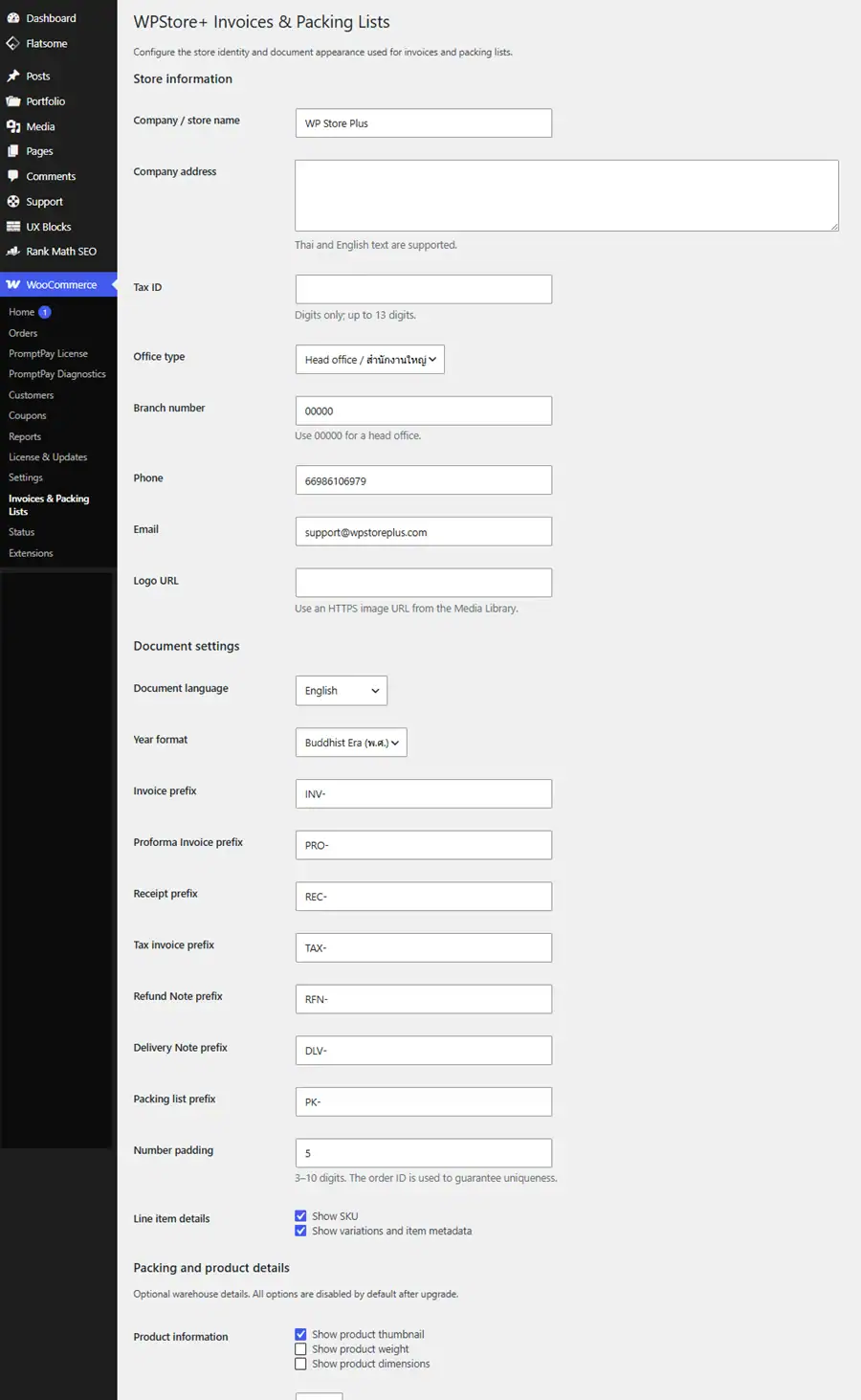
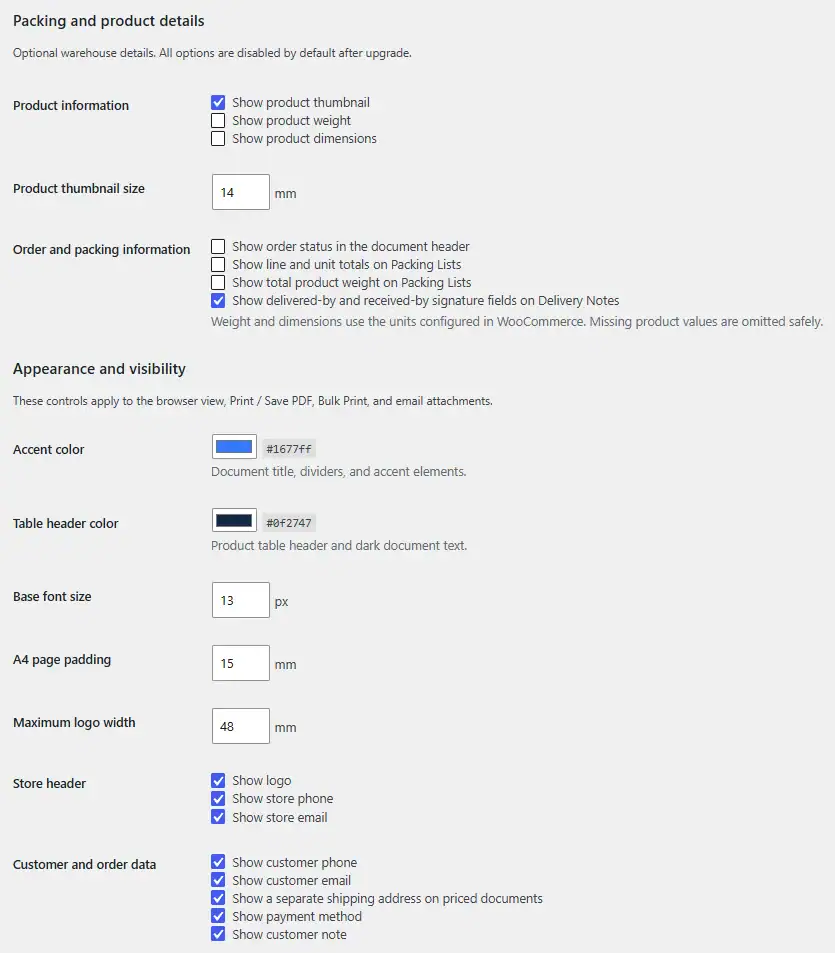
Match documents to your store using controls for:
- Store logo and company details
- Accent and table-header colors
- Font size, A4 padding, and logo width
- Customer and store contact visibility
- Billing and shipping address visibility
- Payment method and customer note visibility
- Per-document notes and a common footer
- SKU, variation, and item metadata
- Optional product thumbnails, weight, and dimensions
- Optional order status, packing totals, packing weight, and delivery signatures
Core Mode and Premium Mode
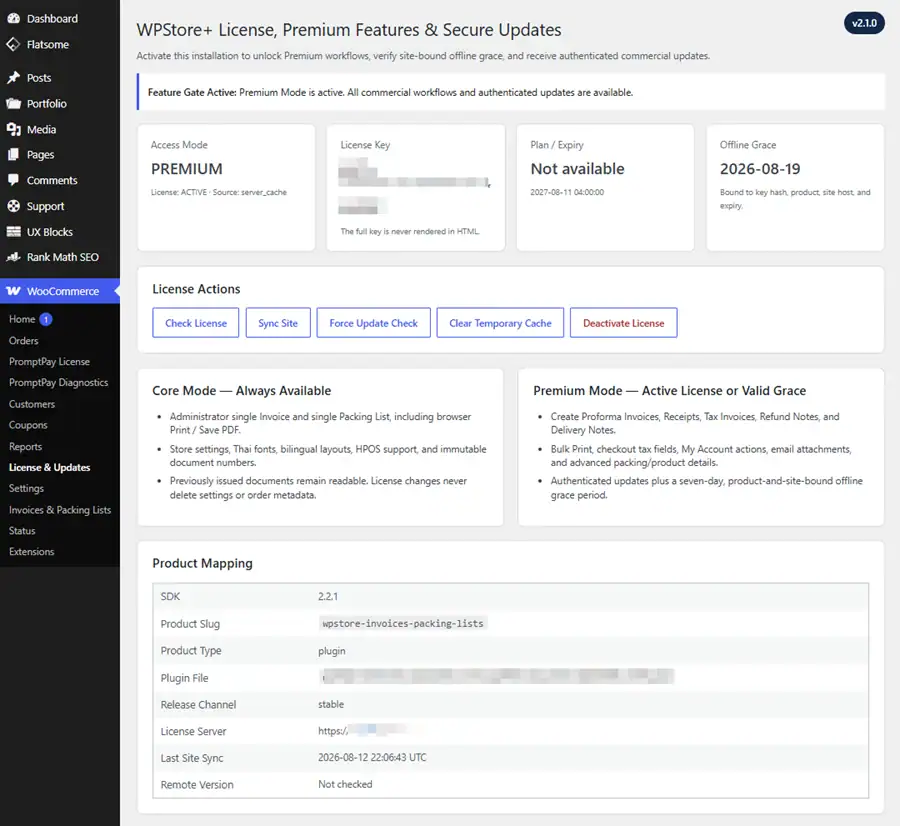
The central Feature Gate separates essential document access from commercial automation.
Core Mode remains available without an active license:
- Administrator single Invoice printing
- Administrator single Packing List printing
- Print / Save PDF for Core documents
- Store settings and document appearance
- Thai fonts, bilingual layouts, and HPOS support
- Existing settings, order metadata, and immutable document numbers
- Authorized access to documents that were already issued
Premium Mode requires an active WPStore License or valid offline grace:
- Create Proforma Invoices, Receipts, Tax Invoices, Refund Notes, and Delivery Notes
- Bulk Print all document types
- Checkout tax-invoice fields
- My Account document automation
- WooCommerce email attachments
- Advanced product and packing details
- Authenticated commercial updates
License expiration, deactivation, or reactivation never deletes document settings, tax information, order metadata, or issued document numbers. Premium settings remain stored and return when the license is reactivated.
Built for WooCommerce Stability and Security
- Compatible with WooCommerce High-Performance Order Storage (HPOS)
- Uses WooCommerce CRUD APIs instead of direct order-database queries
- Capability checks, ownership validation, and nonce-protected document URLs
- Runtime enforcement for direct requests, checkout, My Account, email, rendering, and Bulk Print
- Private no-cache document responses with noindex headers
- Site-bound WPStore License validation with a seven-day offline grace period
- No public storage of generated customer documents
- Settings and historical document numbers are preserved during license transitions
Important Compliance Notice
This plugin creates print-ready business documents from WooCommerce order data. It does not submit Thai e-Tax Invoices, apply digital signatures, connect to the Revenue Department, or guarantee compliance with the accounting or tax rules of any country. Refund Note is a WooCommerce refund summary and is not a Thai tax credit note. Merchants remain responsible for reviewing document content and meeting their legal, accounting, and tax obligations.
Installation
### Requirements
* WordPress 6.4 or later
* PHP 7.4 or later
* WooCommerce 8.9 or later
* Administrator access to install and configure plugins
### Installation Steps
1. Download the plugin ZIP file from your WPStore+ account.
2. In WordPress, go to Plugins > Add New Plugin > Upload Plugin.
3. Select the ZIP file and click Install Now.
4. Click Activate Plugin.
5. Open WooCommerce > Invoices & Packing Lists.
6. Enter your company name, address, Tax ID, office type, contact information, logo, language, and document preferences.
7. Save the settings.
8. Open a WooCommerce order and use the WPStore+ Documents box to test an Invoice and Packing List.
9. Open WooCommerce > License & Updates and activate the license mapped to this product.
10. Configure Premium document, checkout, My Account, email, and packing options as required.
11. Test Print / Save PDF and customer-facing workflows on a staging site before using them in production.
### Updating from an Earlier Version
1. Back up the website database and files.
2. Upload the new ZIP through Plugins > Add New Plugin > Upload Plugin.
3. Choose Replace current with uploaded when WordPress detects the existing plugin.
4. Confirm that store settings and issued document numbers are unchanged.
5. Check the License page and run a secure update check.
6. Test at least one Invoice, Packing List, Premium document, customer action, and email rule.
Frequently Asked Questions
### Does the plugin support Thai names and addresses?
Yes. It uses UTF-8 and includes the Sarabun webfont for Thai text. Thai, English, and bilingual document labels are available.
### Which documents can it create?
It supports Proforma Invoice, Invoice, Receipt, Tax Invoice, Refund Note, Delivery Note, and Packing List.
### Does it generate PDF files on the server?
No. It generates a private print-ready HTML document. Use the browser Print command and choose Save as PDF. This avoids placing generated customer documents in a public uploads directory.
### Is it a Thai e-Tax Invoice system?
No. It does not submit e-Tax Invoices, apply digital signatures, or connect to the Thai Revenue Department. Merchants must verify their own legal and accounting requirements.
### Is Refund Note the same as a Thai tax credit note?
No. Refund Note summarizes refund information recorded in WooCommerce. It is not a tax credit note or e-Tax Invoice.
### What works without an active license?
Core Mode allows an Administrator to open and print individual Invoices and Packing Lists. Settings, Thai fonts, bilingual layouts, HPOS support, existing order metadata, and issued document numbers are also preserved.
### What does Premium Mode unlock?
Premium Mode unlocks new advanced documents, Bulk Print, checkout tax fields, My Account document automation, email attachments, advanced product and packing details, and authenticated updates.
### What happens when the license expires or is deactivated?
Premium automation is paused, but the plugin does not delete settings, order metadata, tax details, or immutable document numbers. Authorized users can still open previously issued documents, and reactivation restores the saved Premium configuration.
### Can customers access their own documents?
Yes, in Premium Mode. Logged-in customers can open enabled and eligible documents for their own orders. Ownership, document settings, payment state, refund state, tax-invoice request, and fulfillment status are checked before access is granted.
### Can documents be attached to WooCommerce emails?
Yes, in Premium Mode. The plugin can attach standalone HTML documents to selected WooCommerce emails according to the configured rules. Temporary files are removed after the email request.
### Does it support Checkout Blocks?
Yes. Tax-invoice request fields support both Classic Checkout and WooCommerce Checkout Blocks.
### Does it support HPOS?
Yes. The plugin declares HPOS compatibility and uses WooCommerce order objects and CRUD APIs.
### Will an issued document number change when the document is reopened?
No. Each document type stores its own immutable number for the order and reuses it when the document is opened again.
### How many orders can be included in one Bulk Print request?
Up to 100 orders. Bulk requests are short-lived and single-use for additional safety.
### Are settings and document numbers deleted when the plugin is uninstalled?
The uninstall policy removes plugin-owned license and temporary scheduling data while deliberately preserving document settings and historical document numbers.
Changelog
### 2.1.0
* Added the central Core/Premium Feature Gate with fail-closed unknown feature identifiers.
* Kept Administrator single Invoice and Packing List printing available in Core Mode.
* Added Premium enforcement for advanced documents, Bulk Print, checkout fields, My Account automation, email attachments, and warehouse details.
* Enforced entitlement in the UI, signed endpoints, direct runtime calls, rendering, and settings sanitization.
* Preserved settings, tax data, order metadata, issued document numbers, and authorized issued-document access across license transitions.
* Added Active License and valid site-bound Offline Grace support for Premium access.
### 2.0.0
* Added WPStore License SDK 2.2.1-compatible activation and validation.
* Added masked-key status, site synchronization, offline grace, and authenticated stable-channel updates.
* Added product, plugin-file, channel, package-host, and downgrade validation guards.
### 1.9.0
* Added Delivery Note with a separate number, note, fulfillment summary, and optional signature fields.
* Added Delivery Note support for administration, Bulk Print, My Account, and Completed Order emails.
### 1.8.0
* Added Refund Note for partial and full WooCommerce refunds.
* Added cumulative refund totals, refund history, customer access, Bulk Print, and email rules.
### 1.7.0
* Added Proforma Invoice for eligible unpaid orders.
* Added a separate number, notice, customer action, Bulk Print, and On-hold email rule.
### 1.6.0
* Added advanced customer-document and email-attachment delivery rules.
* Added per-document My Account controls and per-email attachment settings.
### 1.5.0
* Added product thumbnails, weight, dimensions, order status, packing totals, packing weight, and delivery details.
### 1.4.0
* Added document appearance and visibility controls shared across browser, print, bulk, and email output.
### 1.3.2
* Corrected customer document Close/Back behavior and aligned browser and print layouts.
### 1.3.0
* Added secure My Account document actions and WooCommerce email attachments.
### 1.2.0
* Added Thai tax-invoice request data for Classic Checkout and Checkout Blocks.
* Added privacy-tool integration and canonical order metadata.
### 1.1.0
* Added Receipt and Tax Invoice documents with independent numbers and visible DRAFT validation.
### 1.0.0
* Initial release with Thai-ready Invoice and Packing List documents, Sarabun fonts, bilingual labels, print styling, and HPOS support.
Product Screenshots
Preview the plugin interface, settings, and key features before purchase.
Only logged in customers who have purchased this product may leave a review.
Related products
LINE Integration
Analytics & Reporting
Core Web Vitals Monitoring
Payment Gateway

WooCommerce Plugins
Analytics & Reporting

AI Tools


Reviews
There are no reviews yet.