


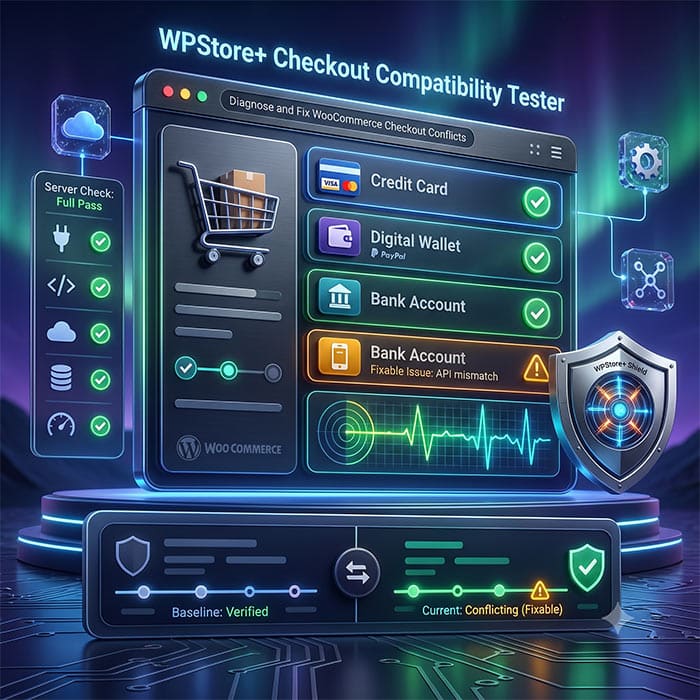
WPStore+ Checkout Compatibility Tester
Original price was: $49.00.$39.00Current price is: $39.00.
Test your WooCommerce checkout before customers discover the problem.
WPStore+ Checkout Compatibility Tester provides read-only Server Scans, an administrator-only Live Checkout Probe, payment gateway visibility checks, Gateway Conflict Intelligence, Environment Drift Detection, regression monitoring, scenario validation, and privacy-safe support reports—without creating an order or attempting a payment.
Launch Price: $39/year · Regular Price: $49/year · 1-Site License
Test Your WooCommerce Checkout Before Customers Discover the Problem
A checkout page can appear normal while an important payment gateway is missing, a Store API request is failing, a cache rule is affecting the session, or a recent update has changed the environment. These issues are often discovered only after customers abandon their carts or contact support.
WPStore+ Checkout Compatibility Tester gives store owners, developers, and support teams a structured way to inspect WooCommerce checkout readiness before a problem reaches customers. It combines server-side diagnostics with a browser-based Live Checkout Probe and compares current results with a known-good baseline.
The plugin is diagnostic and read-only. It does not submit the checkout form, create an order, authorize a payment, collect payment credentials, or automatically change WooCommerce settings.
Core Diagnostic Features
Complete Checkout Compatibility Diagnostics
Run a Full Server Scan to review the technical components that support the WooCommerce checkout flow:
-
WooCommerce dependency and runtime environment
-
Assigned Cart and Checkout pages
-
Classic Checkout shortcode and Checkout Block detection
-
Enabled and registered payment gateways
-
AJAX, WordPress REST API, and WooCommerce Store API connectivity
-
WooCommerce session-handler and browser-cookie support
-
HTTPS and mixed-content signals
-
Cart and Checkout response and cache-header signals
-
HPOS status and compatibility declaration
-
Checkout-, gateway-, currency-, session-, and cache-related extensions
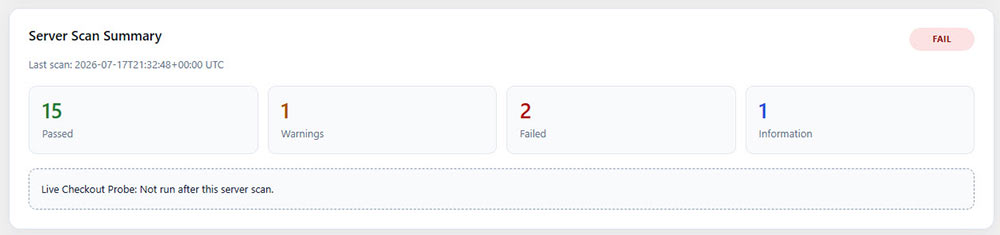
Results are organized into PASS, WARNING, FAIL, and INFO groups so administrators can quickly identify what requires attention.
Administrator-Only Live Checkout Probe
The Live Checkout Probe observes the Checkout page under the current administrator browser session. It compares enabled gateways with the payment methods that are actually visible for the current cart, currency, address, shipping, account, and session conditions.
It supports both Classic Checkout and Checkout Blocks. The probe does not click Place order, submit customer information, or contact a payment gateway for authorization.
Gateway Intelligence & Conflict Tracking
Payment Gateway Visibility and Conflict Intelligence
An enabled gateway is not always available to the customer. Currency restrictions, country rules, cart conditions, shipping methods, custom callbacks, and gateway-rule extensions can all affect visibility.
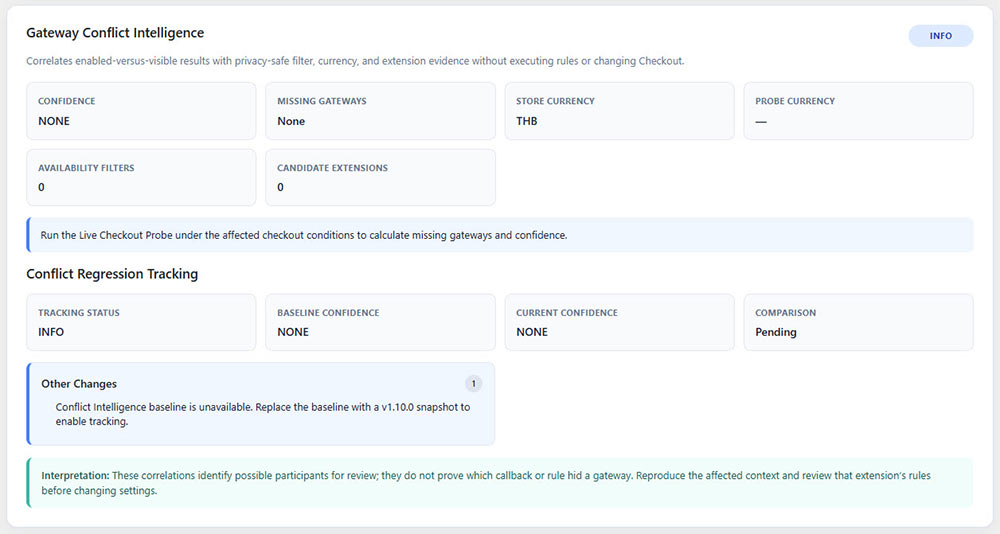
Gateway Conflict Intelligence correlates enabled-versus-visible gateway results with:
-
Privacy-safe availability-filter callback sources and priorities
-
Active gateway-rule and currency-extension signals
-
Store-versus-Probe currency differences
-
Missing and unexpected gateway IDs
-
NONE, LOW, MEDIUM, and HIGH confidence levels
It can observe Stripe, PayPal, bank transfer, cash on delivery, and other gateways registered with WooCommerce. The plugin reports correlation evidence for administrator review; it does not claim that a specific extension caused the issue and never executes availability callbacks itself.
Gateway Conflict Regression Tracking
Save a known-good baseline and track future changes in gateway conflict evidence. Version 1.11.0 can compare:
-
Conflict status and confidence
-
Missing gateway IDs
-
Currency mismatch state
-
Availability-filter count and source labels
-
Candidate extension slugs
-
Evidence signal keys
Differences are separated into regressions, warnings, improvements, and informational changes.
Baseline & Environment Tracking
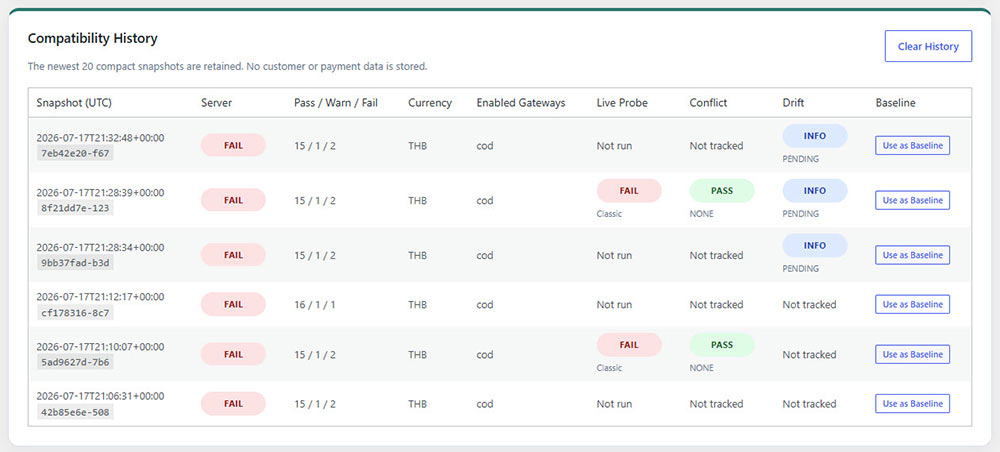
Compatibility History and Known-Good Baseline
The plugin retains up to 20 compact compatibility snapshots. Administrators can select the current result or a previous History entry as the primary known-good baseline.
Future scans can identify:
-
New failed checks
-
New warnings
-
Resolved checks
-
Page, currency, gateway, runtime, and extension changes
-
Live-visible gateway and browser-endpoint changes
-
Gateway conflict regressions
-
Checkout environment drift
History stores compact diagnostic observations only and does not contain orders, customer records, addresses, payment credentials, or cart product details.
Checkout Environment Drift Detection
Environment Drift Detection helps identify when the current checkout environment no longer matches the known-good baseline. It compares compact observations for:
-
WordPress, WooCommerce, and PHP versions
-
WordPress environment type
-
Store and Live Probe currency
-
Cart and Checkout page assignments, modes, and publication status
-
Enabled payment gateways
-
Live Probe Checkout mode
-
Relevant extension slugs and versions
Drift is classified as Critical, Warning, Informational, Stable, or Pending. Critical changes are included in baseline regressions and can be detected by Scheduled Monitoring.
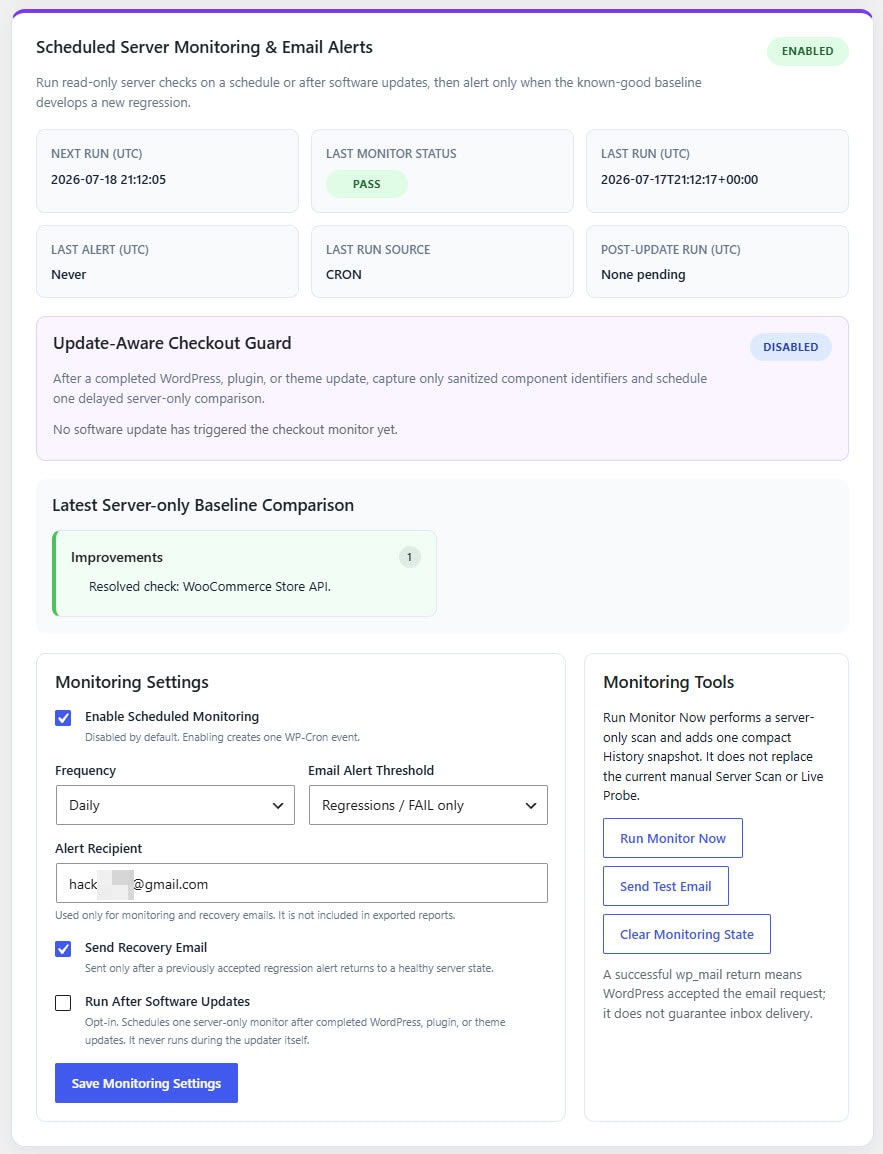
Scheduled Monitoring and Update-Aware Guard
Enable optional daily or weekly server-only monitoring with WP-Cron. The plugin can send alerts for FAIL results or for both FAIL and WARNING results.
Monitoring includes:
-
Automatic comparison with the saved baseline
-
Duplicate-alert suppression
-
Optional recovery email
-
Manual Run Monitor Now control
-
Privacy-safe test email
-
Optional delayed scan after completed WordPress core, plugin, or theme updates
-
Compact sanitized update context
Scheduled monitoring does not run the browser Live Checkout Probe and does not modify the checkout environment.
Scenarios & Validation
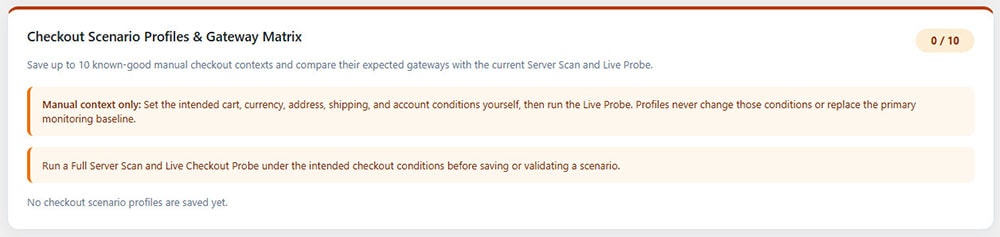
Checkout Scenario Profiles and Gateway Matrix
Save up to 10 named checkout scenarios for conditions that matter to the store, such as:
-
THB / Thailand / Standard cart
-
USD / International customer
-
Logged-in customer
-
Specific shipping method
-
Classic Checkout or Checkout Block
Each scenario can retain expected enabled and visible gateway IDs, currency, Checkout mode, observed cart-item count, and payment-requirement state. The plugin compares the current manually prepared context with each saved scenario without changing the cart, address, shipping method, account, currency, or gateway rules.
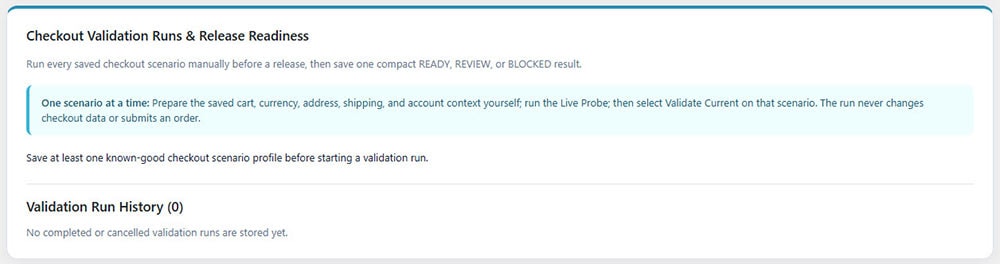
Validation Runs and Release Readiness
Create a named Validation Run before a release or major configuration change. Each saved scenario becomes a manual validation target with PASS, WARNING, FAIL, PENDING, STALE, or REMOVED status.
Release readiness is summarized as:
-
READY — every target passes
-
REVIEW — completed targets contain warnings
-
BLOCKED — one or more completed targets fail
After WordPress core, plugin, or theme updates, the Revalidation Queue can mark saved scenarios as due for a fresh manual check.
Reports & Administration
Privacy-Safe TXT Compatibility Report
Download a structured TXT report for troubleshooting, documentation, or support handoff. Reports can include software versions, gateway IDs, diagnostic status, compact filter-source labels, monitoring state, conflict evidence, and environment drift.
Reports exclude customer data, addresses, payment credentials, full license keys, API secrets, package URLs, and absolute server paths.
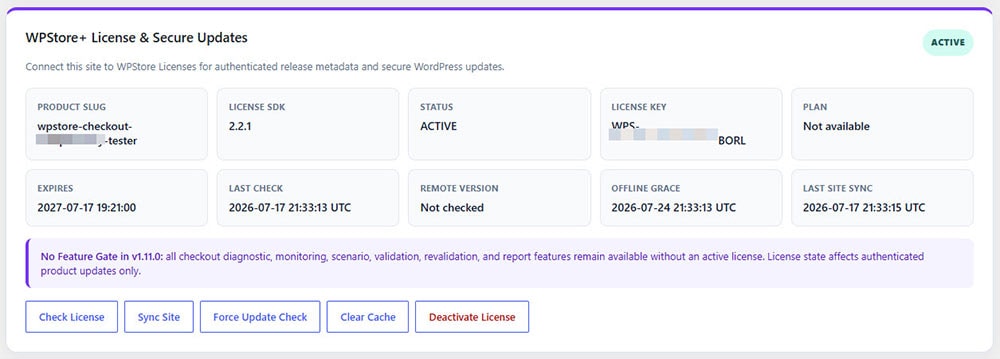
WPStore+ License and Secure Updates
The plugin includes WPStore License SDK 2.2.1 for license activation, validation, site synchronization, offline grace cache, remote release metadata, and authenticated WordPress updates.
Version 1.11.0 does not restrict diagnostic features when a license is inactive. License activation is used for authenticated product updates and site synchronization.
Target Audience & Limitations
Built for Store Owners, Developers, and Support Teams
WPStore+ Checkout Compatibility Tester is suitable for:
-
WooCommerce store owners preparing for launch
-
Developers testing plugin or theme updates
-
Support teams investigating missing payment gateways
-
Agencies maintaining multiple checkout configurations
-
Stores using Checkout Blocks, Classic Checkout, HPOS, currency extensions, or gateway rules
Important Limitation
A passing diagnostic report does not prove that a payment gateway can successfully authorize or capture a payment. Every gateway should still be tested using its official sandbox or test mode before production use.
Installation
### Requirements
- WordPress 6.2 or later
- WooCommerce 8.0 or later
- PHP 7.4 or later
- HTTPS recommended for production checkout pages
- WP-Cron or a real server cron for Scheduled Monitoring
### Installation Steps
1. Download the `WPStore-Checkout-Compatibility-Tester-v1.11.0.zip` file.
2. In WordPress, go to **Plugins > Add New Plugin > Upload Plugin**.
3. Select the ZIP file and click **Install Now**.
4. Click **Activate Plugin**.
5. Open **Checkout Tester** from the WordPress administrator menu.
6. Click **Run Full Server Scan** and review the PASS, WARNING, FAIL, and INFO results.
7. Add a normal product to the Cart without completing a purchase.
8. Return to Checkout Tester and click **Open Live Checkout Probe**.
9. Wait for the probe to finish, then return to the Checkout Tester dashboard.
10. When the result represents a verified working checkout context, select **Set Current Result as Baseline** or **Replace Baseline with Current**.
11. Optionally create Checkout Scenario Profiles, start a Validation Run, and enable Scheduled Monitoring.
12. Open **WPStore+ License & Secure Updates** to activate the product license, synchronize the site, and check for authenticated updates.
### Recommended First-Run Workflow
1. Prepare the intended cart, currency, address, shipping, and account conditions manually.
2. Run the Full Server Scan.
3. Run the Live Checkout Probe.
4. Review all warnings and failures.
5. Confirm every payment gateway with its official sandbox or test mode.
6. Save the result as the known-good baseline only after the checkout condition has been verified.
### Updating from an Earlier Version
Upload the new ZIP through WordPress or use the authenticated WPStore+ update system. Existing History, baseline, scenarios, validation runs, monitoring settings, and diagnostic data are preserved during a normal update.
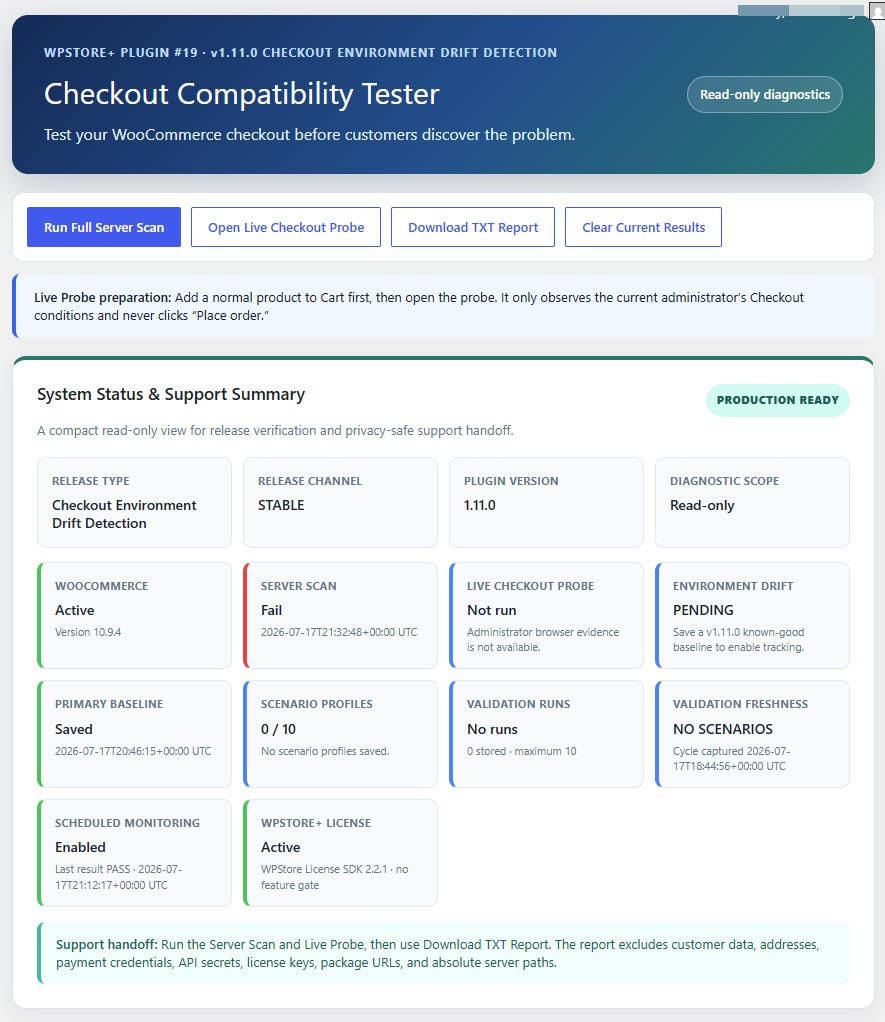
A baseline created before v1.11.0 does not contain the Environment Drift snapshot. Existing baseline comparisons continue to work, but Environment Drift remains Pending until a new known-good Server Scan and Live Checkout Probe are saved as the baseline.
Frequently Asked Questions
### Does the plugin create an order or charge a payment method?
No. The plugin performs read-only diagnostics. It does not click Place order, submit Checkout, create an order, authorize or capture a payment, or read payment credentials.
### Does it support both Classic Checkout and Checkout Blocks?
Yes. The Server Scan identifies the Checkout page type, and the administrator-only Live Checkout Probe observes payment methods rendered by either Classic Checkout or Checkout Blocks.
### Can it test Stripe, PayPal, and other payment gateways?
It can compare any gateways registered and enabled through WooCommerce with the methods visible in the current Checkout context. This includes Stripe, PayPal, bank transfer, cash on delivery, and other WooCommerce gateways. It does not perform a real authorization or replace the gateway's official sandbox test.
### Why can an enabled gateway be reported as not visible?
Gateway availability may depend on currency, country, cart total, product type, shipping method, customer account, or custom gateway rules. Review Gateway Conflict Intelligence and repeat the Live Probe under the intended checkout conditions.
### Does Gateway Conflict Intelligence prove which plugin hid a gateway?
No. It correlates registered availability filters, privacy-safe callback sources, active extension signals, currency differences, and missing gateway results. The evidence helps administrators investigate, but it does not prove that a specific extension or callback caused the result.
### What is Checkout Environment Drift Detection?
It compares the current WordPress, WooCommerce, PHP, pages, Checkout mode, currencies, enabled gateways, Live Probe context, and relevant extension versions with a known-good v1.11.0 baseline. Differences are classified as Critical, Warning, Informational, Stable, or Pending.
### Does Environment Drift automatically roll back a change?
No. Drift Detection is read-only. It never installs, updates, downgrades, activates, deactivates, or configures WordPress, WooCommerce, extensions, pages, currencies, gateways, carts, orders, or payments.
### Does Scheduled Monitoring run the Live Checkout Probe?
No. Scheduled and post-update monitoring perform server-only checks. The Live Checkout Probe requires an authorized administrator browser session and must be run manually.
### Does the plugin automatically fix checkout problems?
No. It identifies compatibility signals and provides recommendations for administrator review. It does not automatically change cache settings, gateway rules, pages, currencies, sessions, extensions, or WooCommerce configuration.
### Does it support WooCommerce HPOS?
Yes. The plugin declares HPOS compatibility and does not query WooCommerce order tables directly.
### Is the TXT report safe to share with support?
The report is designed for privacy-safe support handoff. It excludes orders, customer details, addresses, payment credentials, full license keys, API secrets, package URLs, and absolute server paths. Review the report before sharing it if the site has additional privacy requirements.
### Does a PASS result guarantee that customers can complete payment?
No. PASS means the observed compatibility checks succeeded under the tested conditions. It does not confirm payment authorization, capture, fraud screening, webhook delivery, or settlement. Complete an official sandbox or test-mode transaction for every gateway before production use.
### Is an active license required to run the diagnostic features?
Version 1.11.0 does not use a feature gate for checkout diagnostics. The Server Scan, Live Probe, monitoring, scenarios, validation, History, baseline, conflict tracking, Environment Drift, and reports remain available. A valid WPStore+ license is used for authenticated product updates and site synchronization.
### What data does the plugin store?
It stores the latest diagnostic results, up to 20 compact History snapshots, one primary baseline, up to 10 scenario profiles, up to 10 validation runs, one revalidation queue, monitoring state, and local license/update metadata. It does not store customer records, addresses, payment credentials, cart product details, orders, or payment results in diagnostic snapshots.
### Why is Environment Drift Pending after updating from an older version?
A baseline saved before v1.11.0 does not include the compact Environment Drift snapshot. Run the Full Server Scan and Live Checkout Probe under a known-good checkout condition, then replace the baseline. Existing earlier comparisons continue to work without creating false drift.
Changelog
### Version 1.11.0 — Checkout Environment Drift Detection
- Added compact Checkout Environment snapshots to History and the primary baseline.
- Added deterministic comparison for WordPress, WooCommerce, PHP, environment type, pages, Checkout modes, currencies, enabled gateways, Probe context, and relevant extension versions.
- Added Critical, Warning, Informational, Stable, and Pending drift states.
- Added Environment Drift to the dashboard, System Status, History, baseline alerts, Scheduled Monitoring, and TXT reports.
- Added backward-compatible handling for pre-v1.11.0 baselines without false drift.
### Version 1.10.0 — Gateway Conflict Regression Tracking
- Added compact Gateway Conflict Intelligence snapshots to History and the primary baseline.
- Added regression comparison for confidence, missing gateways, currency mismatch, filter sources, candidate extensions, and evidence signals.
- Added Conflict status and confidence to History and TXT reports.
- Added backward-compatible handling for older baselines.
### Version 1.9.0 — Gateway Conflict Intelligence
- Added confidence-based evidence for enabled gateways missing from the Live Checkout Probe.
- Added privacy-safe availability-filter source, callback, and priority inventory.
- Added gateway-rule, currency-extension, currency-mismatch, and no-visible-gateway signals.
- Added a dedicated dashboard and TXT report section.
### Version 1.8.2 — License Action Form Hotfix
- Restored valid protected forms for Check License, Sync Site, Force Update Check, Clear Cache, and Deactivate License.
- Preserved nonce, capability, confirmation, and redirect protections.
### Version 1.8.1 — Translation Timing and License Cron Hardening
- Moved License Cron scheduling to `init` priority 30.
- Prevented first-run cron evaluation from triggering third-party translations too early.
### Version 1.8.0 — WPStore License Integration
- Added WPStore License SDK 2.2.1 activation, validation, deactivation, site synchronization, offline grace cache, and authenticated updates.
- Added masked license display and redacted diagnostics.
- Added secure update metadata and daily site check-in.
- Kept every diagnostic feature available without a feature gate.
### Version 1.7.0 — Final Commercial Stable Release Milestone
- Added the read-only System Status & Support Summary.
- Added production-readiness and stable-release metadata.
- Added privacy-safe support handoff guidance.
### Version 1.6.0 — Validation Freshness and Revalidation Queue
- Added automatic revalidation-due markers after completed WordPress core, plugin, and theme updates.
- Added manual revalidation controls and freshness summaries.
- Added compact update context and fresh validation evidence.
### Version 1.5.0 — Checkout Validation Runs
- Added named Validation Runs containing saved scenario targets.
- Added PASS, WARNING, FAIL, PENDING, STALE, and REMOVED states.
- Added READY, REVIEW, and BLOCKED release-readiness summaries.
### Version 1.4.0 — Checkout Scenario Profiles and Gateway Matrix
- Added up to 10 named known-good checkout scenarios.
- Added expected enabled and live-visible Gateway Matrix evidence.
- Added stored validation status and current scenario comparison.
### Version 1.3.0 — Update-Aware Checkout Guard
- Added an optional delayed server-only scan after completed WordPress core, plugin, or theme updates.
- Added duplicate-event prevention and sanitized update context.
- Added update-aware monitoring evidence to alerts and reports.
### Version 1.2.0 — Scheduled Monitoring and Regression Alerts
- Added optional daily or weekly server-only monitoring.
- Added FAIL-only or FAIL-and-Warning email thresholds.
- Added duplicate-alert suppression and optional recovery email.
### Version 1.1.0 — Compatibility History and Baseline Detection
- Added up to 20 compact History snapshots.
- Added known-good baseline selection and automatic comparison.
- Added Regression, Warning, Improvement, and Other Change groups.
### Version 1.0.0 — Initial Release
- Added the read-only Full Server Scan and administrator-only Live Checkout Probe.
- Added Classic Checkout and Checkout Block detection.
- Added payment gateway, AJAX, REST API, Store API, session, cookie, HTTPS, cache-header, mixed-content, and HPOS diagnostics.
- Added privacy-safe TXT report download.
Product Screenshots
Preview the plugin interface, settings, and key features before purchase.
Only logged in customers who have purchased this product may leave a review.
Related products
AI Tools
Analytics & Reporting
Analytics & Reporting

AI Tools
Currency Tools
LINE Integration

Privacy & Cookie Management

Reviews
There are no reviews yet.