


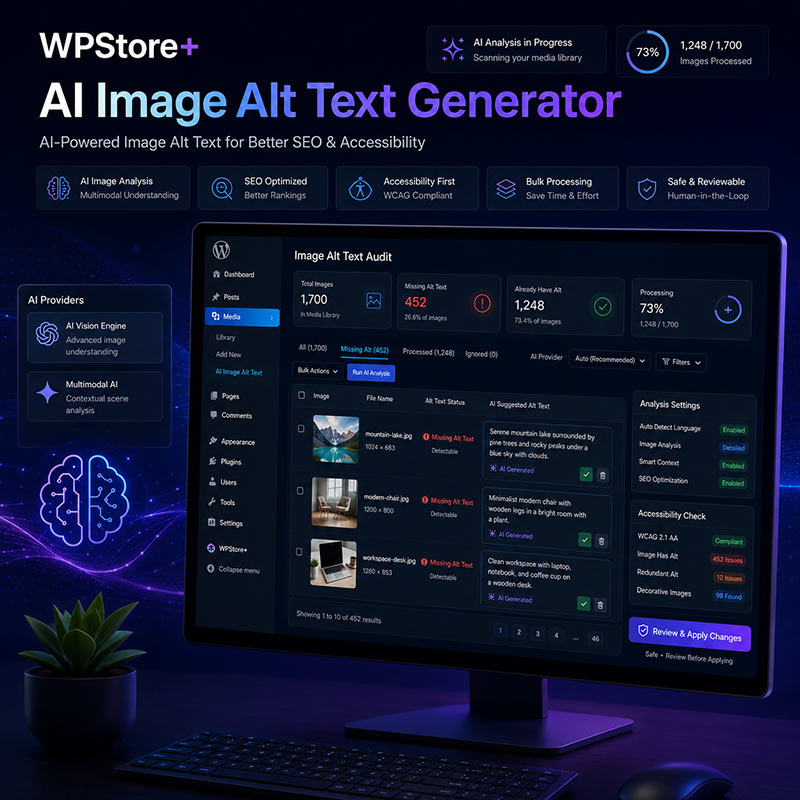
WPStore+ AI Image Alt Text Generator
Original price was: $49.00.$29.00Current price is: $29.00.
WPStore+ AI Image Alt Text Generator helps you find images that are missing alt text and create clear, context-aware suggestions using OpenAI or Google Gemini.
Scan your WordPress Media Library, review AI-generated suggestions, process multiple images through a controlled bulk queue, detect alt text differences inside posts and pages, and keep full control before any changes are applied.
Launch Price: $29/year · Regular Price: $49/year · 1-Site License
Create Better Image Alt Text with AI and WordPress Context
Writing useful alt text for hundreds or thousands of images can take a considerable amount of time. WPStore+ AI Image Alt Text Generator provides a structured workflow for identifying missing alt text, generating suggestions with AI, reviewing the results, and applying approved changes safely.
The plugin can analyze the visible content of an image together with relevant WordPress or WooCommerce context, such as:
- Media Library title and caption
- Post or page title
- Text near the image
- Featured image role
- WooCommerce product name
- Product categories
- Product attributes
- Product gallery position
- Product variation information
This additional context helps the AI create descriptions that are more relevant to the page where the image is used, without automatically forcing keywords or replacing existing content.
Review Every Suggestion Before Saving
AI-generated alt text is never written directly to the Media Library without review.
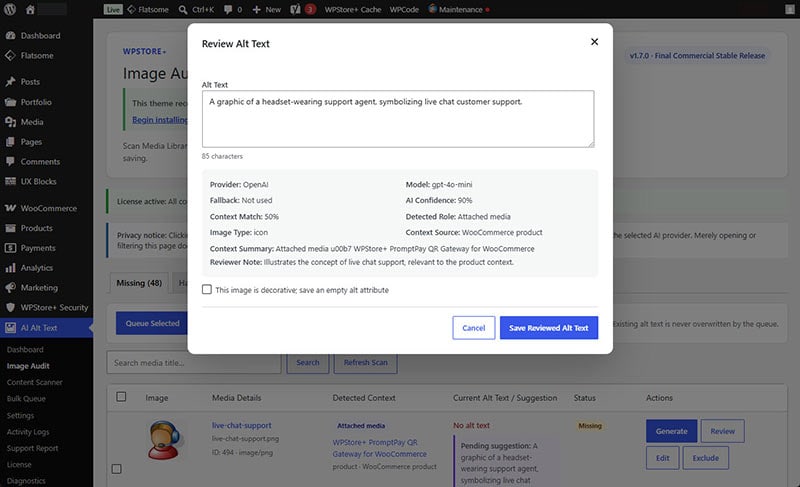
Each generated suggestion is placed into a review workflow where an administrator can:
- Review the suggested alt text
- Edit the wording
- Check the detected image role
- View the context source
- Review AI confidence and context match
- Approve and save the result
- Close the review without changing the current alt text
Existing alt text is not automatically overwritten.
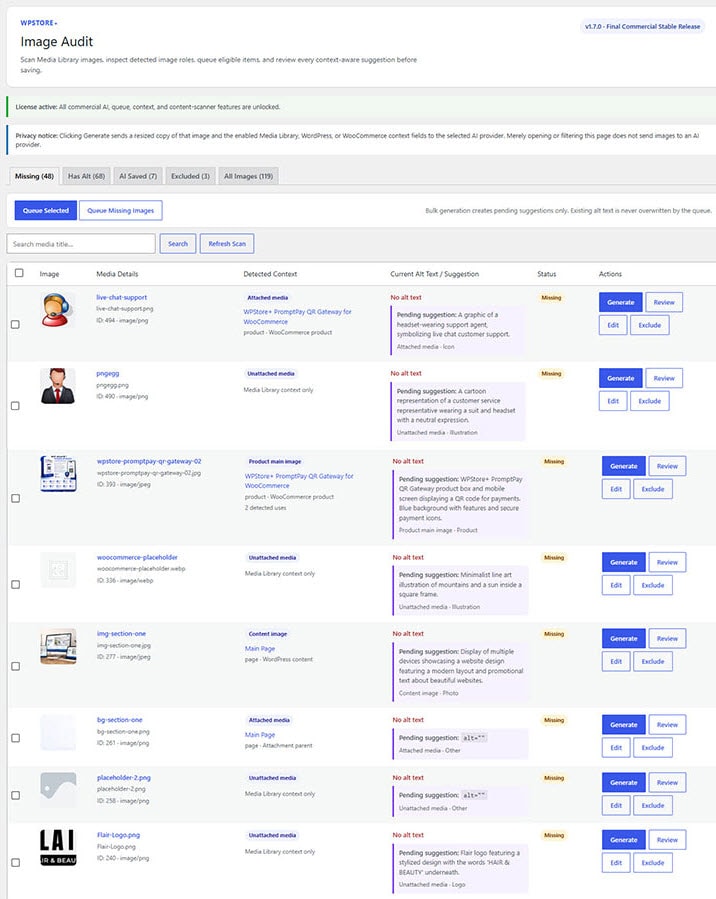
Media Library Image Audit
The Image Audit screen helps you identify and manage images across the WordPress Media Library.
Available filters include:
- Missing Alt Text
- Has Alt Text
- AI Saved
- Excluded
- Decorative Images
- All Images
Each image can be reviewed individually, edited manually, excluded from AI generation, or marked as decorative.
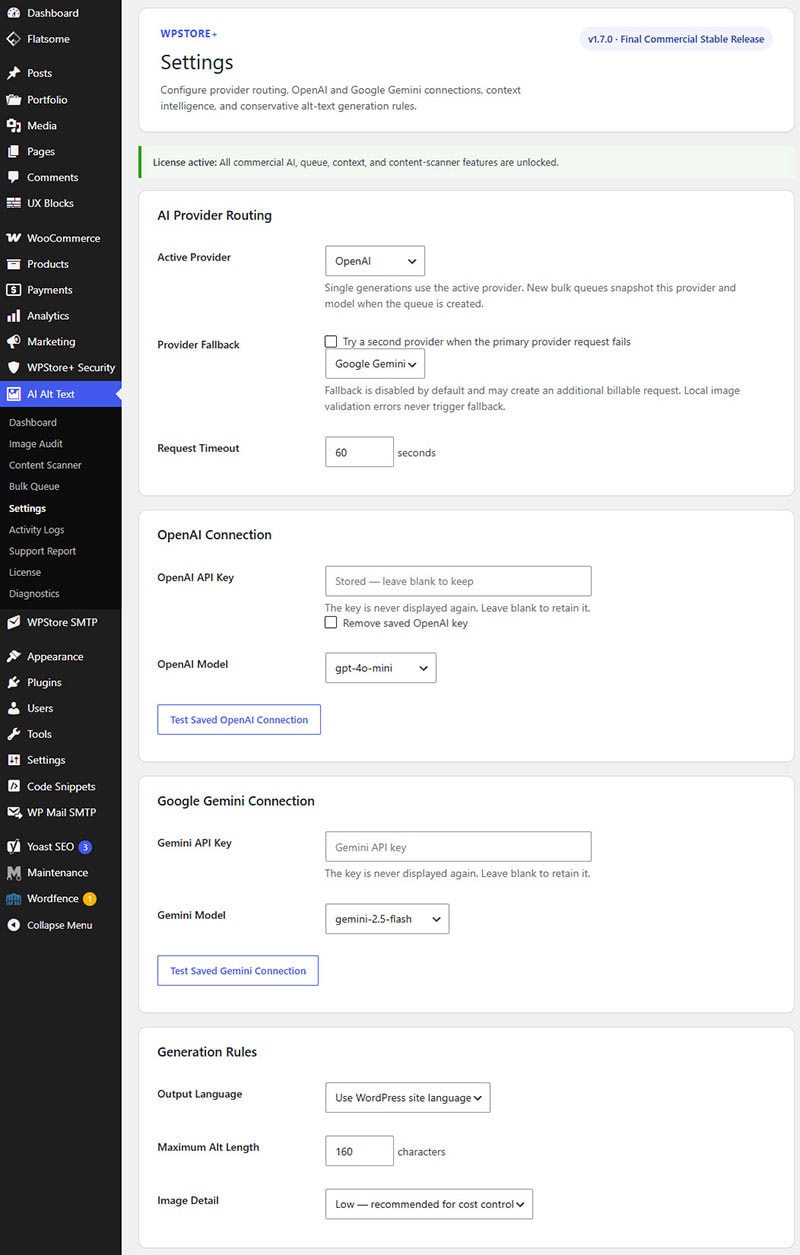
OpenAI and Google Gemini Support
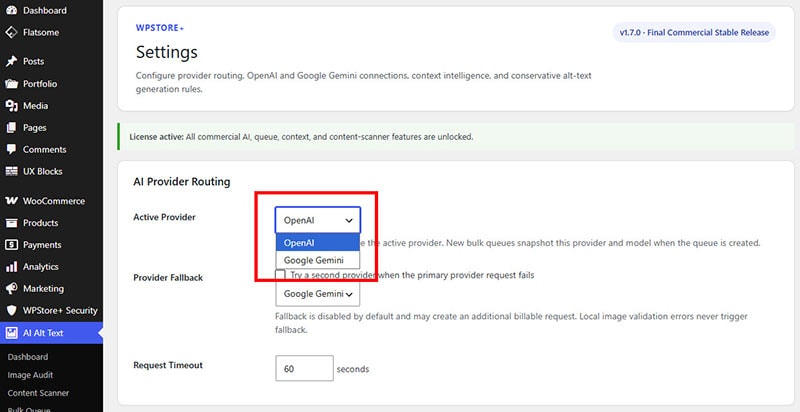
Choose the AI provider that best fits your workflow.
Supported provider features include:
- OpenAI image understanding
- Google Gemini image understanding
- Provider-specific API keys
- Provider-specific models
- Connection testing
- Optional provider fallback
- Provider and model metadata
- Usage statistics by provider
Provider fallback can attempt a second configured provider when the primary provider is temporarily unavailable.
Fallback is optional and disabled by default.
WordPress and WooCommerce Context Intelligence
The plugin can detect how an image is used and select relevant context before generating a suggestion.
Detected image roles can include:
- Featured Image
- Post or Page Content Image
- Attached Media
- Unattached Media
- WooCommerce Main Product Image
- WooCommerce Product Gallery Image
- Product Variation Image
Context controls allow administrators to decide which information may be supplied to the selected AI provider.
Bulk Queue with Cost Protection
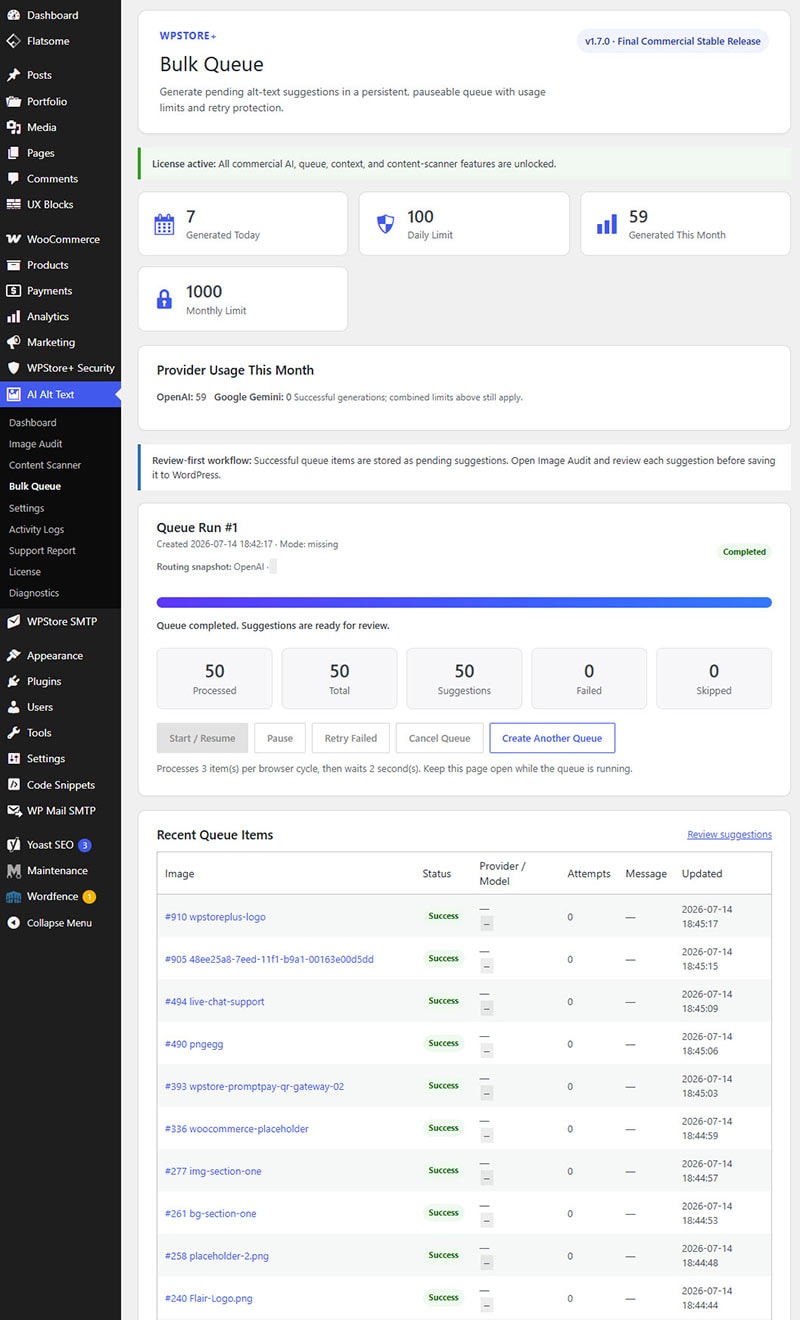
Process multiple missing-alt images through a persistent browser-driven queue.
Bulk Queue features include:
- Queue selected images
- Queue all eligible missing-alt images
- Pause and resume
- Cancel queue
- Retry failed items
- Automatic retry
- Queue recovery
- Provider and model snapshots
- Per-run image limits
- Daily generation limits
- Monthly generation limits
- Processing delay controls
- Progress and result counters
Every successful bulk result becomes a pending suggestion. Bulk processing does not automatically save alt text.
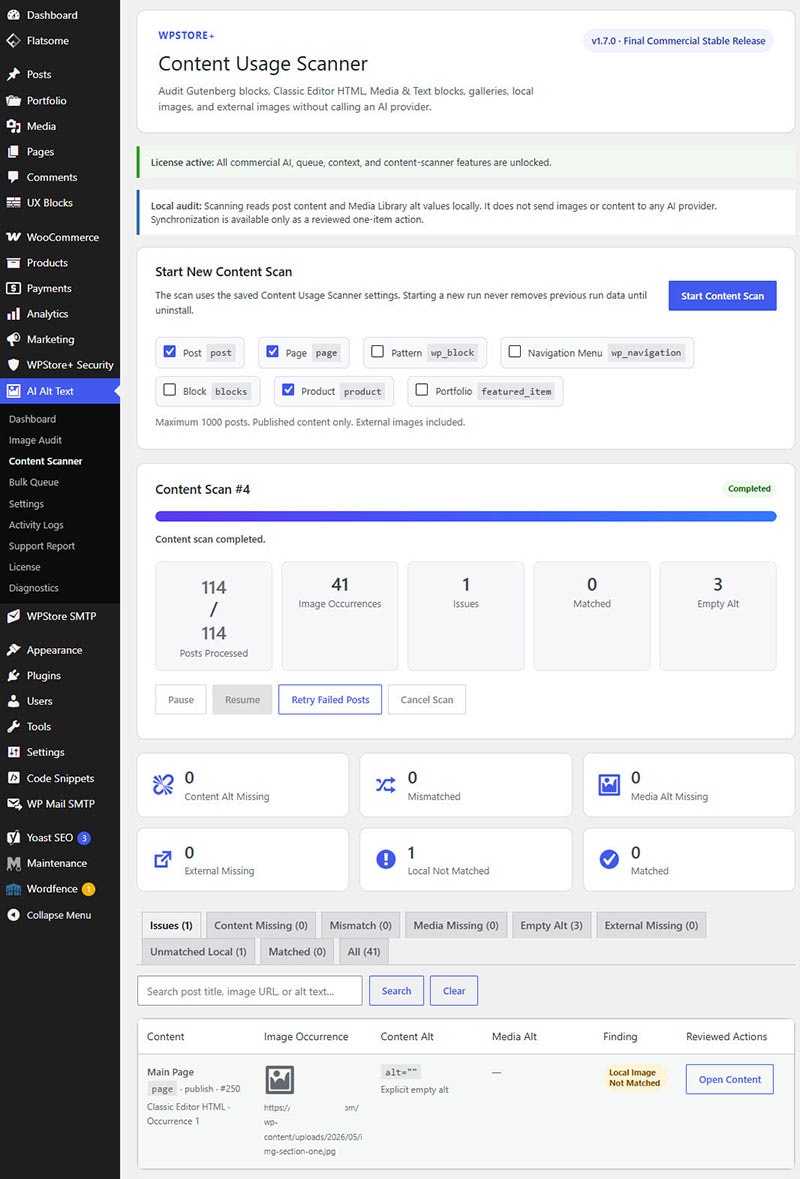
Content Usage Scanner
Media Library alt text and the alt attribute stored inside a post are not always the same.
The Content Usage Scanner audits image occurrences inside WordPress content and can detect:
- Gutenberg Image Blocks
- Gutenberg Gallery Blocks
- Media & Text Blocks
- Classic Editor HTML
- Custom HTML Blocks
- Local Media Library images
- External images
Reported conditions include:
- Content Alt Missing
- Media Alt Missing
- Alt Missing in Both
- Alt Text Mismatch
- Alt Text Matched
- Decorative Image
- External Image Missing Alt
- Local Image Not Matched
The scanner works locally inside WordPress and does not send post content to OpenAI or Gemini.
Safe One-Item Synchronization
When the Media Library alt text and content-level alt text are different, an administrator can review and synchronize one occurrence at a time.
Available actions include:
- Use Media Alt in Content
- Use Content Alt in Media
A content hash is checked before any synchronization. If the post has changed since the scan, the plugin rejects the outdated result and asks for a new scan.
This helps prevent an old scan from editing the wrong image occurrence.
Free Evaluation
The plugin includes a limited evaluation mode when no active license is present.
Free Evaluation includes:
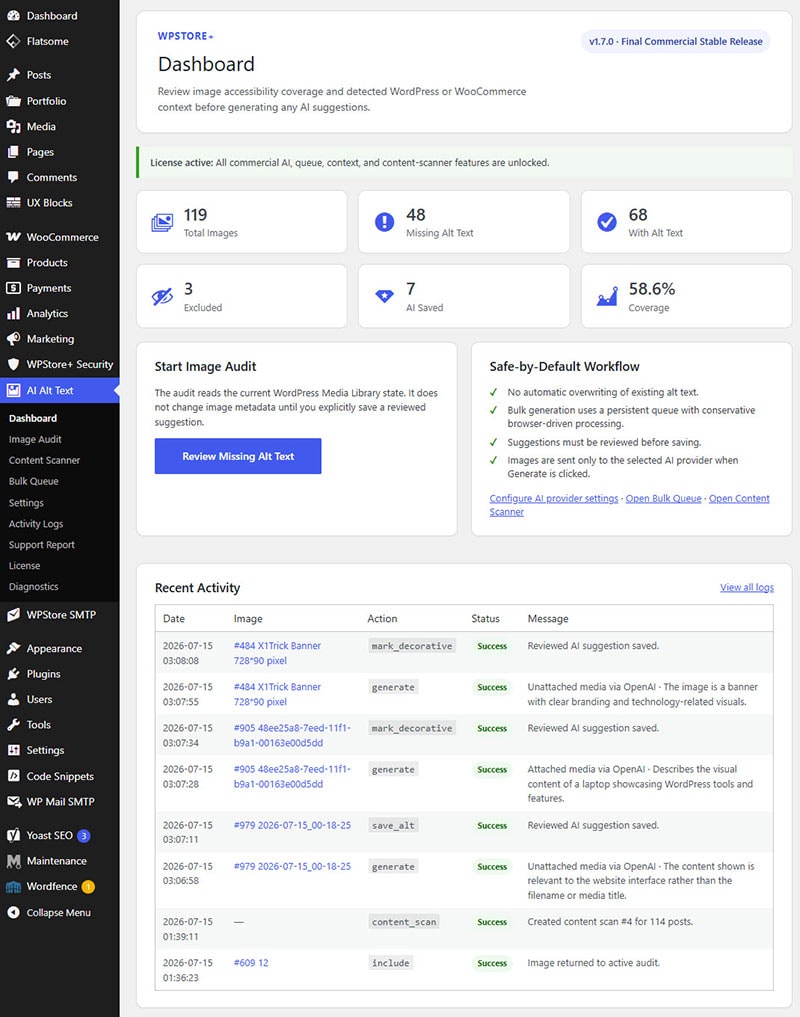
- Dashboard
- Image Audit
- Search and filters
- Manual alt text editing
- Decorative image controls
- Exclude and include controls
- Activity Logs
- Review and save existing suggestions
- OpenAI connection testing
- Up to 3 successful OpenAI generations
Free Evaluation generations use Media Library context only.
The trial counter is stored on the server and only increases after a successful AI generation. Failed requests and connection tests do not consume the evaluation allowance.
Features Unlocked with an Active License
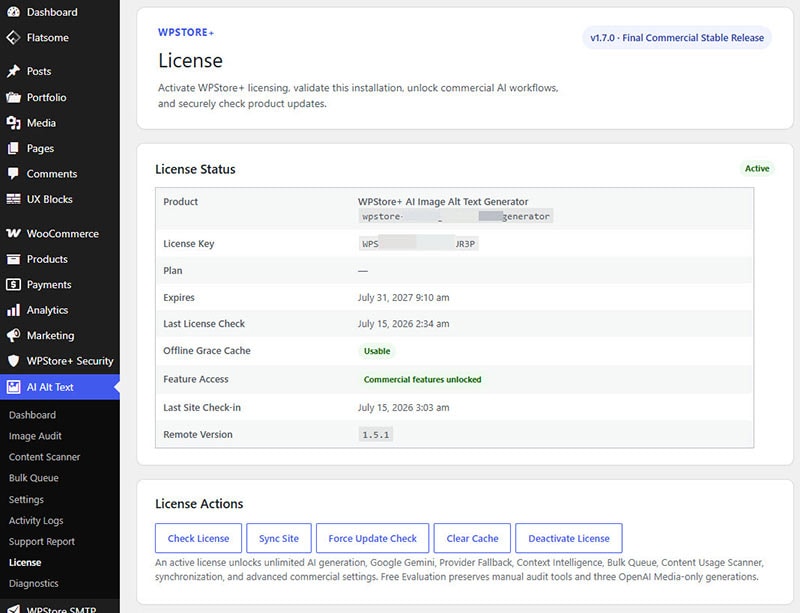
An active WPStore+ license unlocks:
- Continued AI generation
- Google Gemini
- Provider fallback
- WordPress context intelligence
- WooCommerce product context
- Bulk Queue
- Content Usage Scanner
- Content synchronization
- Advanced provider settings
- Advanced context settings
- Queue and cost controls
- Scanner configuration
- License diagnostics
- Secure update integration
If license access is temporarily lost, existing data is preserved. Running queues and scanners are paused instead of deleted and can continue after the license becomes active again.
Privacy and Security Controls
The plugin is designed around a review-first and privacy-conscious workflow.
Security measures include:
- API keys are not displayed in page source
- License keys are masked
- API keys are not written to Activity Logs
- Base64 image data is not stored in logs
- AI requests occur only when generation is requested
- Content Scanner does not call AI providers
- AJAX actions require permissions and nonces
- Commercial feature access is enforced on the server
- Image paths are validated before processing
- Remote update packages are restricted to approved WPStore+ hosts
- Version downgrade protection
- Product slug validation
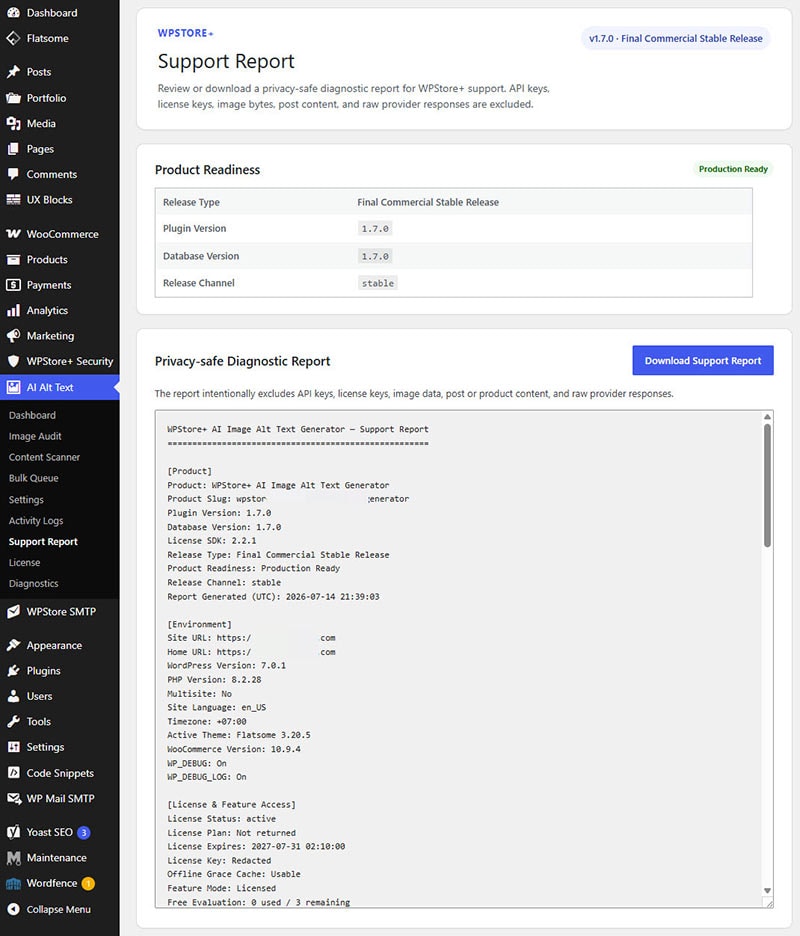
- Privacy-safe Support Report
Support Report and Diagnostics
The built-in Support Report provides useful technical information without exposing private content.
The report can include:
- Plugin and database versions
- Release type and product readiness
- WordPress and PHP environment
- License status
- Feature access mode
- Provider configuration status
- Usage totals
- Queue status
- Scanner status
- Media Library coverage
- Database table status
The report excludes:
- API keys
- License keys
- Image data
- Generated alt text
- Pending suggestion text
- Post and product content
- Raw AI responses
Administrators can download the report as a plain-text file for support requests.
Key Features
- AI-assisted image alt text generation
- OpenAI and Google Gemini
- Review-before-save workflow
- WordPress Media Library audit
- WooCommerce product context
- Featured image and content-role detection
- Persistent bulk processing queue
- Daily and monthly cost limits
- Provider fallback
- Provider-specific usage statistics
- Content Usage Scanner
- Gutenberg and Classic Editor support
- External image audit
- Safe one-item synchronization
- Decorative image management
- Manual editing
- License feature gate
- Free OpenAI evaluation
- Secure update integration
- Privacy-safe Support Report
- Activity Logs and System Status
Who Is This Plugin For?
WPStore+ AI Image Alt Text Generator is suitable for:
- WordPress website owners
- WooCommerce store owners
- Content publishers
- SEO professionals
- Accessibility-focused site administrators
- Agencies managing large Media Libraries
- Websites migrating older content
- Stores with large product galleries
- Administrators who want review control over AI-generated content
Important Notes
- AI provider usage fees are not included with the plugin.
- You must use your own OpenAI or Google Gemini API key.
- AI-generated descriptions should be reviewed before publication.
- The plugin does not guarantee search ranking improvements.
- External images can be audited but cannot be synchronized with the WordPress Media Library.
- CSS background images are not included in the Content Usage Scanner.
- The plugin does not automatically generate alt text when an image is uploaded.
- Existing alt text is not overwritten automatically.
Installation
### Automatic Installation from a ZIP File
1. Download the WPStore+ AI Image Alt Text Generator ZIP file.
2. Sign in to your WordPress administration area.
3. Go to Plugins → Add New Plugin.
4. Click Upload Plugin.
5. Select the downloaded ZIP file.
6. Click Install Now.
7. Click Activate Plugin.
8. Open AI Alt Text → Settings.
9. Add an OpenAI or Google Gemini API key.
10. Select the preferred provider and model.
11. Click the provider connection test button.
12. Open AI Alt Text → Image Audit to begin reviewing images.
### License Activation
1. Go to AI Alt Text → License.
2. Enter the license key received from WPStore+.
3. Click Activate License.
4. Confirm that the license status changes to Active.
5. Return to Settings to configure Gemini, provider fallback, Context Intelligence, Bulk Queue, and Content Scanner features.
### Recommended First Scan
1. Open AI Alt Text → Image Audit.
2. Select the Missing Alt Text filter.
3. Generate a suggestion for one test image.
4. Review and edit the suggestion.
5. Save the approved alt text.
6. Configure daily and monthly limits before starting a large Bulk Queue.
7. Run the Content Usage Scanner after the Media Library review is complete.
### Updating the Plugin
1. Create a backup before updating.
2. Install the new ZIP over the existing version or use the WPStore+ update system.
3. Do not delete the previous version before updating.
4. Confirm the plugin and database versions in AI Alt Text → Settings → System Status.
5. Test one AI generation and one small queue after the update.
Frequently Asked Questions
### Does the plugin automatically overwrite existing alt text?
No. Existing alt text is not overwritten automatically. AI results are placed into a pending review workflow where an administrator can edit and approve them.
### Does the plugin generate alt text immediately after an image is uploaded?
No. The plugin uses a controlled, review-first workflow. Generation begins only when an administrator requests it.
### Which AI providers are supported?
The plugin supports OpenAI and Google Gemini. An active license is required for Gemini and provider fallback.
### Are API costs included with the plugin license?
No. AI provider fees are separate. You must supply your own OpenAI or Google Gemini API key.
### Can the plugin be used without a license?
Yes. Free Evaluation includes manual image management and up to three successful OpenAI generations using Media Library context.
### What happens after the three free generations are used?
AI generation is locked until a license is activated. Manual editing, search, filters, decorative controls, exclusions, logs, and the review of existing suggestions remain available.
### Does it support WooCommerce?
Yes. With an active license, the plugin can use product names, categories, attributes, descriptions, gallery roles, and variation context to improve the relevance of suggestions.
### Does it support bulk generation?
Yes. Licensed users can create persistent Bulk Queues with pause, resume, cancel, retry, recovery, and cost-control settings.
### Will Bulk Queue save alt text automatically?
No. Successful bulk results become pending suggestions and must still be reviewed and approved.
### What is the Content Usage Scanner?
The Content Usage Scanner checks image occurrences inside posts, pages, products, Gutenberg blocks, and Classic Editor HTML. It can identify missing or mismatched alt attributes.
### Does the Content Usage Scanner send my posts to an AI provider?
No. Content scanning and alt synchronization take place locally inside WordPress.
### Can it update alt text inside existing posts?
Yes. Licensed users can synchronize one reviewed image occurrence at a time. The plugin checks that the post has not changed since the scan before applying an update.
### Can it scan external images?
Yes. The scanner can report external images that are missing alt attributes. External images cannot be synchronized with the WordPress Media Library.
### Can decorative images use an empty alt attribute?
Yes. An image can be reviewed and marked as decorative, which uses an empty alt value where appropriate.
### Does the plugin support different output languages?
Yes. The output language can be selected in Settings.
### Does the plugin guarantee better SEO rankings?
No. Appropriate alt text may support accessibility and image understanding, but no plugin can guarantee search ranking improvements.
### What happens if my license expires while a queue is running?
The queue is paused safely. Existing results and queued items are preserved. The queue can resume after license access is restored.
### Are API keys included in the Support Report?
No. API keys, license keys, image data, generated text, post content, and raw AI responses are excluded.
### Can I remove the plugin without deleting WordPress alt text?
Yes. Uninstalling the plugin removes its own settings, logs, queues, scans, and license records, but standard WordPress Media Library alt text and post content remain.
Changelog
### 1.7.0 — Final Commercial Stable Release
* Finalized production release metadata.
* Added Production Ready status.
* Added stable release channel metadata.
* Added privacy-safe Support Report.
* Added downloadable TXT Support Report.
* Added Support Report permission and nonce enforcement.
* Added final release diagnostics.
* Updated readme, changelog, and system status.
* Preserved all tested License Feature Gate behavior.
* Completed final commercial release hardening.
### 1.6.0 — License Feature Gate & Enforcement
* Added server-side License Feature Gate.
* Added Free Evaluation with three successful OpenAI generations.
* Restricted evaluation generation to Media Library context.
* Added persistent server-side trial counter.
* Added licensed access for Gemini and provider fallback.
* Added licensed access for Context Intelligence.
* Added licensed access for Bulk Queue.
* Added licensed access for Content Usage Scanner and synchronization.
* Added backend AJAX enforcement.
* Added safe queue and scanner pause when license access is lost.
* Preserved premium settings while unlicensed.
* Added offline grace, expiry, and reactivation handling.
### 1.5.1 — Translation Initialization Timing Hotfix
* Deferred plugin runtime until WordPress initialization.
* Prevented early WooCommerce translation loading on WordPress 6.7 and later.
* Preserved License Integration and all existing functionality.
* No database schema changes.
### 1.5.0 — License Integration
* Added WPStore+ License SDK 2.2.1.
* Added License and Diagnostics pages.
* Added license activation, deactivation, and validation.
* Added offline grace cache.
* Added site tracking and daily check-in.
* Added remote version checking.
* Added Force Update Check and Clear Cache.
* Added secure WordPress update integration.
* Added product, package host, and downgrade protection.
* No feature restrictions were introduced in this version.
### 1.4.0 — Multi-Provider AI Integration
* Added Google Gemini support.
* Added provider routing interface.
* Added provider-specific models and API keys.
* Added provider connection testing.
* Added optional provider fallback.
* Added actual-provider metadata.
* Added persistent queue provider snapshots.
* Added provider-specific usage statistics.
* Added migration of existing usage to OpenAI.
### 1.3.1 — PHP Compatibility Hardening
* Improved null-safe handling for administrative edit URLs.
* Improved PHP compatibility in administrative reports.
### 1.3.0 — Content Usage Scanner
* Added persistent Content Usage Scanner.
* Added Gutenberg Image, Gallery, and Media & Text scanning.
* Added Classic Editor and Custom HTML image scanning.
* Added external image auditing.
* Added Media Library and content alt comparison.
* Added safe one-item synchronization.
* Added content hash protection.
* Added scanner pause, resume, cancel, retry, and recovery.
### 1.2.0 — Context Intelligence
* Added WordPress post and page context.
* Added WooCommerce product context.
* Added image-role detection.
* Added Context Priority settings.
* Added Context Match and Image Type output.
* Added Detected Context information to Image Audit.
* Added context metadata to pending suggestions and reviews.
### 1.1.0 — Bulk Queue & Cost Protection
* Added persistent Bulk Queue.
* Added queue-selected and queue-missing actions.
* Added pause, resume, cancel, and retry.
* Added automatic retry and queue recovery.
* Added maximum images per run.
* Added daily and monthly generation limits.
* Added dedicated usage tracking.
* Added progress counters and queue history.
### 1.0.0 — Initial Stable MVP
* Added Media Library scanning.
* Added missing-alt detection.
* Added OpenAI image analysis.
* Added single-image generation.
* Added review-before-save workflow.
* Added manual alt text editing.
* Added decorative image controls.
* Added exclusion controls.
* Added Activity Logs and System Status.
* Added language, maximum length, and image detail settings.
Product Screenshots
Preview the plugin interface, settings, and key features before purchase.
Only logged in customers who have purchased this product may leave a review.
Related products
AI & Automation
Analytics & Reporting

LINE Integration
WordPress Performance
Currency Tools
Invoices & Order Documents
WordPress Plugins

Reviews
There are no reviews yet.