
Knowledge, WordPress Security
WordPress Click2Shell Flaw: Comprehensive Mitigation and Security Guide
Sep
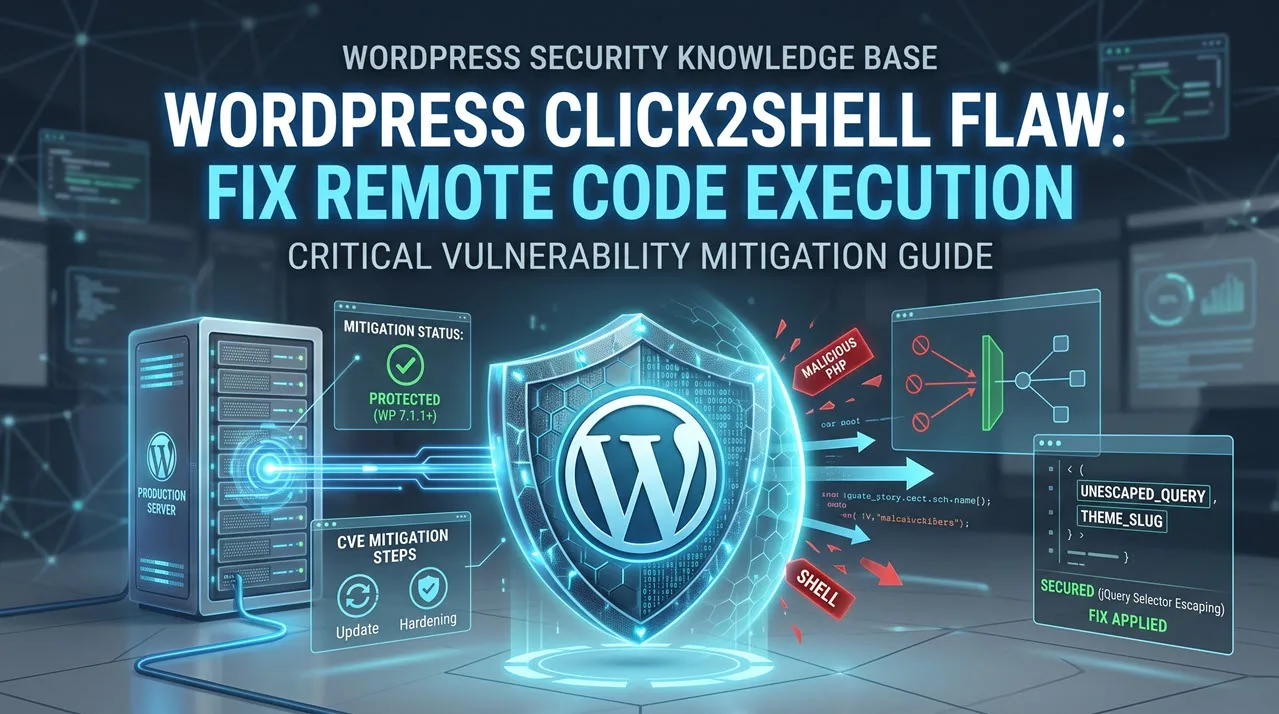
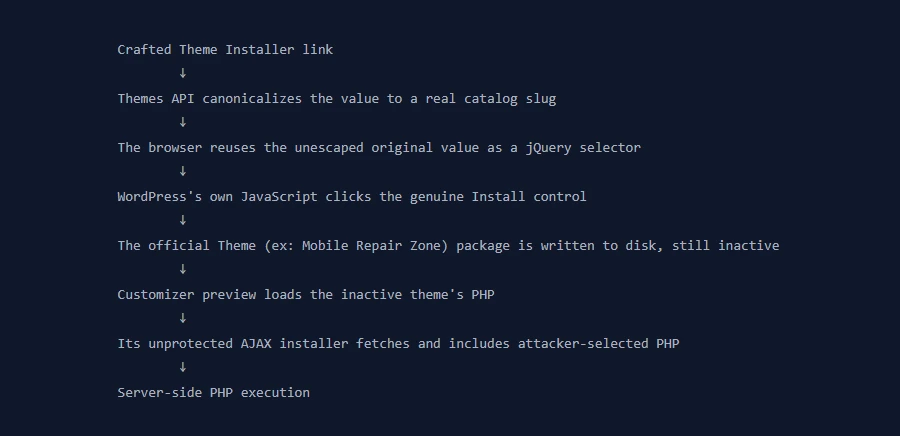
The WordPress Click2Shell flaw represents a significant security vulnerability affecting WordPress Core versions 7.1.0 and earlier, allowing attackers to achieve remote code execution (RCE) via a sophisticated Cross-Site Request Forgery (CSRF) chain. In standard operating environments, installing themes and executing administrative PHP files requires high-level authentication credentials, specific nonces, and deliberate administrative interaction inside the dashboard. However, the Click2Shell attack chain alters this paradigm by exploiting how theme preview query parameters are handled between the official WordPress.org Themes API and administrative client-side JavaScript within the WordPress Customizer. If an authenticated administrator is induced to click a specially crafted URL, an unauthenticated attacker can force the background installation of arbitrary themes from the WordPress.org catalog and trigger underlying PHP scripts directly on your host server.
This comprehensive Knowledge Base entry is designed to assist WordPress administrators, site owners, and technical engineers in understanding the mechanics of the Click2Shell flaw, diagnosing vulnerability exposure, and implementing permanent remediation measures. Technical researchers at pwn.ai and security intelligence teams at Patchstack have validated that full Proof-of-Concept (PoC) exploit scripts are actively circulating in public channels. Unauthorized PHP execution compromises database confidentiality, exposes sensitive environment variables within your wp-config.php file, and enables threat actors to establish rogue administrative accounts or deploy persistent backdoors across your hosting filesystem. By following this operational manual, you will learn how to verify your deployment version, update safely to WordPress 7.1.1, apply hard server-level file protection flags, and run diagnostic validation tests to confirm your server’s defense posture against CSRF-driven exploit vectors.
Technical Analysis of the Click2Shell Vulnerability Chain
Understanding the attack mechanics of the Click2Shell flaw allows systems administrators to identify potential threat indicators within access logs and implement defense-in-depth measures. The attack operates through a multi-stage chain combining Cross-Site Request Forgery, DOM parsing discrepancies, and Customizer runtime execution.
Attack Architecture and Discrepancy Breakdown
The core vulnerability originates from an architectural flaw in how the WordPress theme-preview URL parameter is evaluated. When a preview request is dispatched:
-
Server-Side Validation: The parameter value is initially read and validated by the WordPress.org Themes API to verify whether the theme exists within the official repository.
-
Client-Side Ingestion: The identical value is passed back into the administrator’s active browser session and parsed by JavaScript using an unescaped jQuery selector.
-
DOM Manipulation Failure: In affected core versions (7.1.0 and lower), the theme slug is not strictly sanitized or escaped before being fed into internal theme card selectors.
-
Automatic Ingestion: This logic flaw tricks the administrative browser interface into issuing a legitimate, authenticated request to download and extract the specified theme package directly onto the web host.
Attacker Crafts Malicious Preview URL
                 │
                 ▼
Logged-in Admin Clicks Crafted Link (Phishing/XSS)
                 │
                 ▼
Admin Browser Evaluates Unescaped Theme Slug Parameter
                 │
                 ▼
Admin Session Auto-Fetches Theme from WordPress.org Catalog
                 │
                 ▼
WordPress Customizer Renders Preview Environment
                 │
                 ▼
Inactive Theme Code Executes Arbitrary PHP on Web Server
Pre-Authentication and Administrative Execution Chains
The most alarming aspect of the Click2Shell exploit is its pre-authenticated origin combined with high-privilege execution:
-
Attacker Privilege Level: The attacker requires no registered account on the target WordPress installation, no valid administrative credentials, and no pre-generated nonce tokens.
-
Victim Requirements: The attack relies on an authenticated administrator visiting a crafted URL via spear-phishing, social engineering, or an indirect Cross-Site Scripting (XSS) payload embedded in a third-party site.
-
Execution Context: Privilege checks restrict this chain exclusively to administrative roles. Subscribers, Contributors, Authors, and Editors do not possess the underlying
install_themescapability, meaning malicious links triggered by non-admin staff fail to complete the installation stage. -
Theme Inactivity Bypass: Even if a downloaded theme is not officially set to “Active” across the live front-end, WordPress loads theme templates and procedural PHP logic inside the administrative Customizer preview process. If the forced theme contains executable PHP entry points or known secondary vulnerabilities, arbitrary code executes with the system permissions of the web server user (e.g.,
www-dataorapache).
Resolving and Mitigating the Click2Shell Flaw
Securing your infrastructure requires a structured deployment process. Below are the sequential stages to eliminate the Click2Shell attack vector from your server environments.
Step 1: Pre-Update Backup and Diagnostic Audit
Before initiating modifications to WordPress Core or environment configurations, establish a complete operational restore point.
-
Log in to your web hosting control panel (cPanel, DirectAdmin, RunCloud, or SSH terminal).
-
Export a complete dump of your MySQL or MariaDB database using
wp-cliormysqldump:Bash
wp db export click2shell_pre_backup.sql -
Generate an archive of your absolute document root directory:
Bash
tar -czvf full_site_backup.tar.gz /path/to/wordpress/ -
Log in to the WordPress administrative dashboard (
/wp-admin/). -
Navigate to Dashboard > Updates and record your current running version. If the installed version is 7.1.0 or lower, your site is vulnerable.
Step 2: Upgrading Core to WordPress Version 7.1.1
The official patch for Click2Shell is incorporated directly into the WordPress 7.1.1 release. The core engineering team corrected the flaw by escaping the theme slug parameter before passing it to jQuery selectors and restricting DOM queries strictly to validated theme cards.
-
Navigate to Dashboard > Updates inside your administrative panel.
-
Locate the section labeled An updated version of WordPress is available.
-
Click the blue button labeled Update to version 7.1.1.
-
Ensure that maintenance mode clears automatically following the update message: “WordPress updated successfully”.
-
Alternative (Command-Line Interface): For high-traffic enterprise environments, run the non-interactive upgrade command via WP-CLI to avoid browser timeout drops:
Bash
wp core update --version=7.1.1
wp core update-db
Step 3: Implementing Server-Level File Modification Hardening
In cases where production sites cannot be immediately updated due to enterprise regression testing, strict change-freezing, or bespoke framework dependencies, you must apply the defensive mitigation recommended by security intelligence teams: disabling filesystem modifications.
When the DISALLOW_FILE_MODS directive is active, the WordPress runtime prevents theme installations, plugin installations, and file modifications directly at the core execution level. This prevents Click2Shell from fetching arbitrary catalog themes.
-
Connect to your hosting server via Secure File Transfer Protocol (SFTP) or SSH.
-
Open the root directory of your site and locate the
wp-config.phpfile. -
Download and create a local backup copy named
wp-config.php.bak. -
Open
wp-config.phpin a plain-text code editor. -
Locate the line reading:
PHP
/* That's all, stop editing! Happy publishing. */ -
Immediately above that line, insert the following operational constants:
PHP
// Disable in-app file installations to mitigate Click2Shell define( 'DISALLOW_FILE_MODS', true ); define( 'DISALLOW_FILE_EDIT', true ); -
Save and re-upload the modified file.
-
Verify that file upload and installation menus under Appearance > Themes > Add New are no longer accessible within the administrative dashboard.
| Parameter Flag | Configuration Target | Defensive Objective |
DISALLOW_FILE_MODS |
wp-config.php |
Disables theme/plugin downloads, blocking CSRF-driven forced installs |
DISALLOW_FILE_EDIT |
wp-config.php |
Shuts down native file editing, reducing scope of successful RCE |
| Core Version Check | version.php |
Confirms upgrade to 7.1.1, rendering the jQuery DOM exploit invalid |
Administrative Precautions and Critical Verification Points
When managing vulnerabilities that permit remote code execution, basic updates must be accompanied by strict hygiene and credential management.
Access Control and Session Pruning
Because Click2Shell depends entirely on manipulating an active administrative session, administrator account management is a critical vector:
-
Review Active Users: Access Users > All Users and filter by the Administrator role. Audit every user profile. Remove any unknown accounts that may have been created if your server was compromised before patching.
-
Enforce Session Expiration: Terminate all active administrative sessions to ensure stale authentication cookies cannot be captured via adjacent cross-site scripting vulnerabilities. You can force session invalidation across all user tiers by generating new security keys in
wp-config.phpor using WP-CLI:Bash
wp user session destroy --all -
Implement Privilege Separation: Routine editorial tasks, content drafting, and publishing should never be handled from an account with the
Administratorrole. Restrict content staff toEditororAuthorroles, which lackinstall_themescapabilities and cannot trigger the Click2Shell installation chain.
Inspecting wp-content and Theme Catalogs
If an installation was running version 7.1.0 while exposed to public web traffic, verify that no unauthorized themes were pulled into your environment:
-
Navigate to
/wp-content/themes/using your file manager or terminal. -
Review directory timestamps against your development records.
-
Investigate any theme folder that was not explicitly installed by your engineering staff.
-
Examine PHP error logs for unauthorized invocations of theme files:
Bash
grep -i "wp-content/themes/" /var/log/nginx/error.log -
Check your primary configuration file (
wp-config.php) to confirm database secrets, user salts, and external database ports have not been modified or exfiltrated.
Testing the Plugin and Core Security Posture
Following the implementation of WordPress 7.1.1 or the DISALLOW_FILE_MODS hardening rule, run verification tests to confirm your site is secure.
Verifying Theme Installation Restrictions
If you implemented the DISALLOW_FILE_MODS mitigation parameter:
-
Authenticate to your dashboard with a confirmed Administrator account.
-
Attempt to manually navigate to the internal theme installer URL:
[https://example.com/wp-admin/theme-install.php](https://example.com/wp-admin/theme-install.php) -
Expected Output: WordPress should display an error message stating: “Sorry, you are not allowed to access this page.”
-
Navigate to Appearance > Themes. Confirm that the Add New Theme button is completely removed from the graphical interface. This confirms the CSRF vector cannot force-download catalog archives.
Verifying Core Selector Escaping via Customizer
If you applied the primary resolution by upgrading to WordPress Core 7.1.1:
-
Verify the updated core file:
Open
/wp-includes/version.phpand verify that the$wp_versionvariable string reads precisely'7.1.1'. -
Navigate to Appearance > Customize.
-
Open browser Developer Tools (F12 or Inspect Element) and access the Console tab.
-
Monitor network activity while navigating the Customizer. Confirm that theme parameter parsing does not register unescaped script errors or improper DOM element selections when passing arbitrary strings into theme preview selectors.
-
Review administrative outbound requests using an inspection plugin or host-level firewall (such as Wordfence, Patchstack, or ModSecurity) to ensure that incoming traffic targeting
/wp-admin/customize.phpwith nested theme arguments is correctly sanitized.
Frequently Asked Questions (FAQs)
What makes the WordPress Click2Shell flaw different from standard CSRF bugs?
Standard Cross-Site Request Forgery typically performs an action the user intends to allow in some context, such as changing an email address or updating an option. Click2Shell chains a query parameter parsing flaw with an automatic catalogue download and an immediate preview execution. This chain achieves full server-side remote code execution (RCE) without requiring the attacker to supply administrative credentials or upload arbitrary zip files directly through an open web form.
Does an attacker need a registered user account on my site to exploit this?
No. The attacker requires zero authentication on the target platform. They do not need a subscriber profile, contributor role, or an API key. However, the attack relies on triggering an existing administrator’s browser session. The attacker must induce a fully logged-in administrator to click a specially crafted exploit link via phishing, chat channels, or embedded cross-site scripting (XSS).
Can an Editor or Author account trigger this vulnerability if tricked into clicking the link?
No. Patchstack’s technical analysis confirmed that the installation stage in the chain requires high-level administrative capabilities (install_themes). Editor, Author, and Contributor roles do not possess the necessary privileges to install themes via background requests. If non-administrative users click the exploit link, the installation call is rejected by WordPress permission routines.
I cannot update to WordPress 7.1.1 right now. How can I protect my site immediately?
Add define( 'DISALLOW_FILE_MODS', true ); to your wp-config.php file above the “That’s all, stop editing!” comment. This native directive shuts down the underlying file manipulation and theme installation capabilities within WordPress, neutralizing the primary mechanism used by the Click2Shell exploit chain to pull down the required theme components.
Is upgrading to WordPress 7.1.1 sufficient to fix sites that were already breached?
No. Upgrading to version 7.1.1 closes the vulnerability so it cannot be exploited again. However, if your website was already attacked prior to the upgrade, updating the core will not remove backdoors, unauthorized administrative users, or altered files introduced during the compromise. If you suspect an intrusion, inspect the /wp-content/themes/ directory, rotate your database credentials and secret keys in wp-config.php, and perform a clean codebase scan against official repository checksums.
Why does an inactive theme pose a security threat?
When WordPress loads the Customizer preview environment, it parses and executes theme template files and dependent PHP routines even if the theme is not marked as the active global site theme. If an attacker leverages Click2Shell to force-install a catalog theme with known vulnerabilities, previewing that theme allows the embedded code to execute on the server.
Summary
The WordPress Click2Shell flaw represents a severe pre-authenticated remote code execution vulnerability chain affecting WordPress Core 7.1.0 and earlier versions. By abusing how theme preview parameters are handled between the WordPress.org API and client-side JavaScript selectors, an attacker can leverage an administrator’s browser session to force-install themes from the public catalog and execute arbitrary PHP code during the Customizer preview cycle.
Public disclosure of technical reports and functional Proof-of-Concept exploit code makes immediate remediation essential. Site administrators must prioritize updating their core infrastructure to WordPress 7.1.1, which resolves the selector sanitization issue. For installations with strict update delays, deploying DISALLOW_FILE_MODS within wp-config.php provides an effective interim mitigation. Consistent auditing of administrator roles, automated off-site backups, and strict privilege separation remain fundamental requirements for maintaining high-integrity WordPress production systems.
If you are looking for technical solutions, speed optimization tips, or in-depth plugin setup guides for WordPress and WooCommerce, be sure to explore our comprehensive Knowledge Base. This hub contains a collection of manuals and best practices curated by our team to help you maintain and manage your website smoothly and efficiently.