

WPStore+ Core Web Vitals Monitor
Original price was: $49.00.$29.00Current price is: $29.00.
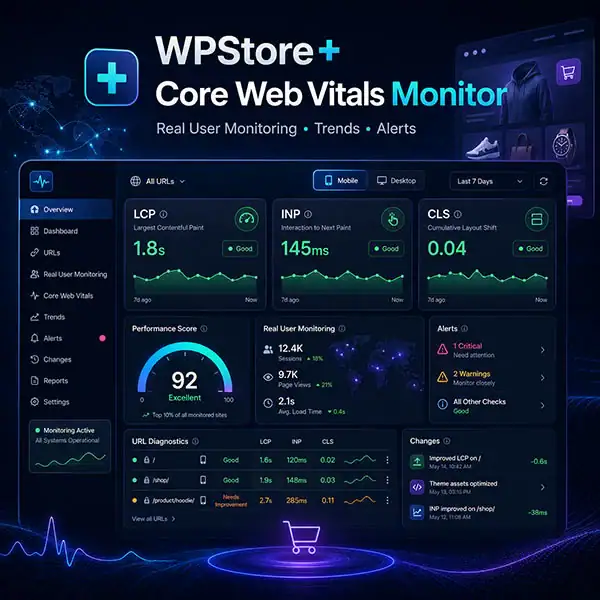
Monitor LCP, INP, and CLS from real WordPress visitors. Track trends, problem URLs, regressions, change impact, WooCommerce performance, alerts, and privacy-safe reports.
Launch Price: $29/year · Regular Price: $49/year · 1-Site License
WPStore+ Core Web Vitals Monitor is a privacy-conscious Real User Monitoring plugin for WordPress and WooCommerce. It measures how real visitors experience your website by collecting Largest Contentful Paint (LCP), Interaction to Next Paint (INP), and Cumulative Layout Shift (CLS) from supported browsers.
Unlike one-time laboratory tests, Real User Monitoring helps you understand performance across actual page visits, devices, page types, and WooCommerce interactions. The plugin provides percentile-based reporting, performance trends, URL-level diagnostics, associated element information, regression alerts, change-impact comparisons, and privacy-safe reporting inside the WordPress dashboard.
You can separate results by Mobile and Desktop, identify pages that need attention, compare performance before and after theme or plugin changes, and monitor important WooCommerce surfaces such as Product, Cart, and Checkout pages.
WPStore+ Core Web Vitals Monitor includes a usable Core Mode for essential monitoring without an active license. Activating a valid license unlocks advanced alerts, change tracking, WooCommerce Intelligence, notification channels, weekly reports, CSV exports, authenticated updates, and read-only integration with WPStore+ Cache Optimizer.
The plugin is designed for monitoring, analysis, and diagnostics. It does not automatically modify your theme, plugins, cache settings, scripts, CSS, CDN, or database configuration.
Key Features
Real User Monitoring
- Collect LCP, INP, and CLS from real frontend visits
- Separate Mobile and Desktop measurements
- Classify Homepage, Post, Page, Product, Cart, Checkout, My Account, archive, and other page types
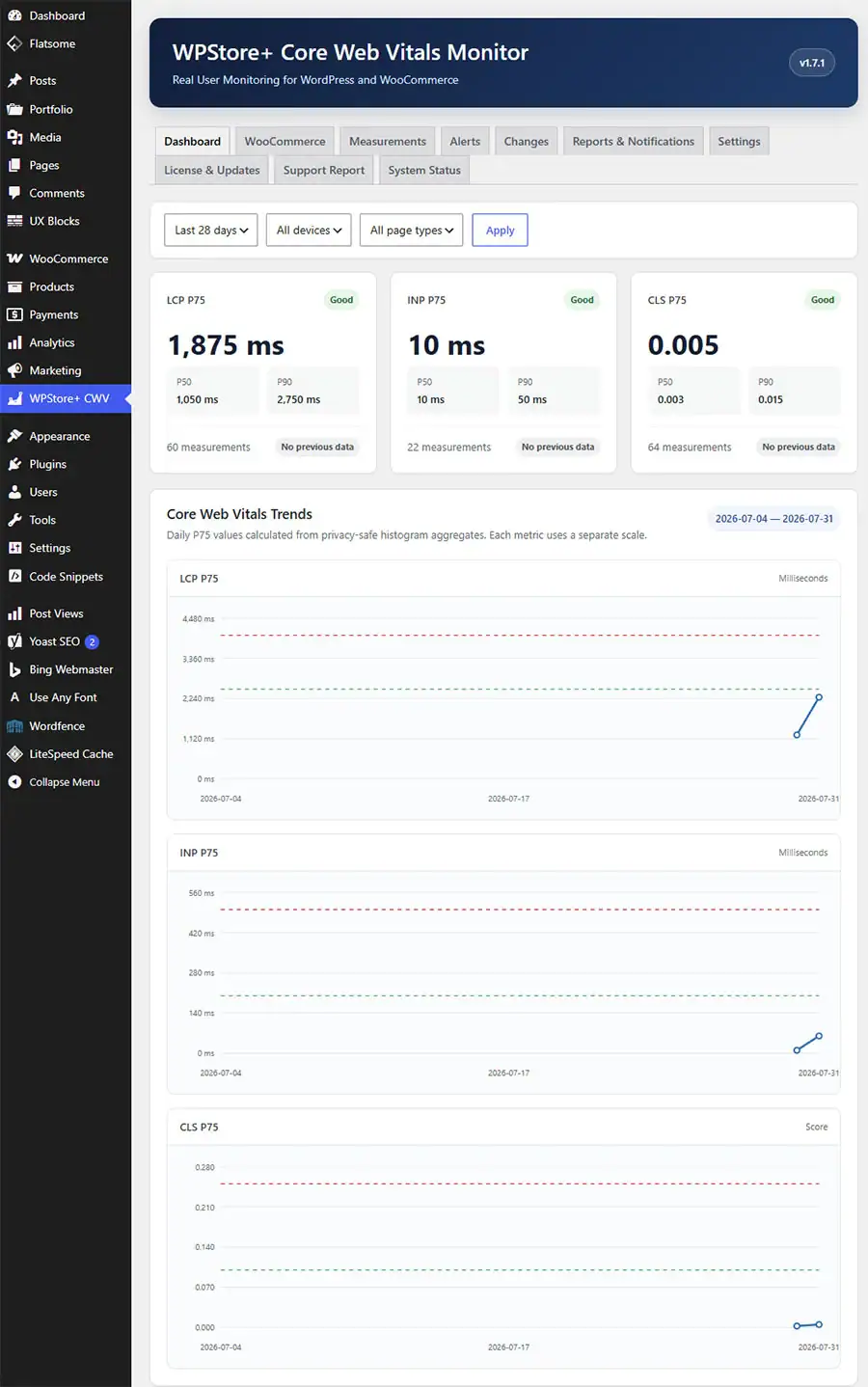
- Display P50, P75, and P90 percentiles
- Show sample counts and Insufficient Data states
- Sanitize URLs before storage
- Remove query strings, fragments, order IDs, and checkout tokens
- Store performance data inside the WordPress database
Performance Trends
- View performance trends over 7, 28, and 90 days
- Compare the current period with the previous equivalent period
- Review separate LCP, INP, and CLS charts
- Track long-term aggregate history
- Rebuild or backfill aggregate data when needed
- Preserve trend data after raw-measurement cleanup
URL and Element Diagnostics
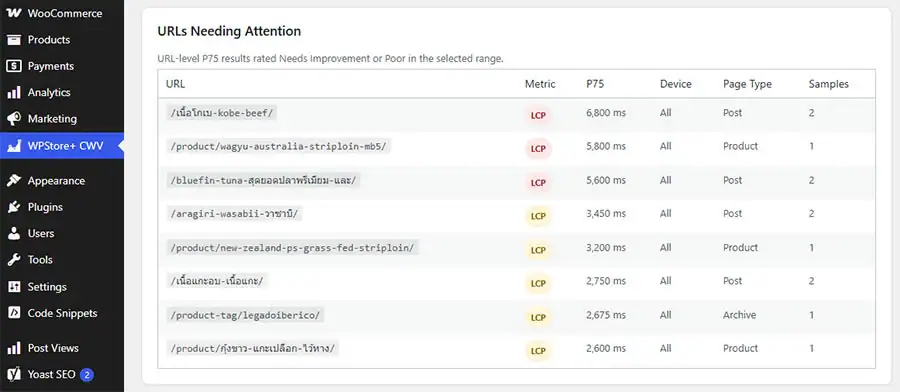
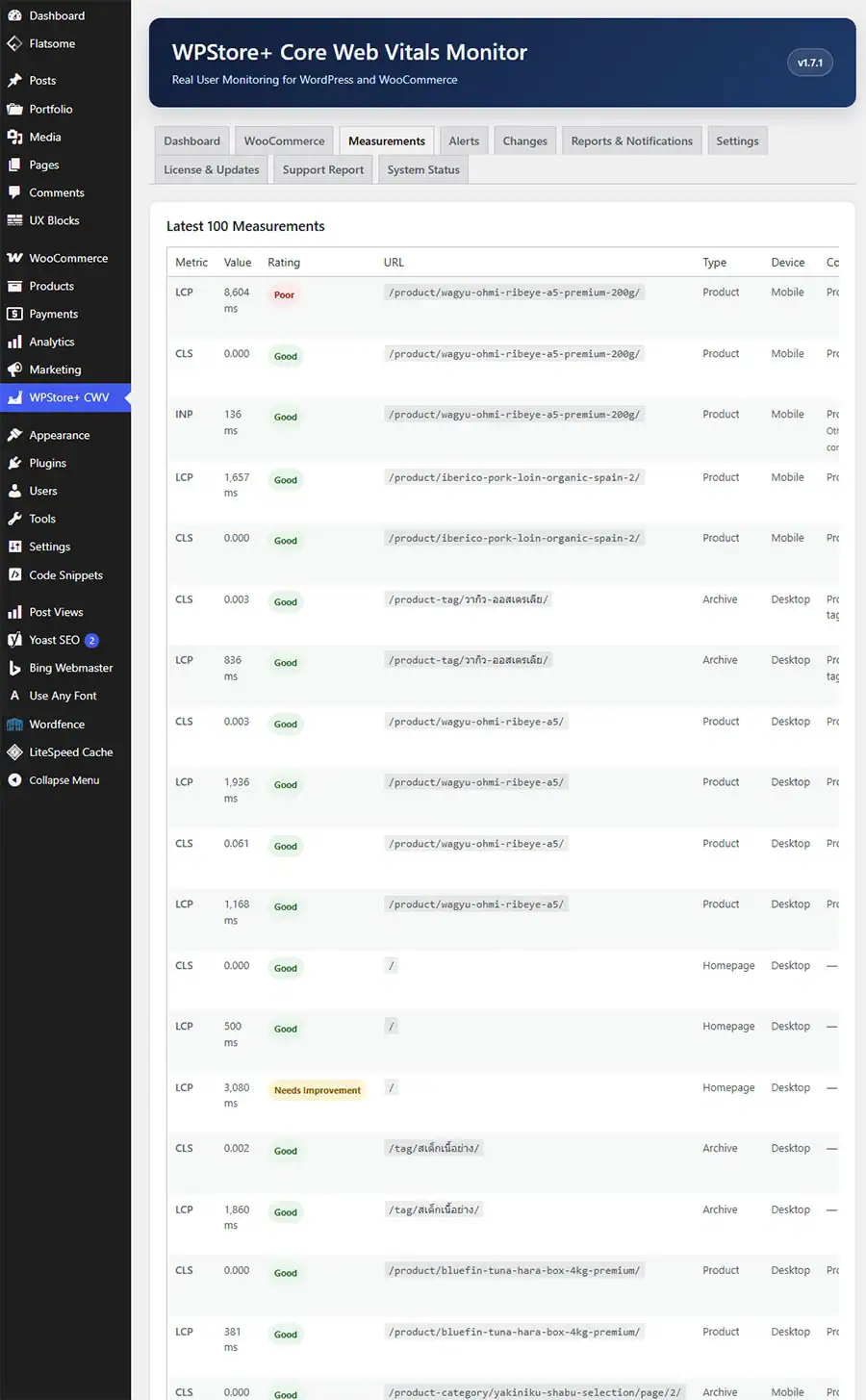
- Identify URLs with Needs Improvement or Poor results
- Review URL-level P75 values
- Detect URLs with performance regressions
- Inspect associated LCP elements and resources
- Inspect elements affected by large layout shifts
- Review slow interaction targets related to INP
- Filter results by device and page type
Performance Alerts
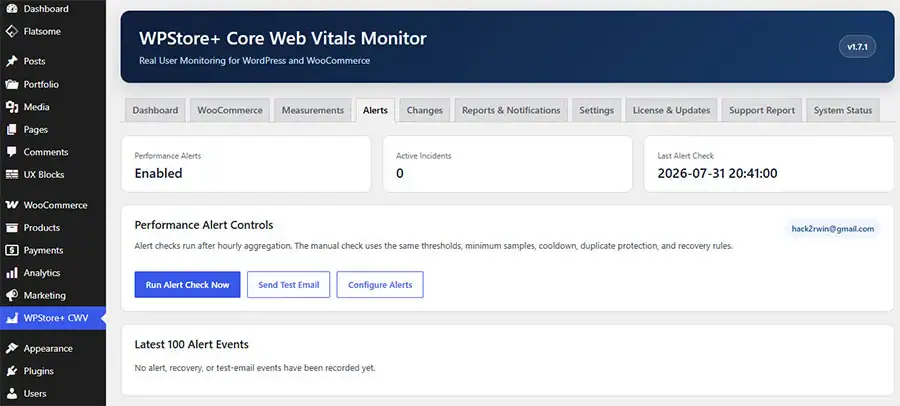
- Detect threshold crossings
- Detect percentage-based performance regressions
- Configure minimum sample requirements
- Monitor Sitewide, Mobile, and Desktop scopes
- Prevent duplicate notifications during active incidents
- Configure cooldown periods
- Apply recovery hysteresis
- Receive recovery notifications when performance improves
Change Impact Tracking
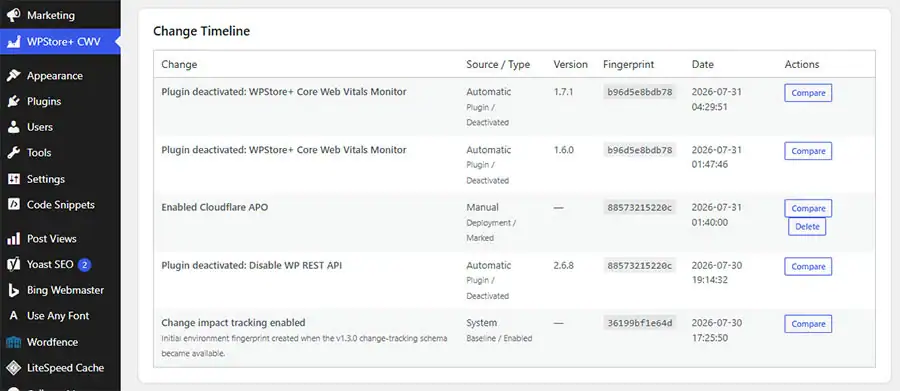
- Automatically record plugin activation and deactivation
- Record plugin, theme, WordPress Core, and WooCommerce updates
- Add manual markers for hosting, CDN, cache, design, and deployment changes
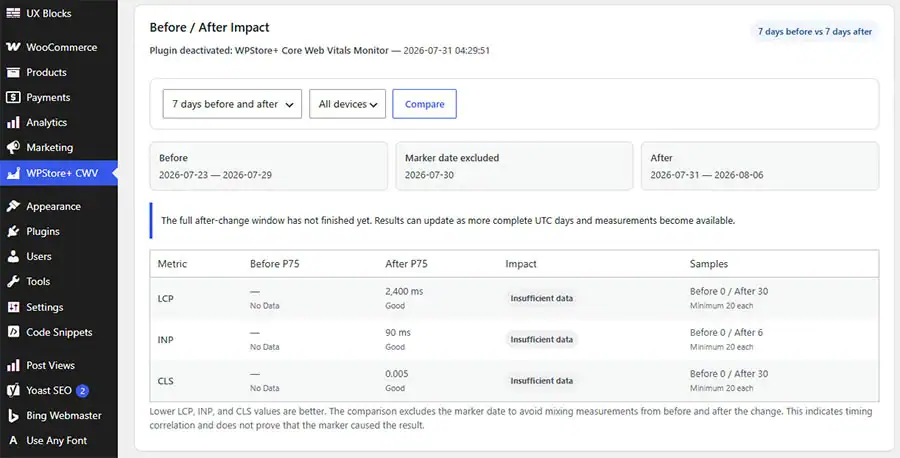
- Compare LCP, INP, and CLS before and after a selected change
- Choose 3, 7, 14, or 28-day comparison windows
- Filter Before/After results by Mobile or Desktop
- Use privacy-safe environment fingerprints
- Avoid storing complete plugin lists inside change markers
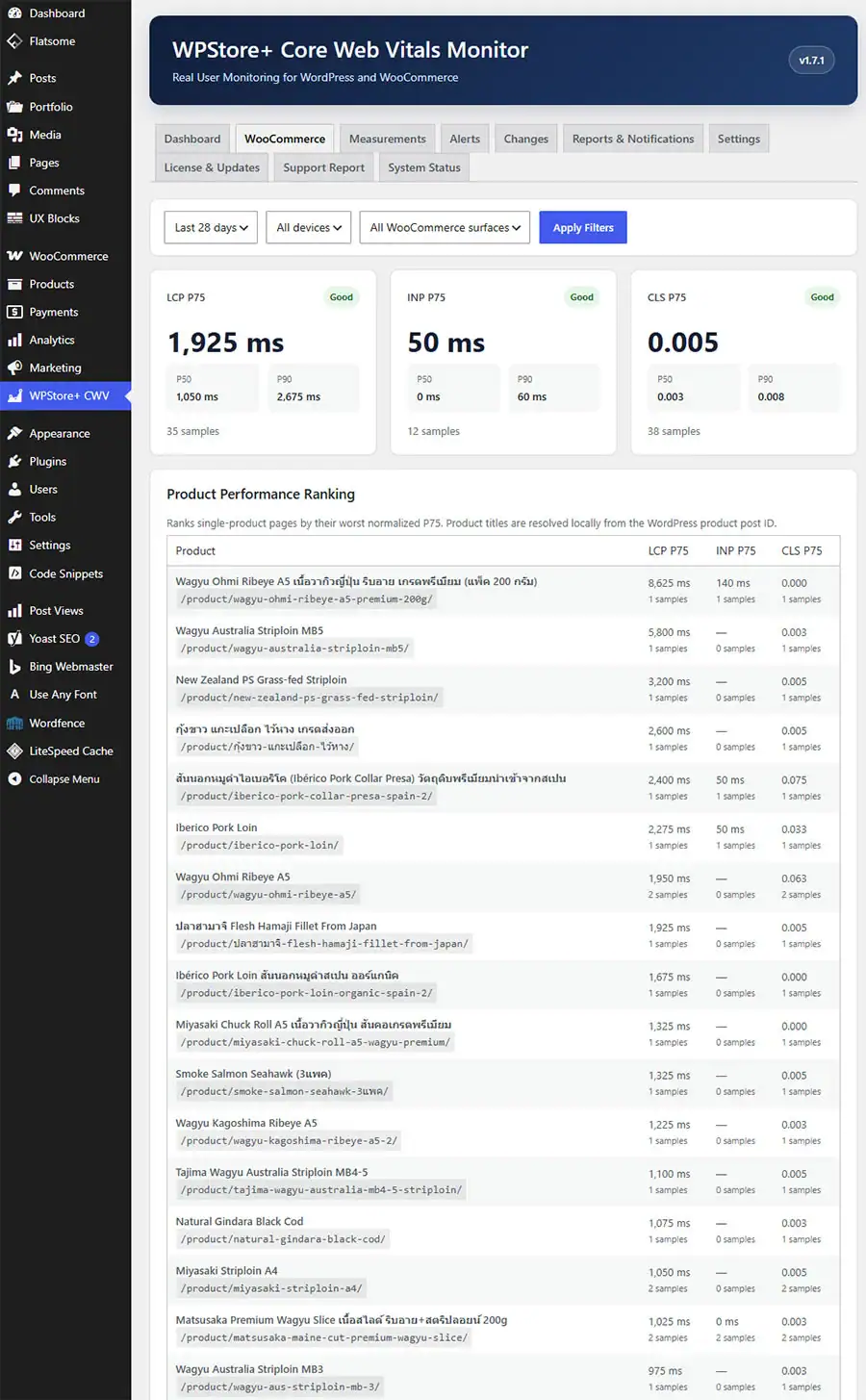
WooCommerce Intelligence
- Analyze Single Product pages
- Analyze Shop and product archive pages
- Analyze Cart and Checkout
- Analyze My Account and other WooCommerce surfaces
- Rank product pages by performance
- Review WooCommerce P50, P75, and P90 results
- Inspect commerce-related INP interactions
- Classify Add to Cart interactions
- Classify variation selection and quantity changes
- Classify cart updates, coupons, payment methods, shipping methods, and Place Order interactions
- Keep customer details and checkout values out of collected measurements
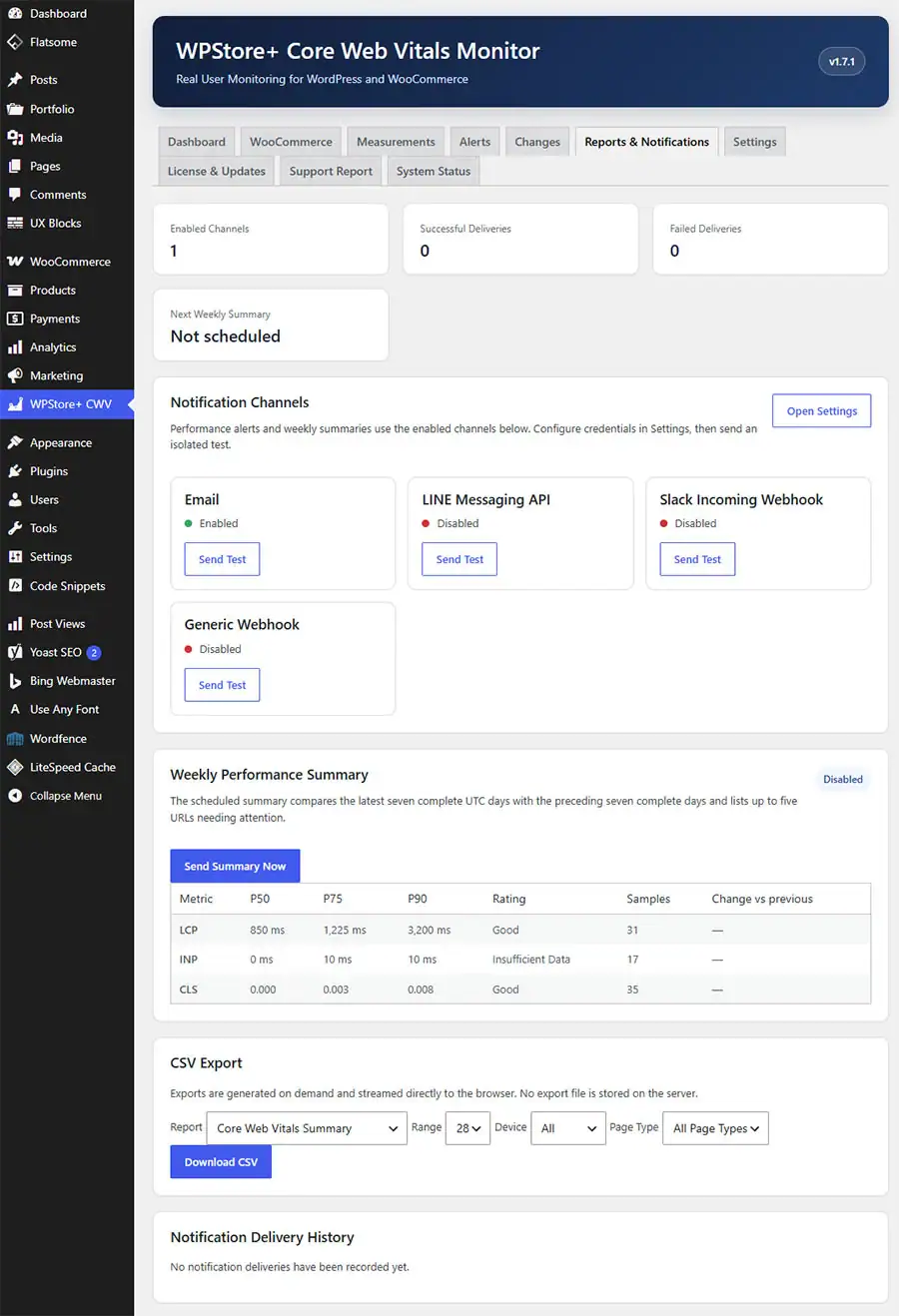
Notifications
- Email alerts
- LINE Messaging API notifications
- Slack Incoming Webhook notifications
- Generic HTTPS Webhook notifications
- Optional HMAC-SHA256 Webhook signing
- Channel-specific delivery history
- Partial-delivery reporting
- Duplicate-delivery protection
- Failed-delivery diagnostics
- Test actions for each notification channel
Reports and Export
- Weekly Performance Summary
- Current week versus previous week comparison
- LCP, INP, and CLS P50, P75, and P90
- URLs Needing Attention
- Mobile and Desktop report scopes
- Manual weekly report delivery
- Core Web Vitals Summary CSV
- URLs Needing Attention CSV
- Alert History CSV
- Change Markers CSV
- Notification Deliveries CSV
- WooCommerce Surface Summary CSV
- UTF-8 BOM support
- Spreadsheet formula-injection protection
Commercial and Support Features
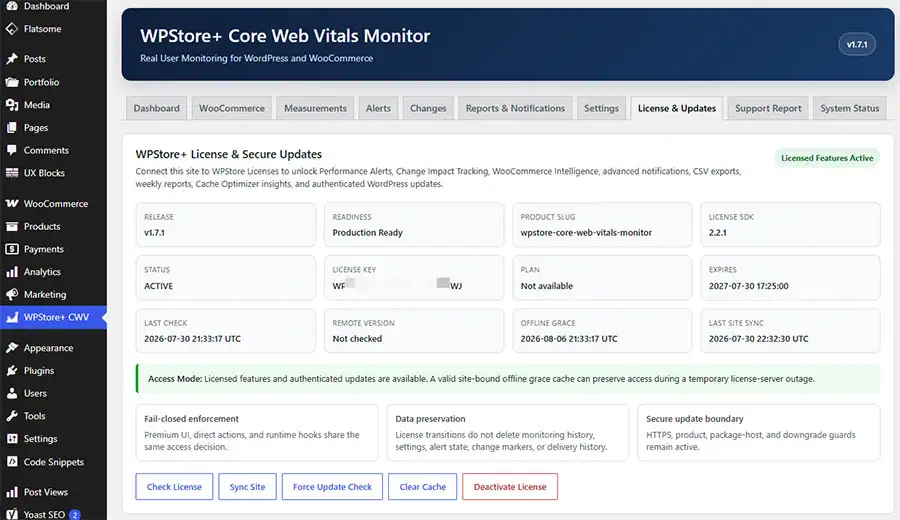
- WPStore+ license activation
- License validation and synchronization
- License deactivation
- Seven-day offline grace after successful validation
- Authenticated plugin updates
- Product and update-package validation
- Update downgrade protection
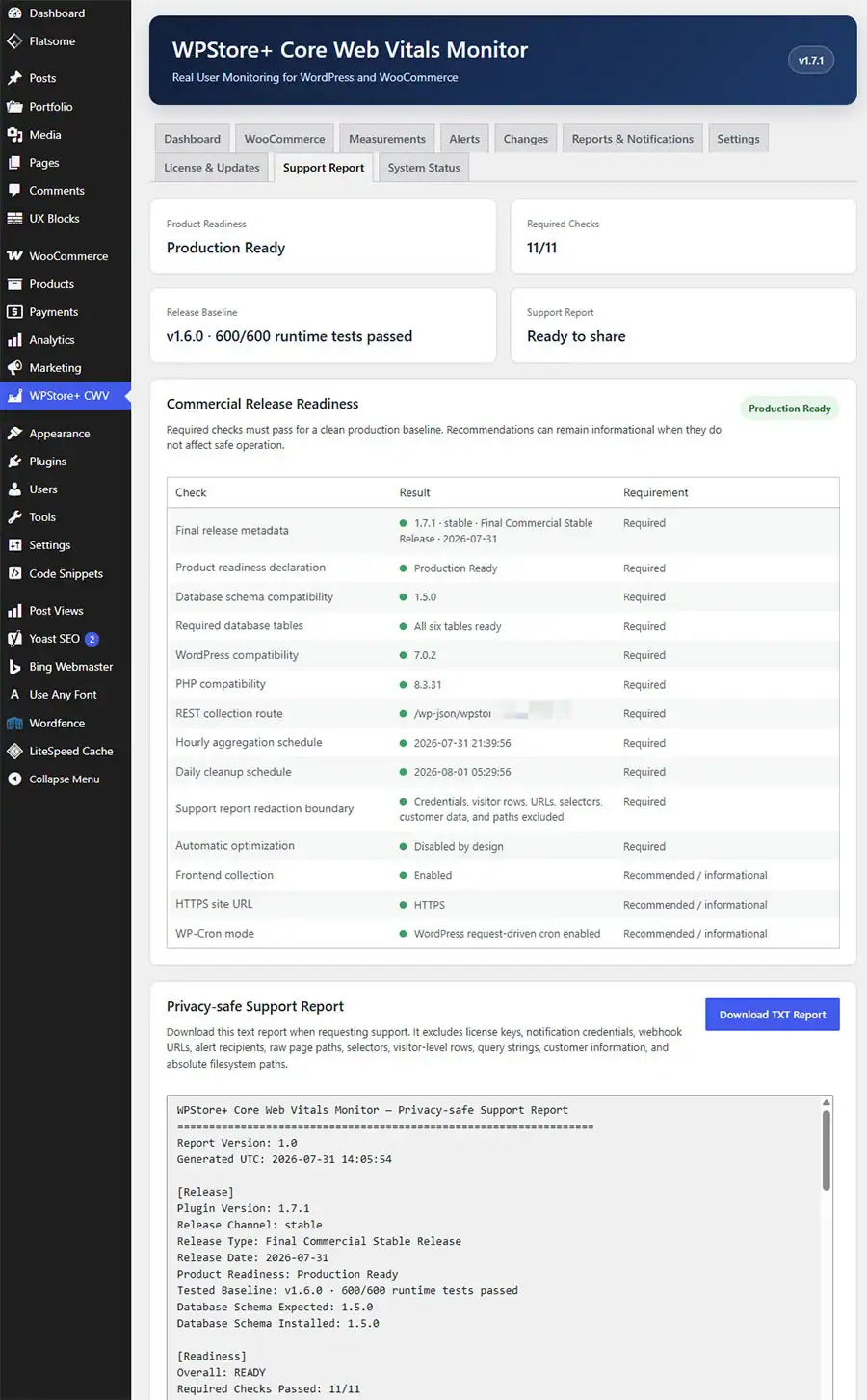
- Privacy-safe Support Report
- Downloadable TXT Support Report
- Product Readiness diagnostics
- WordPress Privacy Policy Guide content
- Read-only integration with WPStore+ Cache Optimizer
- No automatic optimization or configuration changes
Core Mode vs. Licensed Features
| Feature | Core Mode | Licensed Mode |
|---|---|---|
| Collect LCP, INP, and CLS | ✓ | ✓ |
| P50, P75, and P90 Dashboard | ✓ | ✓ |
| Mobile and Desktop filters | ✓ | ✓ |
| Page-type classification | ✓ | ✓ |
| Performance trend charts | ✓ | ✓ |
| URLs Needing Attention | ✓ | ✓ |
| Measurement history | ✓ | ✓ |
| Element diagnostics | ✓ | ✓ |
| Sampling controls | ✓ | ✓ |
| URL exclusions | ✓ | ✓ |
| Data-retention controls | ✓ | ✓ |
| Privacy controls | ✓ | ✓ |
| System Status | ✓ | ✓ |
| Privacy-safe Support Report | ✓ | ✓ |
| License management | ✓ | ✓ |
| Performance Alerts | — | ✓ |
| Regression Detection | — | ✓ |
| Recovery Notifications | — | ✓ |
| Change Impact Tracking | — | ✓ |
| Before/After Comparison | — | ✓ |
| WooCommerce Intelligence | — | ✓ |
| LINE Notifications | — | ✓ |
| Slack Notifications | — | ✓ |
| Generic Webhook | — | ✓ |
| Weekly Performance Summary | — | ✓ |
| CSV Export | — | ✓ |
| Authenticated Updates | — | ✓ |
| WPStore+ Cache Optimizer Insights | — | ✓ |
Core Mode
Core Mode continues collecting and displaying essential Core Web Vitals data without an active license. Measurements, Dashboard, Trends, Settings, Support Report, and System Status remain available.
Licensed Mode
A valid license unlocks Performance Alerts, Change Impact Tracking, WooCommerce Intelligence, notification channels, weekly reporting, CSV exports, commercial updates, and WPStore+ Cache Optimizer aggregate insights.
Existing data is not automatically deleted when a license expires or is deactivated.
Getting Started
Step 1: Review Collection Settings
Navigate to:
WPStore+ CWV → SettingsConfirm that Real User Monitoring is enabled. Review:
- Sampling rate
- Raw-data retention
- Trend-data retention
- Excluded URL paths
- Logged-in administrator exclusion
- Do Not Track behavior
- Daily measurement limit
- Uninstall data behavior
Websites with lower traffic can normally begin with a higher sampling rate. High-traffic websites may use a lower rate to reduce database growth.
Step 2: Generate Initial Measurements
Open several frontend pages using a logged-out browser or Incognito window.
Test pages such as:
- Homepage
- Blog Post
- Standard Page
- Product
- Shop
- Cart
- Checkout
- My Account
INP requires a qualifying interaction. Click buttons, open menus, change product variations, update cart quantities, or interact with Checkout fields to generate INP measurements.
Step 3: Review the Dashboard
Open:
WPStore+ CWV → DashboardReview:
- LCP P50, P75, and P90
- INP P50, P75, and P90
- CLS P50, P75, and P90
- Measurement sample counts
- Mobile and Desktop results
- Performance trends
- URLs Needing Attention
- URL regressions
- Associated elements
Allow enough measurements to accumulate before making performance decisions. Low-traffic URLs may remain in the Insufficient Data state until the required number of samples has been collected.
Step 4: Activate Licensed Features
Open:
WPStore+ CWV → License & UpdatesEnter the license key and activate the website.
After activation, configure:
- Performance Alerts
- Change Tracking
- WooCommerce Intelligence
- Email notifications
- LINE Messaging API
- Slack Incoming Webhook
- Generic HTTPS Webhook
- Weekly Performance Summary
- CSV Export
Step 5: Add Change Markers
Before making an important change, create a manual marker for events such as:
- Hosting migration
- CDN activation
- Cache configuration change
- Homepage redesign
- Theme customization
- Third-party script installation
- Custom-code deployment
Plugin, theme, WordPress, and WooCommerce changes may also be recorded automatically.
Step 6: Compare Before and After
After enough data has been collected, select a Change Marker and compare:
- LCP before and after
- INP before and after
- CLS before and after
- Mobile results
- Desktop results
- Sample counts
- Rating changes
The comparison shows a time-based relationship. It does not automatically prove that a particular theme or plugin caused the performance change.
Step 7: Configure Notifications
Test each enabled channel separately before relying on automated alerts.
Supported channels:
- LINE Messaging API
- Slack Incoming Webhook
- Generic HTTPS Webhook
Review delivery results under Notification Delivery History.
Step 8: Review Support and System Status
Use:
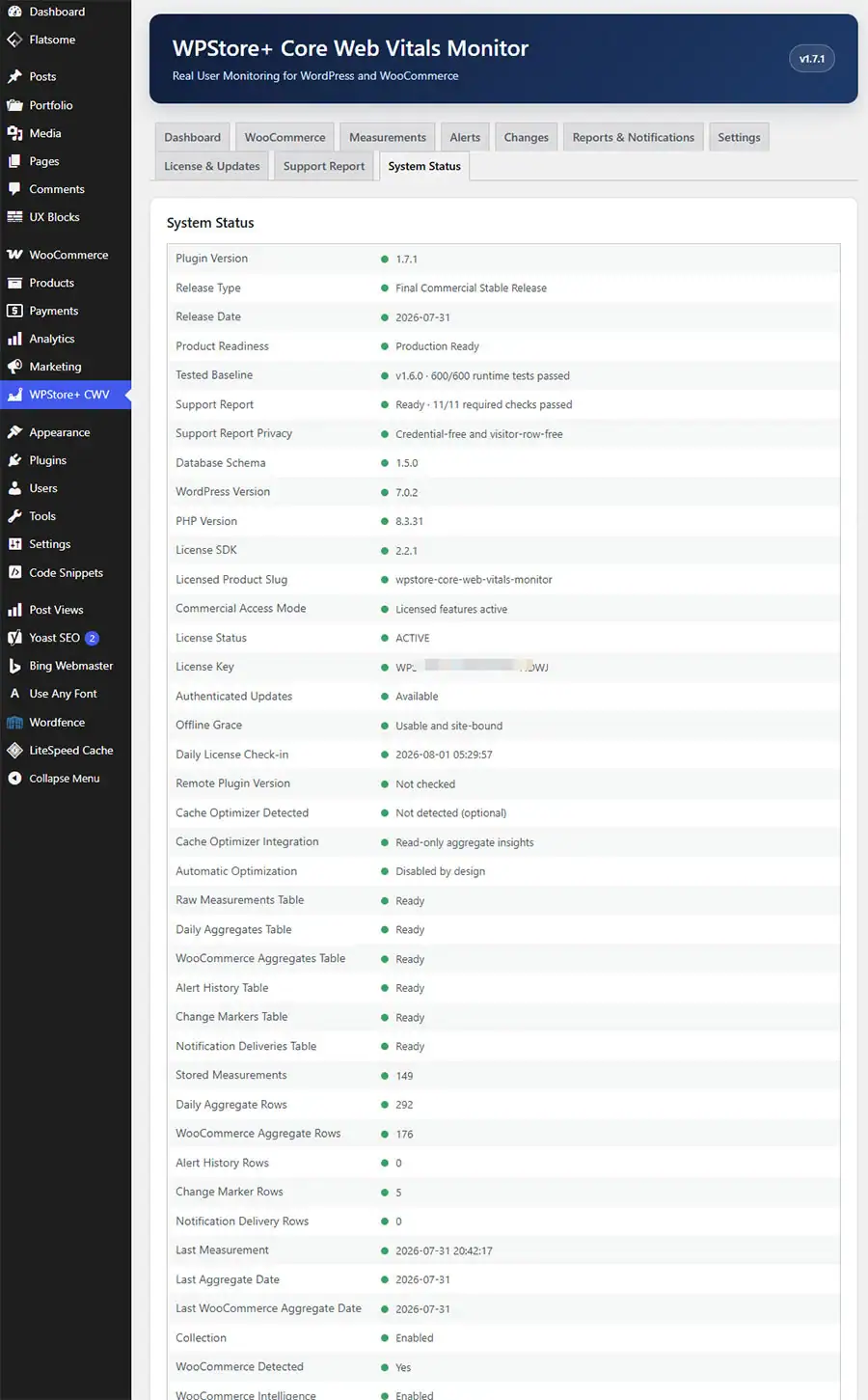
WPStore+ CWV → System Statusto verify database tables, scheduled events, version information, license state, and product readiness.
Use:
WPStore+ CWV → Support Reportto create a privacy-safe diagnostic report when contacting WPStore+ support.
Privacy and Data Collection
WPStore+ Core Web Vitals Monitor is designed to collect website-performance information without creating visitor profiles.
Data the Plugin May Store
The plugin may store:
- LCP values
- INP values
- CLS values
- Metric rating
- Measurement date and time
- Sanitized page path
- Page type
- Mobile or Desktop classification
- Navigation type
- Associated CSS selector
- Sanitized LCP resource URL
- Interaction category
- WooCommerce surface classification
- Numeric WordPress or product object ID where applicable
- Aggregate percentile data
- Sample counts
- Change Marker information
- Notification delivery status
Data the Plugin Does Not Intentionally Store
The plugin is designed not to store:
- Visitor IP addresses
- Visitor names
- Visitor email addresses
- WordPress user IDs
- Cookies
- Persistent visitor identifiers
- Form-field values
- Checkout-field values
- Payment-card information
- Customer addresses
- Customer phone numbers
- Shopping-cart contents
- Product prices
- SKU values
- Order identifiers
- Checkout tokens
- Text content from monitored elements
URL Sanitization
Before storage, the plugin can remove or sanitize:
- Query strings
- URL fragments
- Checkout tokens
- Order IDs
- Order-pay identifiers
- Order-received identifiers
- View-order identifiers
- Dynamic or sensitive selector values
- Sensitive resource query parameters
Data Location
Performance measurements and aggregates are stored inside the website’s own WordPress database.
The collected Real User Monitoring data is not automatically transmitted to WPStore+.
Optional notification services may receive selected aggregate alert or report information only when the administrator enables those services.
Optional External Services
The following external services may receive notifications when enabled:
- Email delivery provider
- LINE Messaging API
- Slack Incoming Webhook
- Administrator-configured HTTPS Webhook endpoint
Administrators are responsible for reviewing the privacy policies and data-processing terms of any external service they enable.
Administrative Controls
Administrators can:
- Pause Real User Monitoring
- Change the sampling rate
- Set a daily measurement limit
- Exclude logged-in administrators
- respect Do Not Track
- Exclude selected URL paths
- Configure raw-data retention
- Configure aggregate-data retention
- Rebuild aggregates
- Clear monitoring data
- Choose whether data is removed during plugin uninstallation
Support Report Privacy
The Support Report does not include:
- License keys
- Activation tokens
- Notification credentials
- LINE tokens
- Slack Webhook URLs
- Generic Webhook URLs
- Webhook secrets
- Raw page paths
- Query strings
- CSS selectors
- Element resource URLs
- Visitor-level measurements
- Customer information
- Cart or Checkout information
- Database credentials
- WordPress security salts
- Absolute filesystem paths
Installation
1. Download the plugin ZIP file from your WPStore+ account.
2. Sign in to the WordPress administration area.
3. Navigate to Plugins → Add New Plugin.
4. Click Upload Plugin.
5. Select the WPStore+ Core Web Vitals Monitor ZIP file.
6. Click Install Now.
7. After installation completes, click Activate Plugin.
8. Open WPStore+ CWV from the WordPress administration menu.
9. Review the collection, sampling, retention, and privacy settings.
10. Purge the website cache and CDN cache once.
11. Visit several frontend pages using a logged-out or Incognito browser.
12. Open License & Updates and activate your license to unlock commercial features.
### Requirements
* WordPress 6.2 or later
* PHP 7.4 or later
* JavaScript enabled in the visitor’s browser
* WordPress Cron or a server cron that triggers WordPress scheduled events
* WooCommerce only when using WooCommerce Intelligence
* HTTPS recommended for notification integrations and production websites.
Frequently Asked Questions
### What is Real User Monitoring?
Real User Monitoring collects performance measurements from actual frontend visits. It helps reveal how visitors experience the website across real devices, browsers, network conditions, and page types.
### Which Core Web Vitals does the plugin monitor?
The plugin monitors:
* Largest Contentful Paint
* Interaction to Next Paint
* Cumulative Layout Shift
These are displayed as LCP, INP, and CLS.
### How is this different from PageSpeed Insights?
PageSpeed Insights commonly provides laboratory and Google field data. WPStore+ Core Web Vitals Monitor stores first-party measurements collected directly from visitors to your own WordPress website.
The results may differ because of different visitors, browsers, date ranges, devices, traffic volumes, sampling rates, and aggregation methods.
### Does the plugin automatically improve Core Web Vitals?
No. The plugin monitors, analyzes, compares, and reports performance.
It does not automatically:
* Modify the theme
* Disable plugins
* Change cache settings
* Delay JavaScript
* Optimize images
* Rewrite CSS
* Change CDN settings
* Modify database configuration
### Can I use the plugin without a license?
Yes. Core Mode includes essential LCP, INP, and CLS collection, the Dashboard, trends, measurements, privacy settings, Support Report, and System Status.
A valid license is required for advanced commercial features.
### What happens when the license expires?
Licensed features become unavailable, but Core Mode continues working.
Existing measurements, aggregates, alerts, changes, reports, and settings are not automatically deleted.
### Does the plugin collect personal data?
The plugin is designed not to collect IP addresses, visitor accounts, email addresses, cookies, form values, checkout details, payment information, or order identifiers.
Website administrators should still review their complete legal and privacy obligations.
### Where is the data stored?
Measurements and aggregate reports are stored inside the website’s WordPress database.
### Will the monitoring script slow down the website?
The collector is designed to work asynchronously and supports configurable sampling.
Actual resource usage depends on:
* Website traffic
* Sampling rate
* Hosting resources
* Data-retention settings
* Number of stored measurements
* Scheduled aggregation frequency
### Why does INP sometimes have fewer samples?
INP requires a qualifying visitor interaction. A page view without a click, tap, keyboard action, or other interaction may not produce an INP measurement.
### Why does a URL show Insufficient Data?
The URL has not collected enough samples to meet the configured minimum-sample requirement. This prevents decisions from being made using too little data.
### Can the plugin identify the element causing LCP or CLS?
The plugin can display an associated selector or resource reported by supported browser APIs.
This information is diagnostic and should not always be treated as definitive proof of the underlying cause.
### Can it detect performance changes after a plugin update?
Yes. Change Impact Tracking can record plugin updates and compare P75 results before and after the selected event.
The result indicates a time-based relationship and does not automatically prove causation.
### Can I monitor WooCommerce Checkout?
Yes. Licensed Mode can analyze Product, Cart, Checkout, My Account, and other WooCommerce surfaces.
The plugin does not intentionally store checkout-field values, customer details, payment information, or order data.
### Which WooCommerce interactions can be identified?
Depending on the theme and WooCommerce setup, the plugin may classify:
* Add to Cart
* Variation Selection
* Quantity Change
* Cart Update
* Remove Cart Item
* Apply Coupon
* Proceed to Checkout
* Checkout Field
* Payment Method
* Shipping Method
* Place Order
* Mini Cart
* Account Action
Interaction classification is diagnostic and may vary with themes, page builders, and extensions.
### Which notification channels are supported?
Licensed Mode supports:
* Email
* LINE Messaging API
* Slack Incoming Webhook
* Generic HTTPS Webhook
* Is LINE Notify supported?
No. The plugin uses LINE Messaging API rather than the discontinued LINE Notify service.
### Can Webhook notifications be signed?
Yes. Generic HTTPS Webhook notifications can use an optional HMAC-SHA256 signature.
### Can I export reports?
Yes. Licensed Mode includes six CSV export types:
* Core Web Vitals Summary
* URLs Needing Attention
* Alert History
* Change Markers
* Notification Deliveries
* WooCommerce Surface Summary
### Does it work with WPStore+ Cache Optimizer?
Yes. Licensed Mode can expose privacy-safe aggregate Core Web Vitals insights through a read-only integration.
The integration does not automatically change cache or optimization settings.
### Can I remove all collected data?
Yes. Administrators can clear stored monitoring data and configure whether plugin data should be removed during uninstallation.
Changelog
### 1.7.1 – Translation Timing Hotfix
* Fixed early translation loading notices on WordPress 6.7 and later
* Moved text-domain registration and plugin boot to the correct init lifecycle
* Added a boot guard to prevent duplicate initialization
* Updated Product Readiness version compatibility
* Preserved Database Schema 1.5.0 and all existing data
### 1.7.0 – Final Commercial Stable Release
* Added Final Commercial Stable Release metadata
* Added Product Readiness diagnostics
* Added privacy-safe Support Report preview and TXT download
* Added WordPress Privacy Policy Guide content
* Added final System Status checks
* Added plugin action links for License, Support Report, and Product Page
* Completed final privacy, security, compatibility, and upgrade review
### 1.6.0 – WPStore+ Integration and License Enforcement
* Added WPStore+ license activation, validation, synchronization, and deactivation
* Added Core Mode and Licensed Feature gates
* Added authenticated commercial updates
* Added offline license grace
* Added update package host, product, and downgrade protection
* Added read-only aggregate integration for WPStore+ Cache Optimizer
* Confirmed that automatic optimization remains disabled
### 1.5.0 – Advanced Notifications and Export
* Added LINE Messaging API notifications
* Added Slack Incoming Webhook notifications
* Added Generic HTTPS Webhook with optional HMAC signing
* Added notification delivery history
* Added partial-delivery and duplicate-delivery protection
* Added Weekly Performance Summary
* Added six privacy-safe CSV export types
* Added spreadsheet formula-injection protection
### 1.4.0 – WooCommerce Intelligence
* Added WooCommerce performance dashboard
* Added Product, Shop, Category, Tag, Cart, Checkout, and My Account classifications
* Added product-page performance ranking
* Added commerce interaction diagnostics
* Added WooCommerce P50, P75, and P90 aggregates
* Added privacy protections for checkout and customer information
### 1.3.0 – Change Impact Tracking
* Added automatic plugin, theme, WordPress, and WooCommerce change markers
* Added manual markers for hosting, CDN, cache, deployment, and custom-code changes
* Added privacy-safe environment fingerprints
* Added Before/After P75 comparison
* Added Mobile and Desktop impact filters
* Added configurable impact windows and minimum samples
### 1.2.0 – Performance Alerts
* Added threshold and regression alerts
* Added sitewide, Mobile, and Desktop scopes
* Added minimum-sample safeguards
* Added active-incident duplicate protection
* Added cooldown and recovery hysteresis
* Added recovery notifications
* Added Test Email and Manual Alert Check
* Added Alert History and mail-failure diagnostics
### 1.1.1 – Admin Notice UI Hotfix
* Moved WordPress and third-party admin notices outside the plugin hero area
* Improved notice backgrounds, text contrast, links, and dismiss controls
* Preserved the v1.1.0 monitoring and aggregation baseline
### 1.1.0 – Trends and Aggregation
* Added daily histogram aggregation
* Added P50, P75, and P90 reporting
* Added separate LCP, INP, and CLS trend charts
* Added current-versus-previous-period comparison
* Added URL regressions and long-term trend retention
* Added aggregate backfill and rebuild tools
### 1.0.0 – Real User Monitoring Foundation
* Initial commercial-development release
* Added LCP, INP, and CLS collection from real visitors
* Added Mobile and Desktop classification
* Added WordPress and WooCommerce page-type classification
* Added P75 Dashboard
* Added URL and element diagnostics
* Added sampling, exclusions, data retention, cleanup, and privacy controls
* Added System Status and uninstall data controls
Product Screenshots
Preview the plugin interface, settings, and key features before purchase.
Only logged in customers who have purchased this product may leave a review.
Related products
Local SEO
Payment Gateway
Analytics & Reporting
WordPress Plugins
Database & Optimization
Payment Gateway
WordPress Plugins

Reviews
There are no reviews yet.