


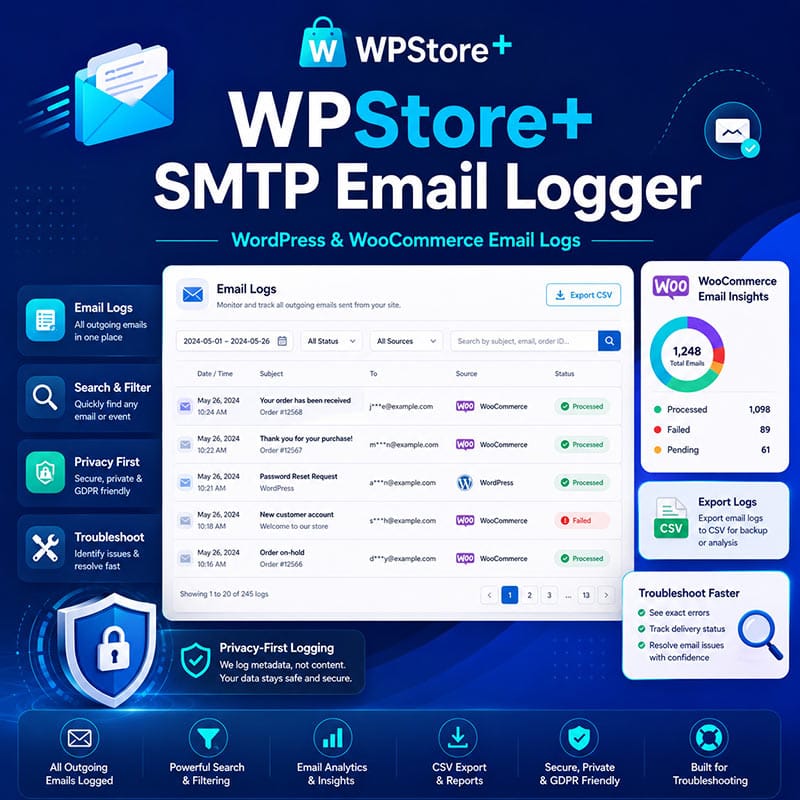
WPStore+ SMTP Email Logger
Original price was: $29.00.$19.00Current price is: $19.00.
Track outgoing WordPress and WooCommerce emails, review delivery-related logs, export reports, and troubleshoot email sending issues with a privacy-first SMTP email logging tool.
Special launch pricing — save $10 on your first year.
WPStore+ SMTP Email Logger helps WordPress and WooCommerce site owners understand what happens when their website sends email.
Instead of guessing whether WordPress attempted to send an order email, password reset, customer notification, or admin alert, this plugin records outgoing email activity in a clean admin log. You can view processed emails, failed emails, short-circuited email events, WooCommerce email context, troubleshooting hints, and export logs for support or debugging.
This plugin is designed as an email logging and troubleshooting tool. It does not replace your SMTP provider or email delivery service. You can continue using services such as MailerSend, SendGrid, Brevo, Gmail SMTP, SMTP.com, Amazon SES, or any SMTP plugin you already trust.
WPStore+ SMTP Email Logger focuses on visibility, privacy, and practical support workflows.
Key Features
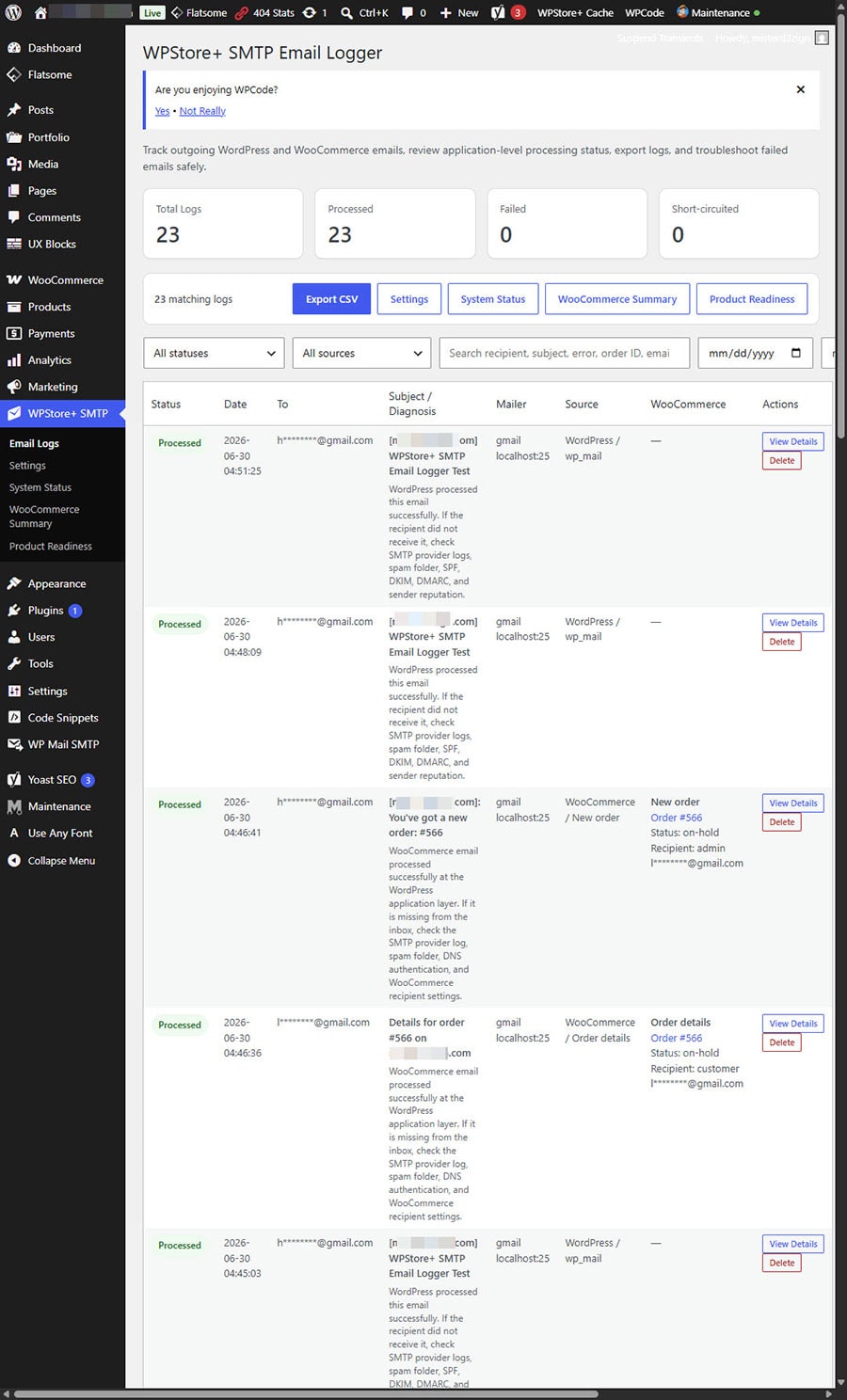
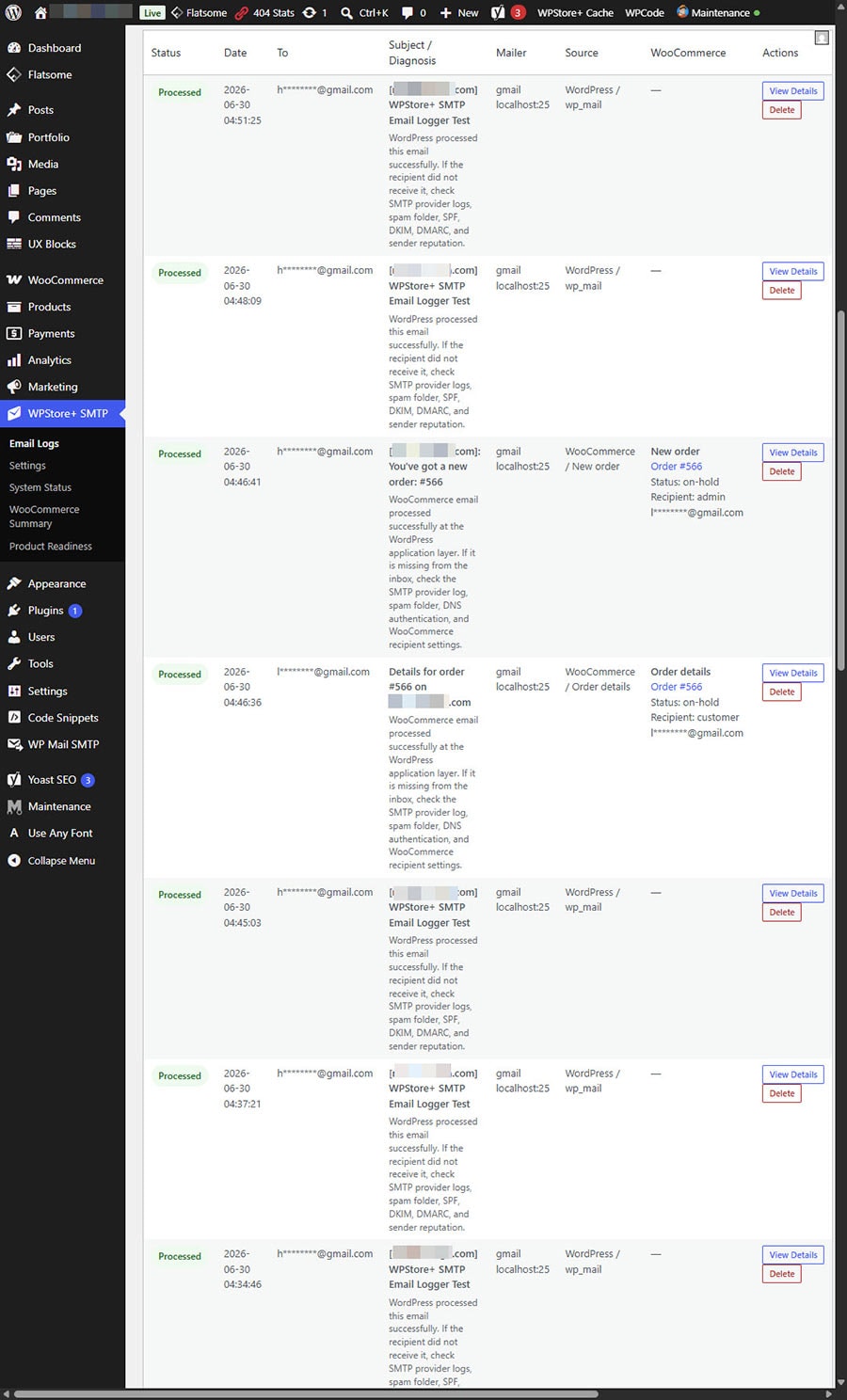
Outgoing Email Logs
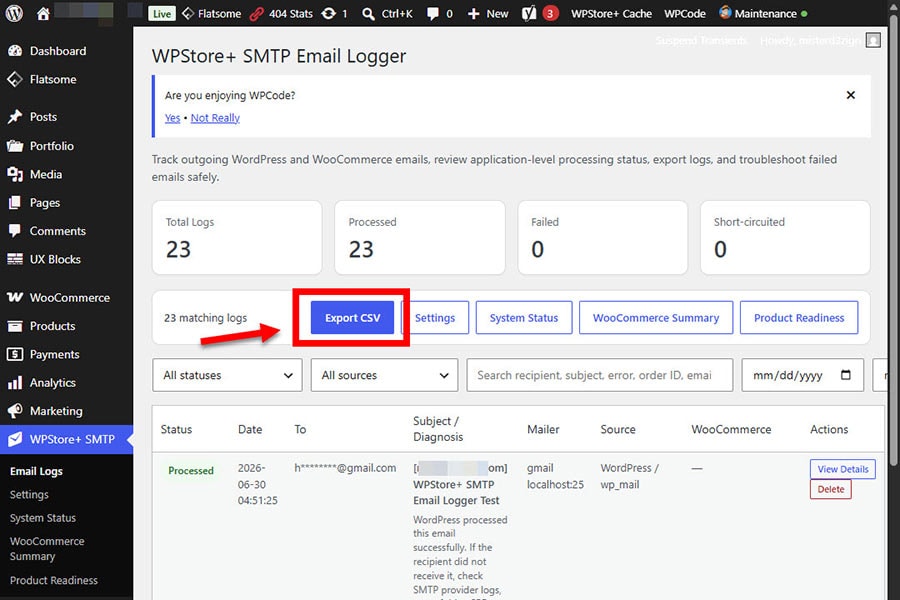
View outgoing WordPress email activity directly from the WordPress admin dashboard.
The log includes useful information such as:
- Date and time
- Email status
- Recipient
- Subject
- Source detection
- Mailer details
- Error message
- Attachments count
- Message hash
- Request URI
- WooCommerce email context when available
Email Status Tracking
The plugin records common WordPress email outcomes, including:
- Processed
- Failed
- Short-circuited Success
- Short-circuited Failed
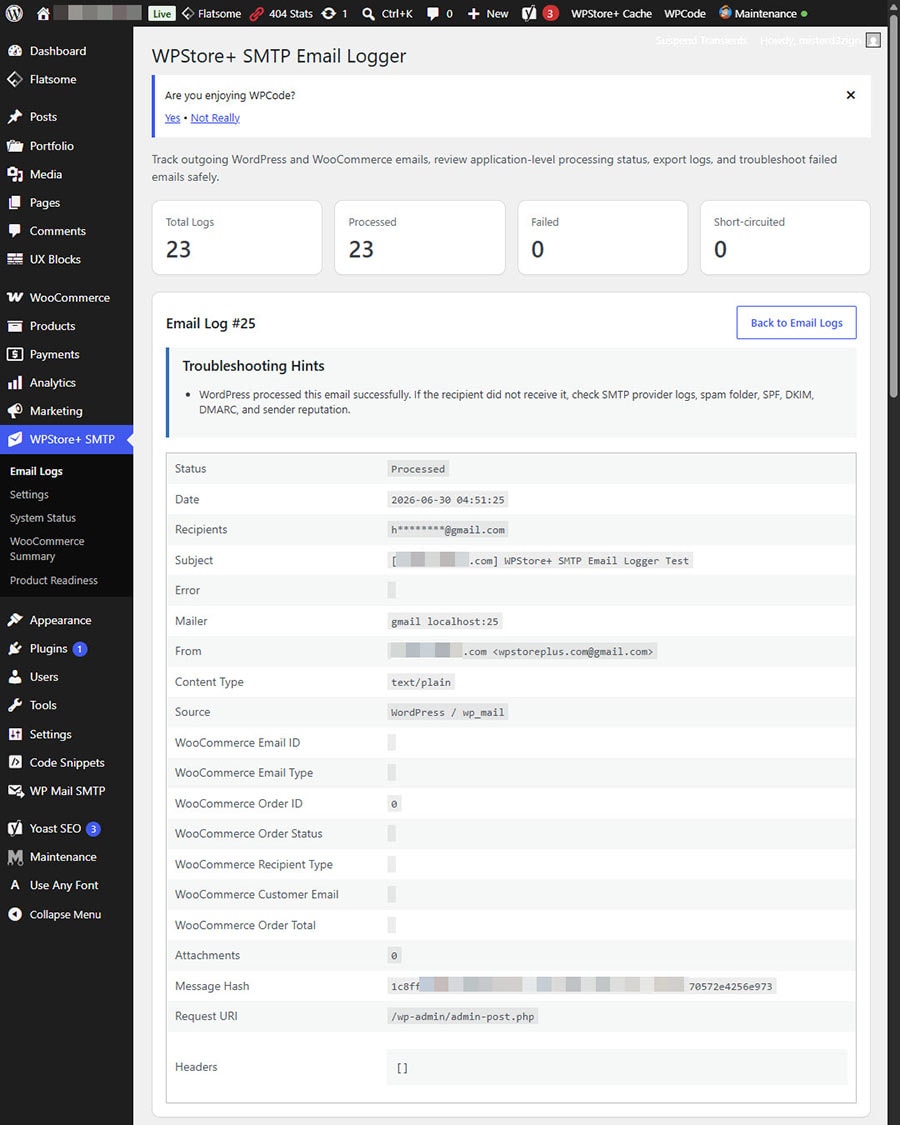
A “Processed” status means WordPress or PHPMailer processed the email request successfully. It does not guarantee that the message reached the recipient’s inbox. Actual inbox delivery depends on your SMTP provider, DNS records, spam filtering, mailbox rules, and email reputation.
WooCommerce Email Intelligence
For WooCommerce stores, the plugin can help identify email activity related to orders and customers.
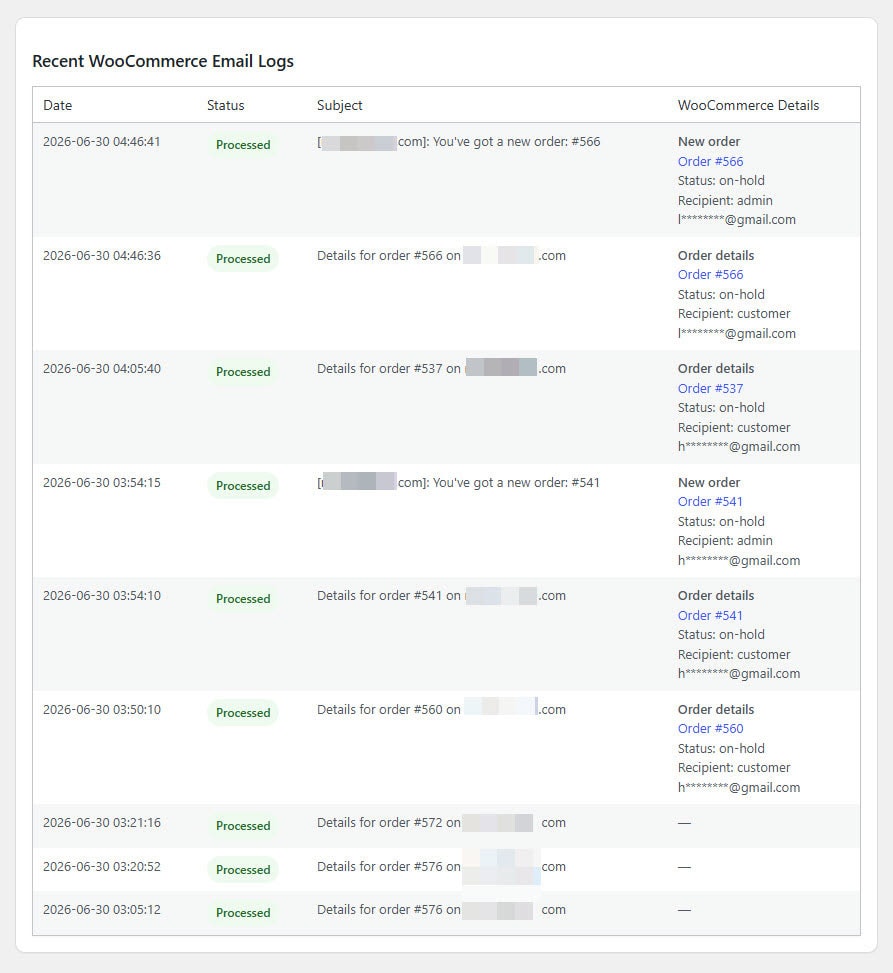
WooCommerce-related log details may include:
- WooCommerce email type
- Email ID
- Order ID
- Order status
- Recipient type
- Masked customer email
- Order total
- Link to the WooCommerce order when available
This makes it easier to troubleshoot common store email questions, such as:
- Was the new order email processed?
- Was the customer completed order email triggered?
- Which order was related to this email?
- Was the email sent to the admin or the customer?
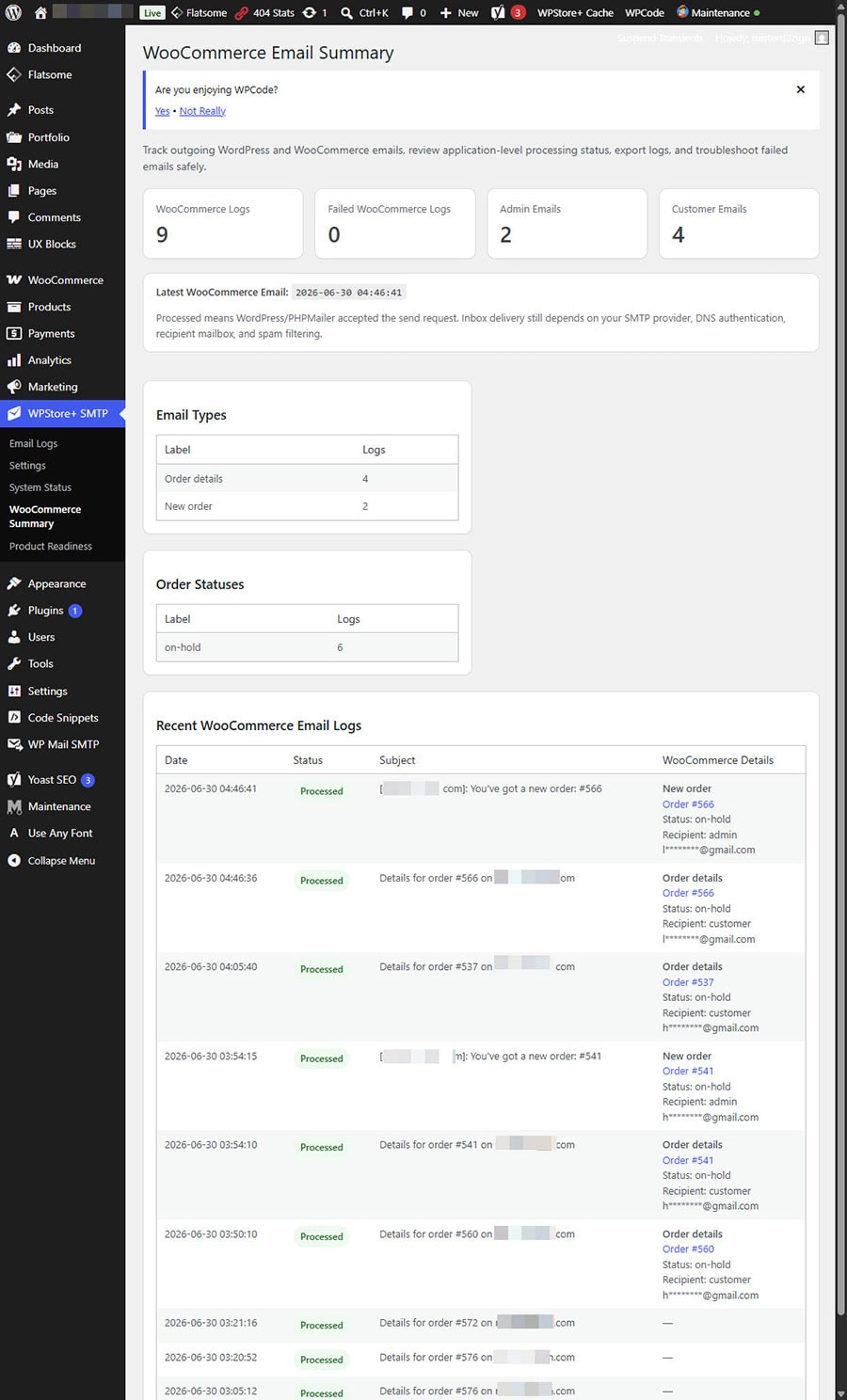
WooCommerce Summary
The WooCommerce Summary page gives store owners a quick overview of WooCommerce-related email logs.
It includes:
- Total WooCommerce email logs
- Failed WooCommerce email logs
- Admin email count
- Customer email count
- Latest WooCommerce email
- Email type summary
- Order status summary
- Recent WooCommerce email logs
Search and Filter
Find email logs faster using built-in filters.
You can filter or search by:
- Status
- Source
- Date range
- Subject
- Recipient
- Error message
- WooCommerce order ID
- WooCommerce email type
- WooCommerce order status
View Details
Each log entry includes a detailed view with more information about the email event.
The detail screen helps administrators and support teams review what happened without needing to search through raw server logs.
Troubleshooting Hints
The plugin includes practical troubleshooting hints for common email problems, such as:
- SMTP connection timeout
- Authentication failure
- Invalid recipient
- SSL/TLS or certificate issue
- Sender policy issues
- Short-circuited email events
- Processed emails that do not appear in the recipient inbox
These hints help site owners understand the next step instead of only seeing a technical error message.
Export CSV
Export filtered email logs as a CSV file.
This is useful when you need to:
- Send logs to a developer
- Review WooCommerce email activity
- Audit recent email events
- Investigate failed emails
- Keep a temporary troubleshooting record
Privacy-First Logging
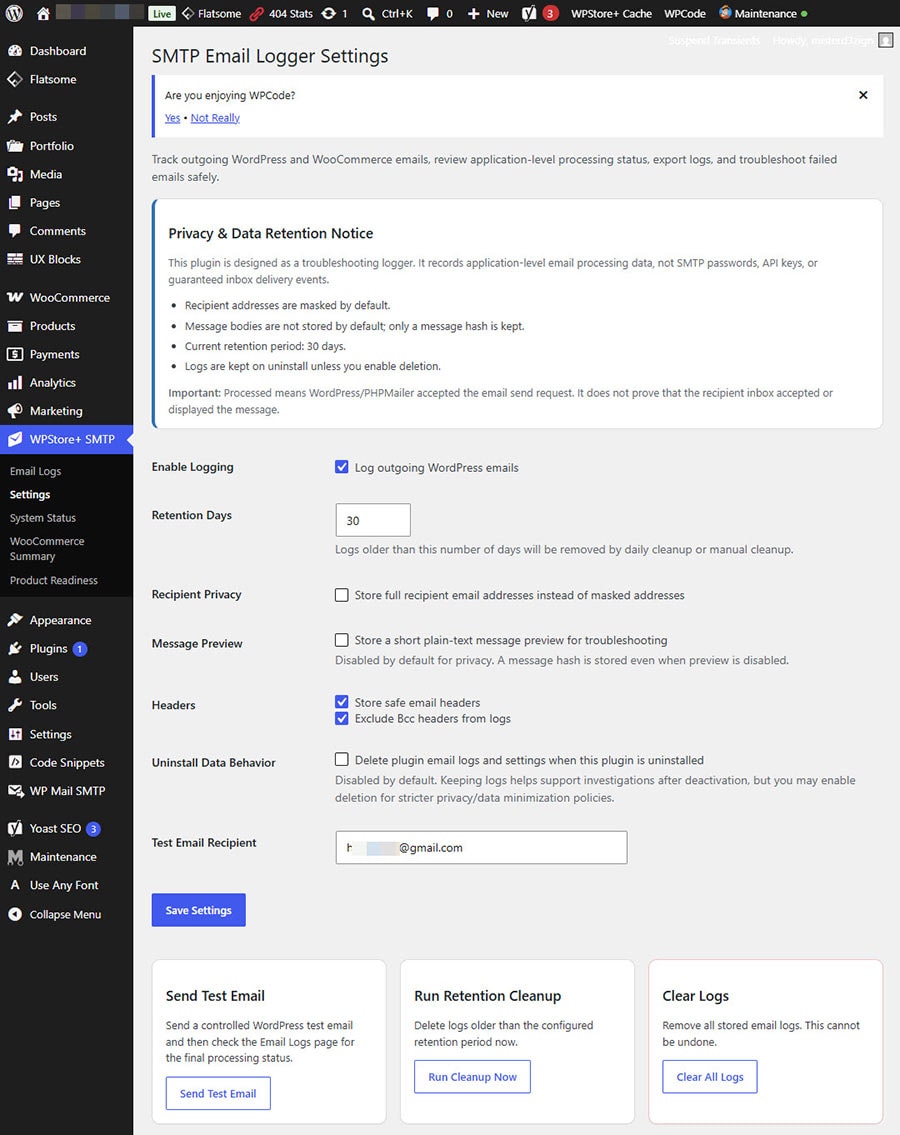
WPStore+ SMTP Email Logger is designed with privacy in mind.
By default:
- Full email message bodies are not stored
- Recipients are masked
- Message hash is stored instead of full content
- Bcc headers are excluded from logs
- SMTP passwords and API keys are never stored by this plugin
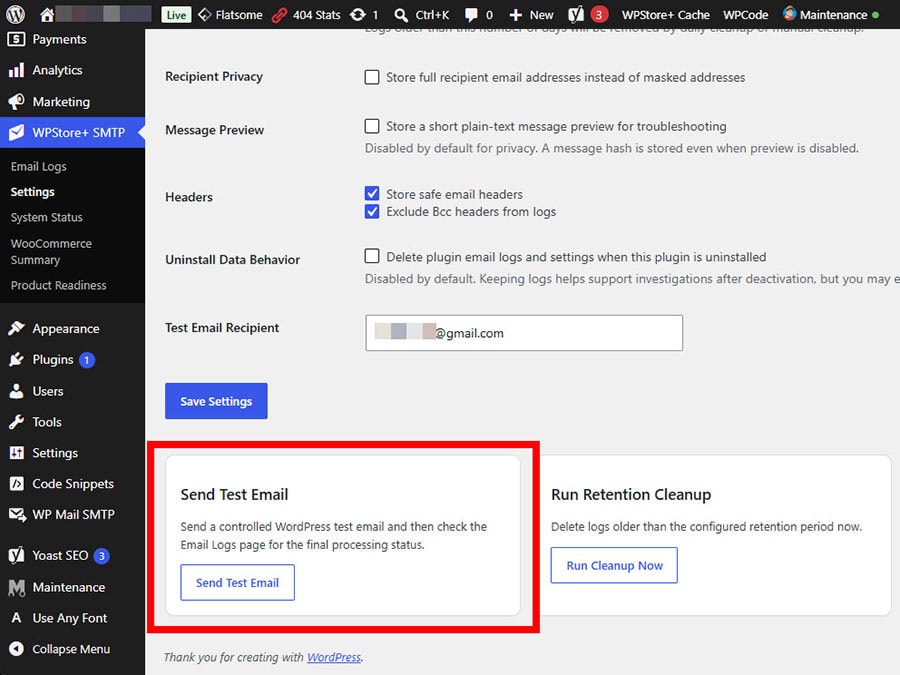
Optional settings allow site owners to control whether message previews or full recipient logging should be enabled.
Data Retention
The plugin includes retention controls to help reduce unnecessary log storage.
Admins can configure how long logs should be kept and run cleanup manually when needed.
System Status and Support Report
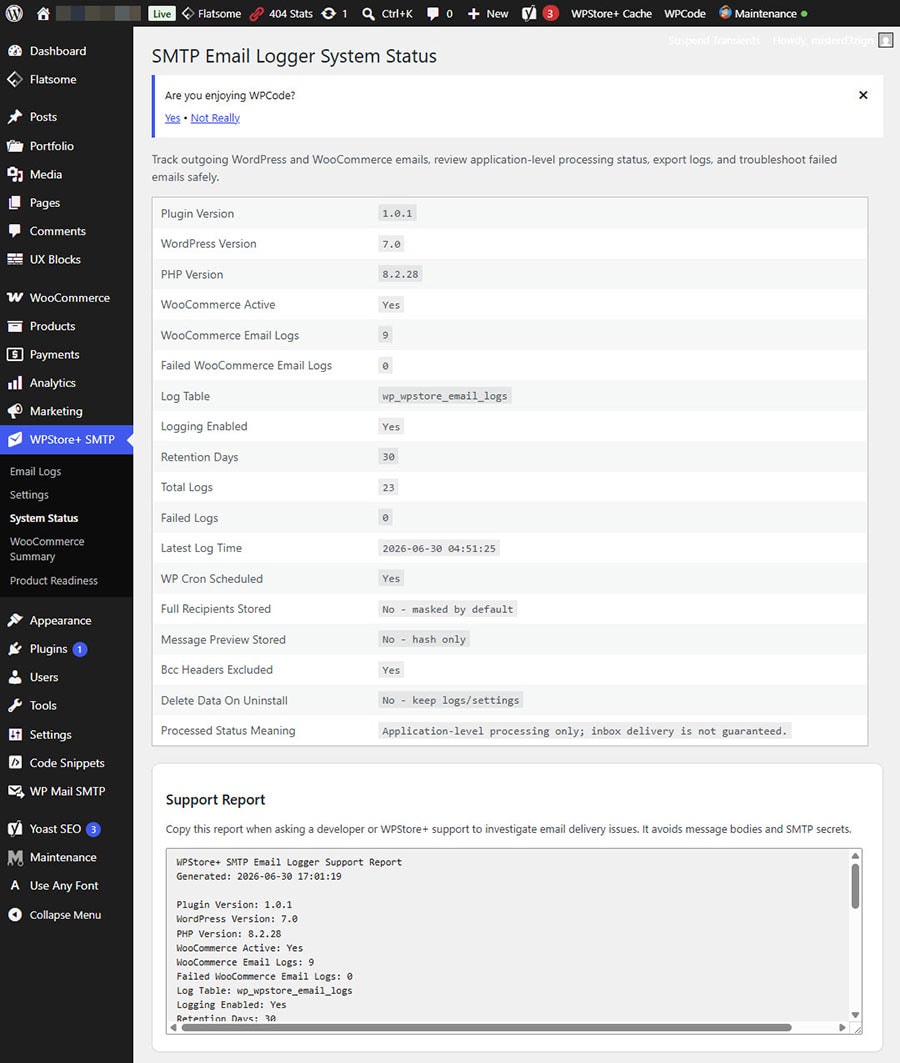
The System Status page provides useful environment and plugin information.
It also includes a copyable Support Report that can be shared with a developer or support team. The report avoids email bodies and SMTP secrets.
Product Readiness
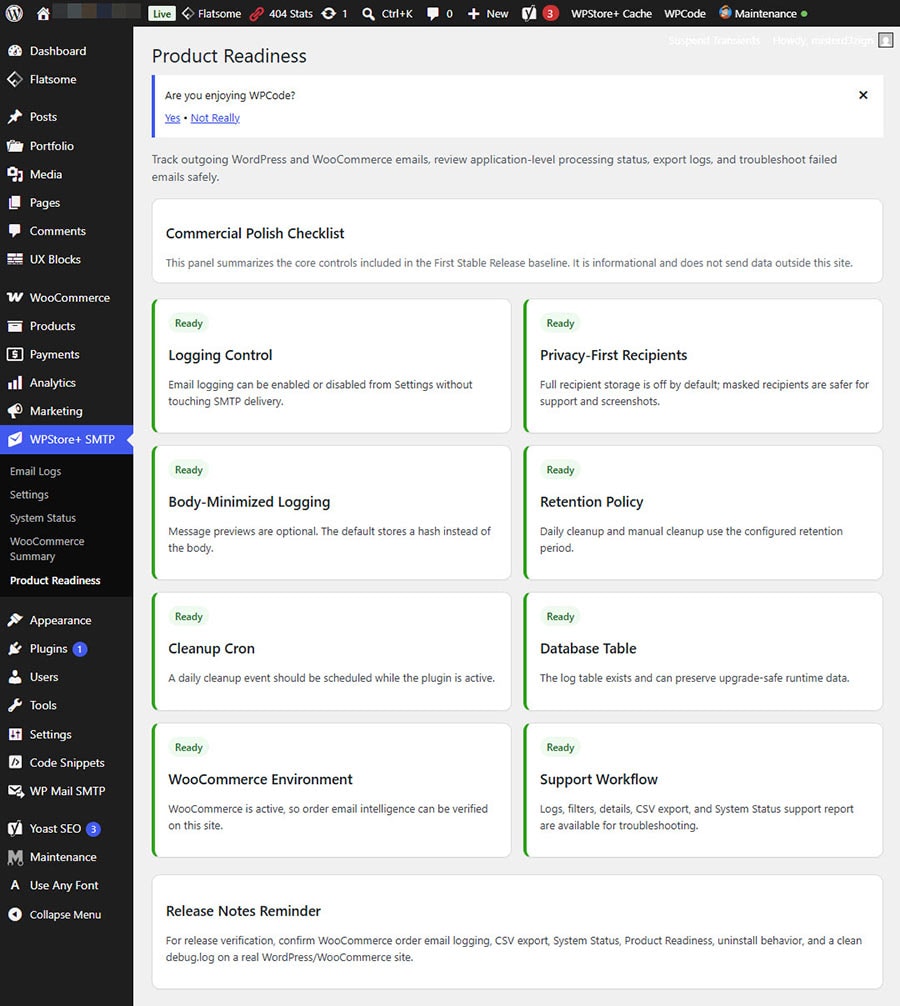
The Product Readiness page helps administrators review whether the plugin is configured in a safe and practical way before using it on a production website.
What This Plugin Does Not Do
WPStore+ SMTP Email Logger does not replace your SMTP provider.
It does not send emails through its own mail server, API, or SMTP connection. Instead, it works alongside your existing WordPress email setup and records useful information about outgoing email events.
To improve actual email deliverability, you should still configure a reliable SMTP or transactional email service and ensure that SPF, DKIM, and DMARC records are correctly set.
Recommended For
WPStore+ SMTP Email Logger is useful for:
- WooCommerce store owners
- WordPress site administrators
- Developers
- Support teams
- Agencies managing client websites
- Website owners troubleshooting missing emails
- Stores using order notifications, password resets, contact forms, or customer emails
Basic Usage
After activation, the plugin starts recording outgoing WordPress email events automatically.
You can access the main tools from:
WPStore+ SMTP > Email Logs
Use this page to review, search, filter, export, and open email log details.
WPStore+ SMTP > WooCommerce Summary
Use this page to review WooCommerce-related email activity.
WPStore+ SMTP > Settings
Use this page to configure privacy, retention, message preview, recipient logging, and uninstall data behavior.
WPStore+ SMTP > System Status
Use this page to review environment information and copy a support report.
WPStore+ SMTP > Product Readiness
Version 1.2.0 — First Commercial Stable Release
### Version 1.2.0 — First Commercial Stable Release
WPStore+ SMTP Email Logger v1.2.0 is the first commercial stable release of the plugin. This version finalizes the tested email logging, failed email monitoring, license protection, CSV export, system diagnostics, and built-in test email workflow for production use.
This release preserves the tested behavior from v1.1.2 and focuses on commercial release readiness, stability, diagnostics, and product reporting.
Use this page to review whether the plugin is configured in a production-friendly way.
Start tracking your WordPress and WooCommerce email activity with a privacy-first email logging and troubleshooting tool from WPStore+.
Installation
1. Download the plugin ZIP file from your WPStore+ account.
2. Go to your WordPress dashboard.
3. Navigate to **Plugins > Add New**.
4. Click **Upload Plugin**.
5. Choose the plugin ZIP file.
6. Click **Install Now**.
7. Click **Activate Plugin**.
8. Go to **WPStore+ SMTP > Settings**.
9. Review the privacy and retention settings.
10. Click **Send Test Email** to confirm logging is working.
11. Go to **WPStore+ SMTP > Email Logs** to review the test log.
12. If you use WooCommerce, create a test order and review the WooCommerce email log details.
Frequently Asked Questions
### Does this plugin send emails through SMTP?
No. WPStore+ SMTP Email Logger is an email logging and troubleshooting plugin. It does not replace your SMTP provider or SMTP configuration.
You should continue using your preferred SMTP or transactional email service.
### Does “Processed” mean the email reached the inbox?
No. “Processed” means WordPress or PHPMailer processed the email request successfully. It does not guarantee that the message reached the recipient’s inbox.
Inbox delivery depends on your SMTP provider, DNS records, email reputation, spam filters, mailbox rules, and other delivery factors.
### Can this plugin fix WordPress emails not sending?
The plugin helps you diagnose email sending problems by recording failed events, errors, and useful troubleshooting hints.
It does not directly fix SMTP credentials, DNS records, blocked server ports, or email provider issues. However, it helps you identify what to check next.
### Does it work with WooCommerce?
Yes. The plugin includes WooCommerce Email Intelligence features that can show WooCommerce email type, order ID, order status, recipient type, customer email, and order total when available.
### Does it work with WP Mail SMTP, MailerSend, SendGrid, Brevo, or other SMTP plugins?
Yes. The plugin is designed to work as a logger and troubleshooting tool alongside your existing email delivery setup.
It does not replace your SMTP plugin or provider.
### Does the plugin store full email content?
By default, full email message bodies are not stored. The plugin uses privacy-first defaults and stores a message hash instead.
Admins can choose whether to enable message preview, depending on their site policy and privacy requirements.
### Does the plugin store SMTP passwords or API keys?
No. WPStore+ SMTP Email Logger does not store SMTP passwords, API keys, or authorization secrets.
### Can I export email logs?
Yes. You can export filtered email logs as a CSV file from the Email Logs page.
### Can I delete old logs?
Yes. The plugin includes retention cleanup settings and a manual cleanup option.
### What happens when I uninstall the plugin?
By default, uninstalling the plugin keeps existing logs and settings.
If you enable the uninstall data removal option, the plugin can remove its log table and settings during uninstall.
### Is this plugin suitable for production websites?
Yes. Version 1.0.1 is the First Stable Release Baseline and includes privacy-first defaults, WooCommerce email intelligence, troubleshooting tools, retention controls, and a clean runtime testing result.
Changelog
Current Version:
### 1.2.0
* First Commercial Stable Release.
* Updated plugin version, stable tag, and internal database version to 1.2.0.
* Added official release type metadata: First Commercial Stable Release.
* Added Release Type information to System Status.
* Added Release Type information to License Diagnostics.
* Added Release Type information to Product Readiness.
* Added Release Type information to Support Report.
* Preserved the tested License Feature Gate from v1.1.1.
* Preserved the built-in Send Test Email tool from v1.1.2.
* Preserved email logging for WordPress emails sent through wp_mail().
* Preserved Sent and Failed email status tracking.
* Preserved Failed Emails view.
* Preserved CSV export support.
* Preserved log retention and cleanup settings.
* Preserved compatibility with WP Mail SMTP, MailerSend, and other SMTP plugins.
* No SMTP password storage is used by this plugin.
* No SMTP sending module is included in this release.
* Stability-focused commercial release based on the tested v1.1.2 baseline.
### 1.1.0
**Release Type:** Commercial License Integration Release
**Latest Update:** WPStore Licenses integration, license activation, update checks, diagnostics, and commercial readiness support.
### 1.0.1
* First Stable Release Baseline hotfix.
* Fixed PHP 8.1+ deprecated warning triggered during the manual Send Test Email flow.
* Added a narrowly scoped formatter guard for the known WordPress formatting warning during the test email action.
* Preserved all v1.0.0 stable features and existing log data.
* No database schema changes.
* No SMTP delivery behavior changes.
### 1.0.0
* First Stable Release Baseline.
* Stable release wording added.
* Preserved privacy-first logging defaults.
* Preserved WooCommerce Email Intelligence.
* Preserved Email Logs, View Details, Export CSV, filters, troubleshooting hints, System Status, Support Report, Product Readiness, and retention controls.
* No new risky delivery behavior added.
### 0.4.2
* Runtime verified Privacy, Retention & Commercial Polish baseline.
* Added formatter null guard follow-up hotfix for PHP 8.1+ compatibility.
* Preserved commercial polish features and existing log data.
### 0.4.0
* Added Privacy & Data Retention Notice.
* Added Uninstall Data Behavior setting.
* Added Product Readiness page.
* Added Support Report to System Status.
* Improved wording for Processed email status.
* Improved commercial release readiness.
### 0.3.1
* Fixed View Details behavior.
* Improved selected log detail display.
* Preserved WooCommerce Email Intelligence features.
### 0.3.0
* Added WooCommerce Email Intelligence.
* Added WooCommerce Summary page.
* Added WooCommerce source filtering.
* Added WooCommerce details to log detail and CSV export.
* Added WooCommerce-specific troubleshooting hints.
### 0.2.2
* Runtime verified Admin UX & Troubleshooting baseline.
* Improved formatter null guard handling.
* Preserved filters, export, cleanup, and troubleshooting tools.
### 0.2.0
* Added CSV export.
* Added search and filters.
* Added date range filtering.
* Added troubleshooting hints.
* Added manual retention cleanup.
* Improved System Status details.
### 0.1.0
* Initial MVP baseline.
* Added outgoing email logging.
* Added settings page.
* Added test email action.
* Added basic system status.
* Added privacy-first logging defaults.
Product Screenshots
Preview the plugin interface, settings, and key features before purchase.
Be the first to review “WPStore+ SMTP Email Logger”
Related products
WordPress Plugins

AI Tools

WooCommerce Plugins


WordPress Plugins

SEO Tools

Media Management
AI Tools

Reviews
There are no reviews yet.