


Skip to content
  • Premium WordPress Plugins, Themes & Website Solutions
    • Contact
    • +66 98 610 6970
  • Premium WordPress Plugins, Themes & Website Solutions
WP Store PlusWP Store Plus
  • Menu
  • Home
  • Shop
    • WordPress Plugins
    • WooCommerce Plugins
  • Services
    • WordPress Fix
    • Malware Removal
    • WooCommerce Support
    • Plugin Installation
  • Pricing
  • Knowledge
  • Support
  • Affiliate
  • Login
    • No products in the cart.

      Return to shop

  • Cart

    No products in the cart.

    Return to shop

Home / WordPress Plugins / Security & Authentication / Social Login
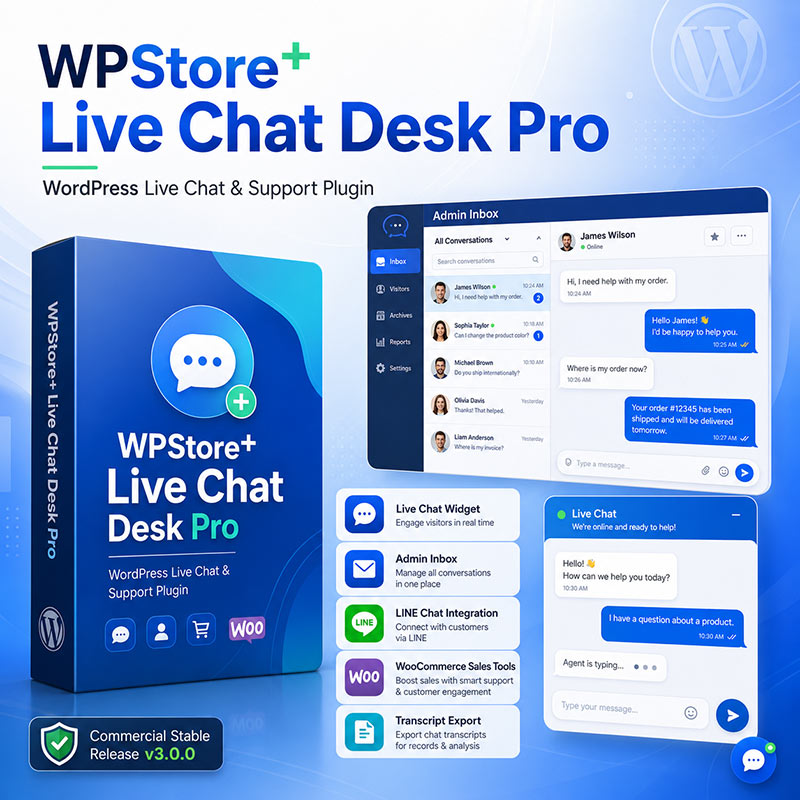
  • WPStore+ Live Chat Desk Pro WordPress live chat plugin with admin inbox, LINE chat integration, WooCommerce sales tools, reports, and transcript export
Browse
  • WooCommerce Plugins
    • AI Tools
    • Analytics & Reporting
    • Currency Tools
    • Invoices & Order Documents
      • Order Management
    • Local SEO
    • Notifications & Automation
    • Payment Gateway
    • Payment Plugins
    • SEO Tools
    • Store Management
    • WooCommerce Performance
    • WooCommerce Security
  • WordPress Plugins
    • Analytics & Reporting
      • Traffic & Content Analytics
    • Customer Support
    • Database & Optimization
    • Developer Tools
    • Diagnostics & Debugging
    • LINE Integration
    • Live Chat
    • Media Management
      • Site Maintenance
    • Monitoring & Analytics
      • Real User Monitoring
    • Performance & Optimization
      • Core Web Vitals Monitoring
    • Security & Authentication
      • Social Login
    • SEO Tools
    • Site Management
    • WordPress Email Tools
    • WordPress Performance
    • WordPress Security
Popular of Week
  • WPStore+ Smart Post Views dashboard showing rising WordPress traffic analytics, content charts, privacy shield, visitor insights, and cache compatibility features. WPStore+ Smart Post Views $49.00 Original price was: $49.00.$29.00Current price is: $29.00.
  • The square graphic promoting the WPStore+ Database Autoload Health plugin displays a blue database icon with a green checkmark shield, signifying the security, monitoring, and cleaning of WordPress databases. It highlights key features such as no automatic deletion, the requirement to back up before cleaning, and guaranteed data recovery. The graphic shows a database health score of 92/100 and displays the Audit, Monitor, Quarantine, and Recover menus at the bottom. WPStore+ Database Autoload Health $59.00 Original price was: $59.00.$39.00Current price is: $39.00.
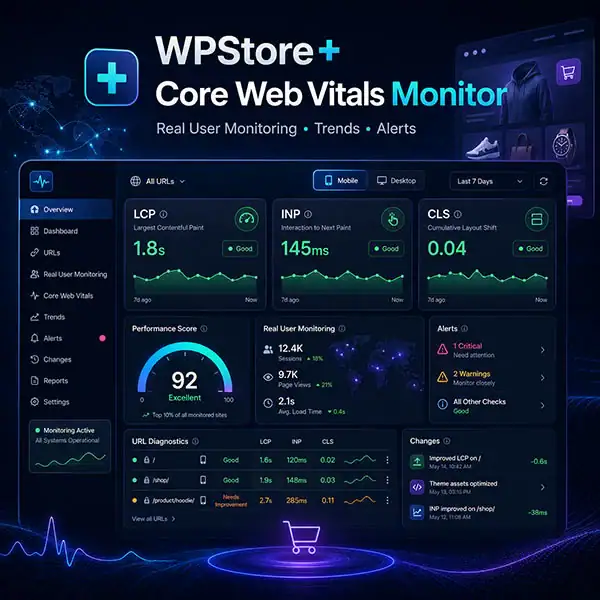
  • WPStore+ Core Web Vitals Monitor dashboard showing LCP, INP, CLS, performance trends, alerts, and Mobile and Desktop results WPStore+ Core Web Vitals Monitor $49.00 Original price was: $49.00.$29.00Current price is: $29.00.
  • WPStore+ AI Live Chat Assistant product cover for WordPress and WooCommerce WPStore+ AI Live Chat Assistant $49.00 Original price was: $49.00.$39.00Current price is: $39.00.
  • The WPStore+ Webhook Delivery Monitor dashboard displays the Webhook Flow diagram, Endpoint Health status, success statistics, and error alerts in Dark Mode. WPStore+ Webhook Delivery Monitor $59.00 Original price was: $59.00.$39.00Current price is: $39.00.
Add to wishlist
Professional WordPress social login plugin supporting Google, Facebook, LINE, X, GitHub, Microsoft, and Apple with WooCommerce compatibility and secure OAuth authentication.

WPStore+ Social Login

$39.00

Currency
USD THB

Enable secure and seamless social login for your WordPress and WooCommerce website. Let customers sign in with their favorite accounts such as Google, Facebook, X, LINE, GitHub, Microsoft, and Apple to improve user experience and increase conversions.

✨ Key Features

  • 🔐 Secure OAuth 2.0 & OpenID Connect authentication
  • ⚡ One-click login and registration
  • 🛒 WooCommerce compatible
  • 👥 Reduce registration friction and improve user engagement
  • 🌐 Support for multiple popular identity providers
  • 🔧 Easy setup with no coding required
  • 🚀 Optimized for performance and modern WordPress sites
  • 🔄 1 Year of updates included
  • 🛠 Professional support from WPStore+
Categories: WordPress Plugins, Security & Authentication, Social Login Tags: apple login, customer authentication, facebook login, github login, google login, line login, microsoft login, oauth, openid connect, social login, user registration, woocommerce login, WooCommerce Plugin, wordpress login, WordPress Plugin, WPStore+, x login
  • Details
  • Installation
  • FAQ
  • Changelog
  • Screenshots
  • Reviews (0)

Make Login Simple for Your Customers

WPStore+ Social Login helps visitors sign in using their existing social accounts instead of creating another username and password. A smoother login experience means higher registration rates and better customer satisfaction.

Whether you run a WooCommerce store, membership website, or community platform, WPStore+ Social Login makes authentication fast, secure, and user-friendly.

Supported Providers

  • Google
  • Facebook
  • X (Twitter)
  • LINE
  • GitHub
  • Microsoft
  • Apple

Why Choose WPStore+ Social Login?

  • Enterprise-grade authentication flow
  • Modern and responsive design
  • Optimized for WooCommerce stores
  • Works with membership and account systems
  • Simple administration interface
  • Lightweight and performance-focused
  • Built for long-term compatibility with WordPress

Perfect For

  • WooCommerce stores
  • Membership websites
  • Online communities
  • Learning platforms
  • Business websites
  • Digital product stores

What’s Included

  • WPStore+ Social Login plugin
  • 1 Year of updates
  • Documentation
  • Professional technical support
  • Future compatibility improvements

License

  • Valid for the selected number of sites
  • Includes 1 year of updates and support
  • Renewal available after expiration

Requirements

  • WordPress 6.x or later
  • PHP 8.x recommended
  • WooCommerce (optional for eCommerce features)
  • HTTPS/SSL enabled
  • Valid API credentials for the desired social providers

Installation

### 1. Download the Plugin

After completing your purchase, download the WPStore Social Login plugin ZIP file from your WPStore+ account or order download page.

### 2. Upload the Plugin to WordPress

Go to your WordPress admin dashboard, then navigate to:

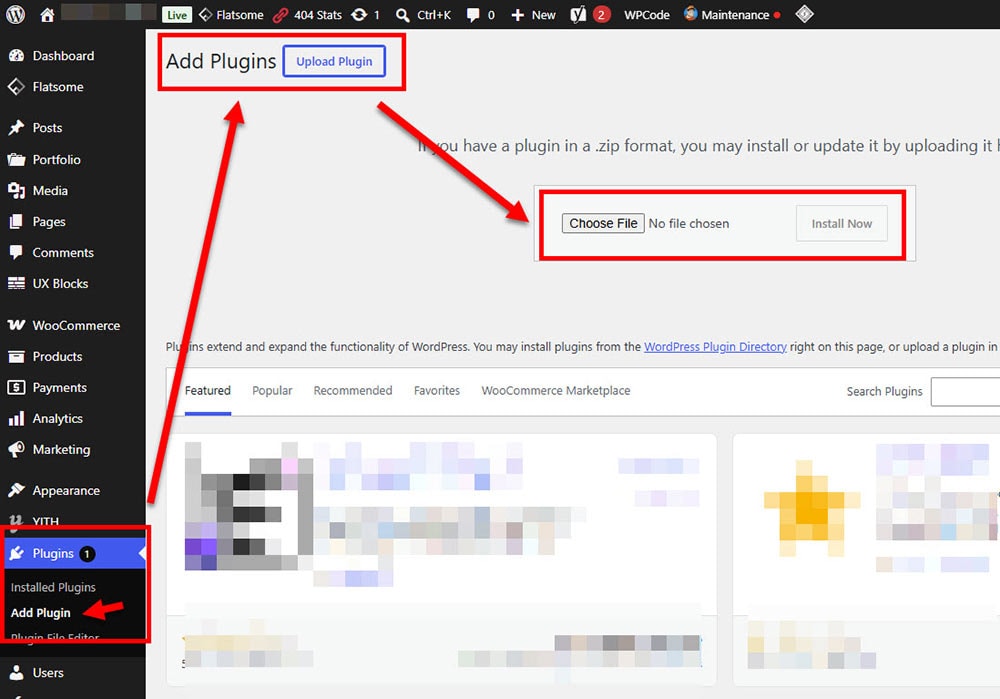
**Plugins → Add New → Upload Plugin**

Choose the plugin ZIP file and click **Install Now**.

### 3. Activate the Plugin

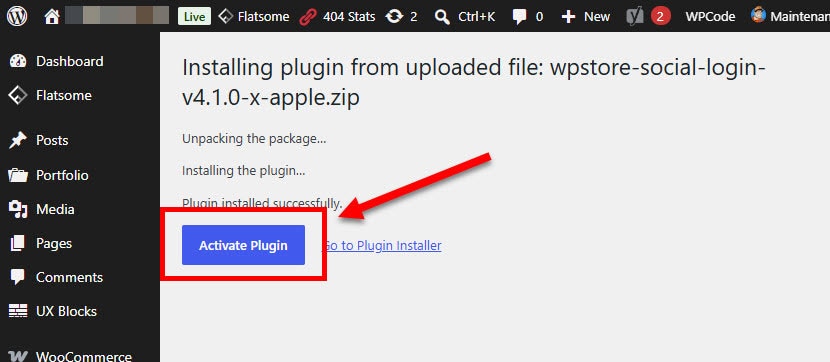
After installation is complete, click **Activate Plugin** to enable WPStore Social Login on your website.

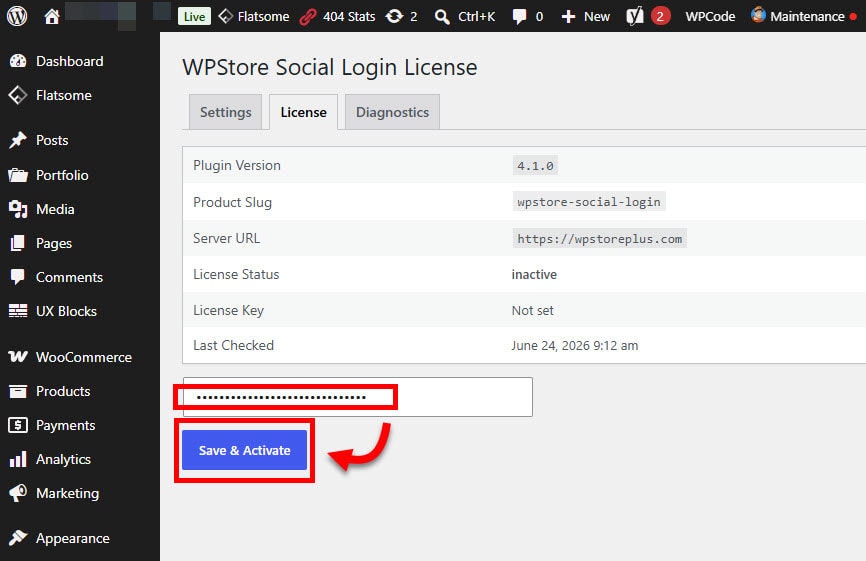
### 4. Activate Your License

Go to the WPStore Social Login settings page and enter your license key. Click **Activate License** to enable licensed features, support, and update access.

### 5. Configure Social Login Providers

Open the plugin settings page and enter the required OAuth credentials for each provider you want to use, such as:

* Google Client ID and Client Secret
* LINE Channel ID and Channel Secret
* GitHub Client ID and Client Secret
* Other supported provider credentials when available

### 6. Copy the Callback URL

Use the callback URL shown in the plugin settings page and add it to the corresponding provider developer console or app settings.

### 7. Enable Login Buttons

Choose where you want the social login buttons to appear, such as the WordPress login page, registration page, WooCommerce My Account page, or custom pages using shortcode.

### 8. Test the Login Flow

Test each enabled provider by logging in with a real social account. Make sure the user account is created or matched correctly.

### 9. Use Shortcode When Needed

You can place the social login buttons on custom pages using the plugin shortcode provided in the settings page.

### 10. Keep the Plugin Updated

Use the built-in WPStore+ update system to keep the plugin updated with the latest improvements, fixes, and compatibility updates.

Frequently Asked Questions

### What is WPStore Social Login?

WPStore Social Login is a WordPress plugin that allows visitors and customers to log in or register using supported social accounts instead of creating a new username and password manually.

### Which social login providers are supported?

WPStore Social Login supports Google, LINE, and GitHub login. The plugin also includes a prepared structure for Facebook and Microsoft login, depending on the availability of provider credentials and platform approval requirements.

### Does this plugin work with WooCommerce?

Yes. WPStore Social Login is designed to work with WooCommerce My Account login and registration pages, helping customers access their accounts more quickly.

### Can I display social login buttons on custom pages?

Yes. The plugin includes shortcode support, allowing you to place social login buttons on custom pages, landing pages, or other areas supported by WordPress shortcodes.

### Do I need to create developer apps for each provider?

Yes. Each social login provider requires its own developer app or OAuth application. You will need to create an app, copy the Client ID and Client Secret, and add the callback URL provided by the plugin.

### Is coding knowledge required to use this plugin?

No coding knowledge is required for normal setup. The plugin provides an admin settings page where you can enter provider credentials and configure available login buttons.

### Does the plugin automatically create a WordPress user account?

Yes. When a new visitor logs in using a supported social provider, the plugin can create a WordPress user account based on the information returned by the provider.

### What happens if the user already has an account?

If the user already has an account with the same email address, the plugin can match the login to the existing WordPress account instead of creating a duplicate account.

### Is WPStore Social Login secure?

The plugin includes OAuth state validation, safer redirect handling, and improved login flow checks to help protect the login process. Security also depends on correct provider setup and keeping WordPress, themes, and plugins updated.

### Does this plugin replace the normal WordPress login form?

No. WPStore Social Login adds social login options while keeping the default WordPress login system available.

Can I use this plugin without an active license?

An active license is recommended for full commercial use, updates, and support. Without an active license, update access and licensed features may be limited depending on the plugin configuration.

### Does the plugin support automatic updates?

Yes. WPStore Social Login integrates with the WPStore+ license and update system. It supports update checks, force update check, and update cache clearing tools.

### Can I customize the button placement?

Yes. Social login buttons can be displayed on supported login/register areas and can also be placed manually using a shortcode.

### Will this plugin slow down my website?

WPStore Social Login is designed to be lightweight and only loads the required login-related functionality where needed. Actual performance may vary depending on the website environment, active plugins, and theme.

### Do I need HTTPS for social login to work?

Yes. HTTPS is strongly recommended and often required by OAuth providers. Your website should have a valid SSL certificate before setting up social login.

### Why does Facebook Login require extra approval?

Facebook may require additional app settings, business verification, privacy policy pages, data deletion instructions, and platform review depending on how the app is used. This requirement comes from Meta/Facebook, not from the plugin itself.

### Why can Microsoft Login require additional setup?

Microsoft Login requires an app registration inside the Microsoft identity platform. The available options may depend on the Microsoft account type, tenant settings, and permissions.

### What should I do if login does not work?

First, check that the Client ID, Client Secret, and callback URL are correct. Then confirm that the provider app is active, the redirect URL matches exactly, and your website uses HTTPS. You can also review the plugin settings and WordPress debug log if needed.

### Is support included?

Yes. Support is available for customers with an active license according to the support terms provided by WPStore+.

Changelog

### Version 4.0.0 – Stable Baseline Release

**Released as a stable baseline version for WPStore Social Login.

* Added improved multi-provider social login support.
* Added Google, LINE, and GitHub login support.
* Prepared provider structure for Facebook and Microsoft login integration.
* Added WooCommerce My Account login/register compatibility.
* Added shortcode support for flexible button placement.
* Improved OAuth security, login state validation, and redirect handling.
* Improved user registration and existing account matching.
* Improved admin settings interface and provider configuration.
* Added WPStore+ license activation, validation, and deactivation support.
* Added automatic update support with force update check and clear update cache tools.
* Improved frontend button display and overall plugin stability.
* Tested and marked as a stable baseline release for commercial use.

Product Screenshots

Preview the plugin interface, settings, and key features before purchase.
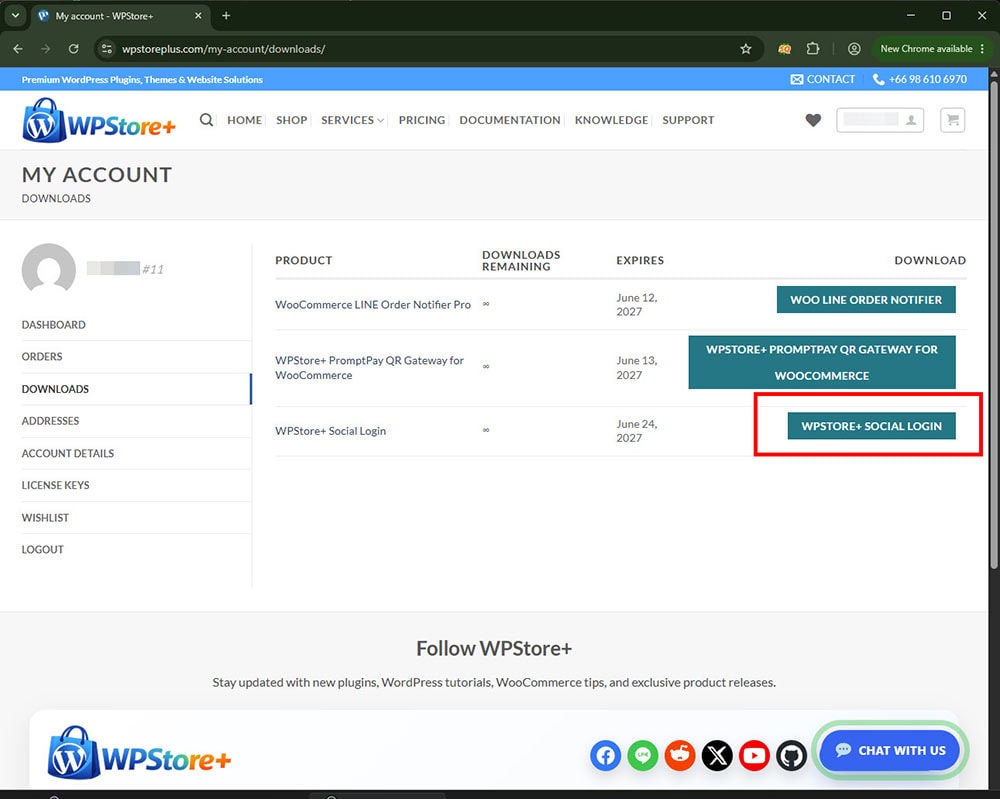
Customer download page showing WPStore+ Social Login download button in My Account.
Customers can download WPStore+ Social Login directly from the My Account downloads page after purchase.
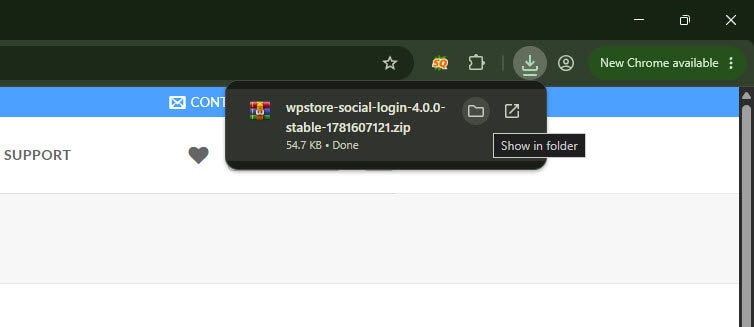
Browser download confirmation for the WPStore+ Social Login plugin ZIP file.
The plugin ZIP file is downloaded and ready to be uploaded to WordPress.
WordPress Add Plugins screen with Upload Plugin and Choose File options highlighted.
Upload the WPStore+ Social Login ZIP file from the WordPress Add Plugins screen.
WordPress plugin installation success screen with Activate Plugin button highlighted.
After installation is complete, activate the plugin to start configuring social login.
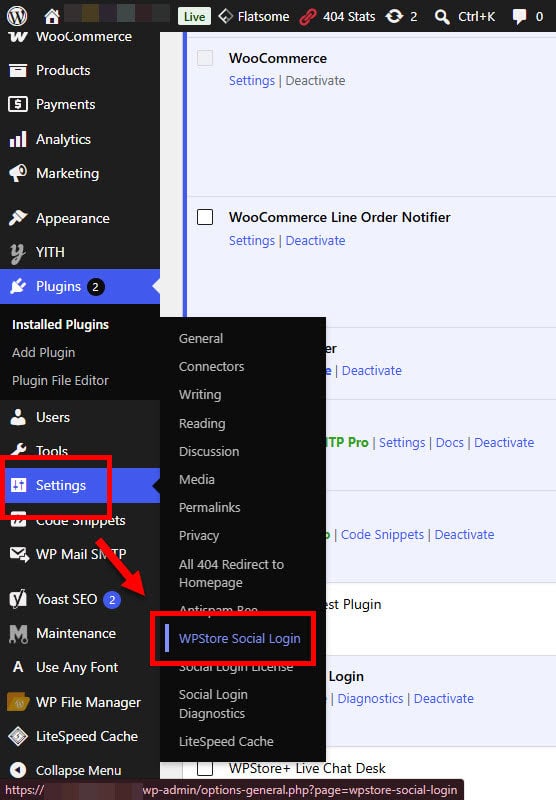
WordPress admin menu showing WPStore Social Login settings location.
WPStore+ Social Login settings are available under the WordPress Settings menu.
WPStore Social Login license screen showing license key activation form.
Enter your license key and click Save & Activate to unlock commercial updates and premium providers.
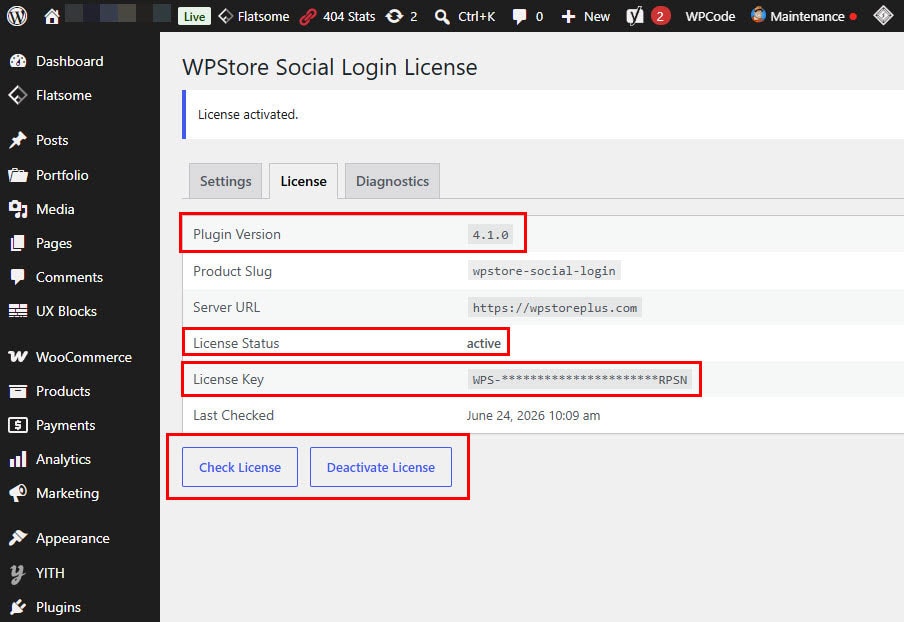
WPStore Social Login license screen showing active license status and license tools.
The license page confirms plugin version, active license status, license key, and license management tools.
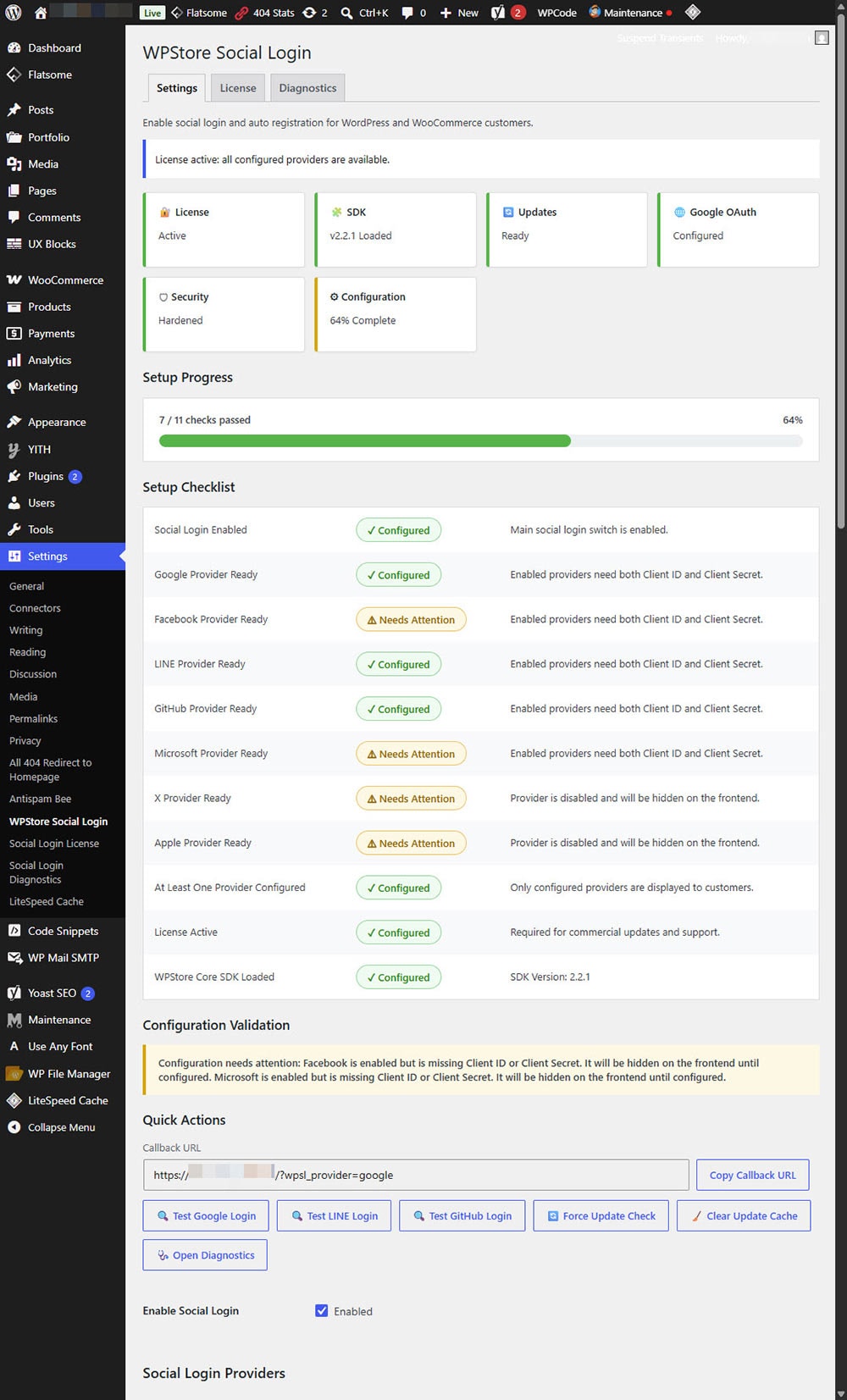
WPStore Social Login setup dashboard with setup progress, checklist, and quick actions.
The setup dashboard helps admins review configuration status, provider readiness, license status, and quick testing tools.
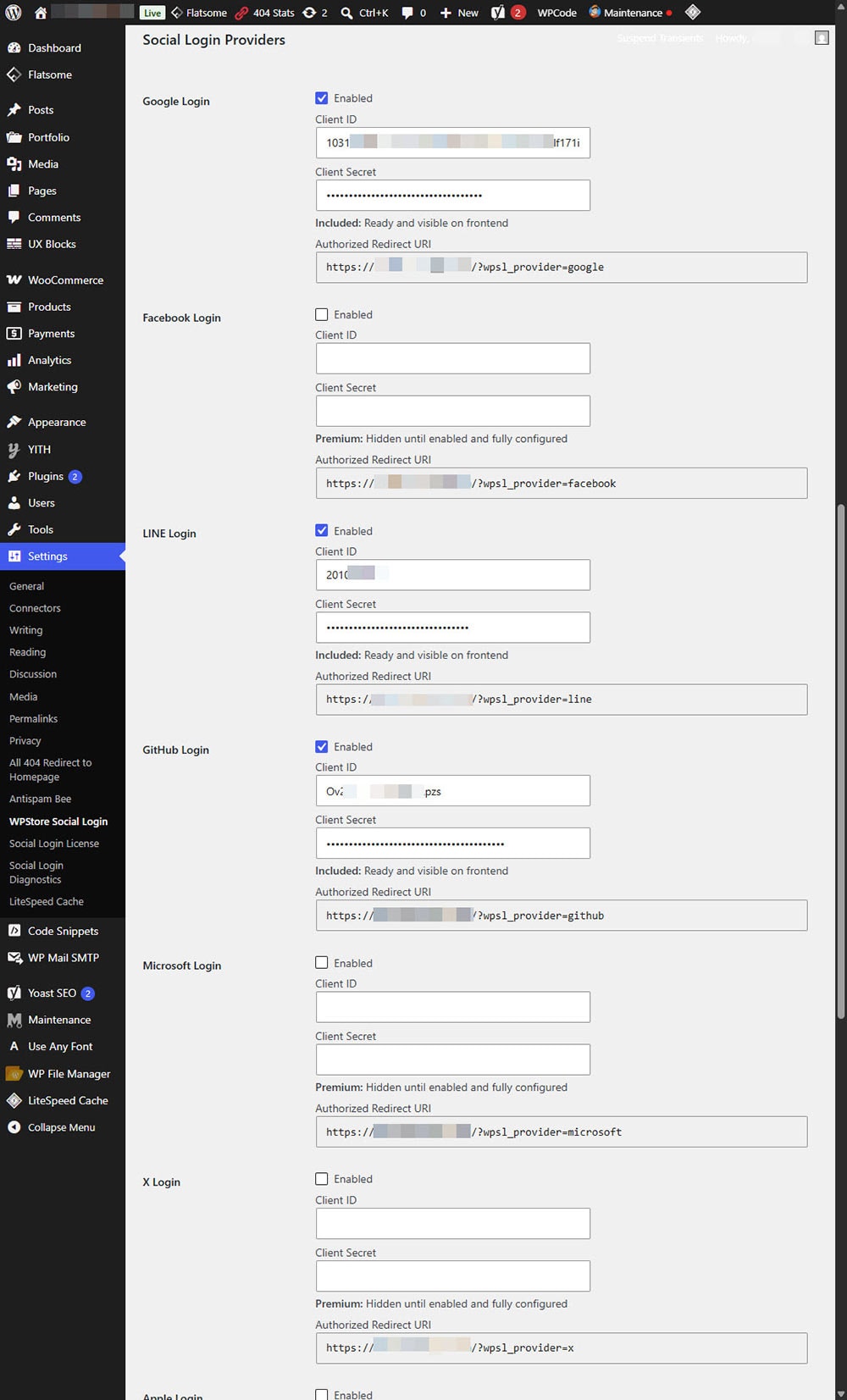
Social login provider settings for Google, Facebook, LINE, GitHub, Microsoft, and X.
Configure each social login provider with Client ID, Client Secret, enable status, and authorized redirect URI.
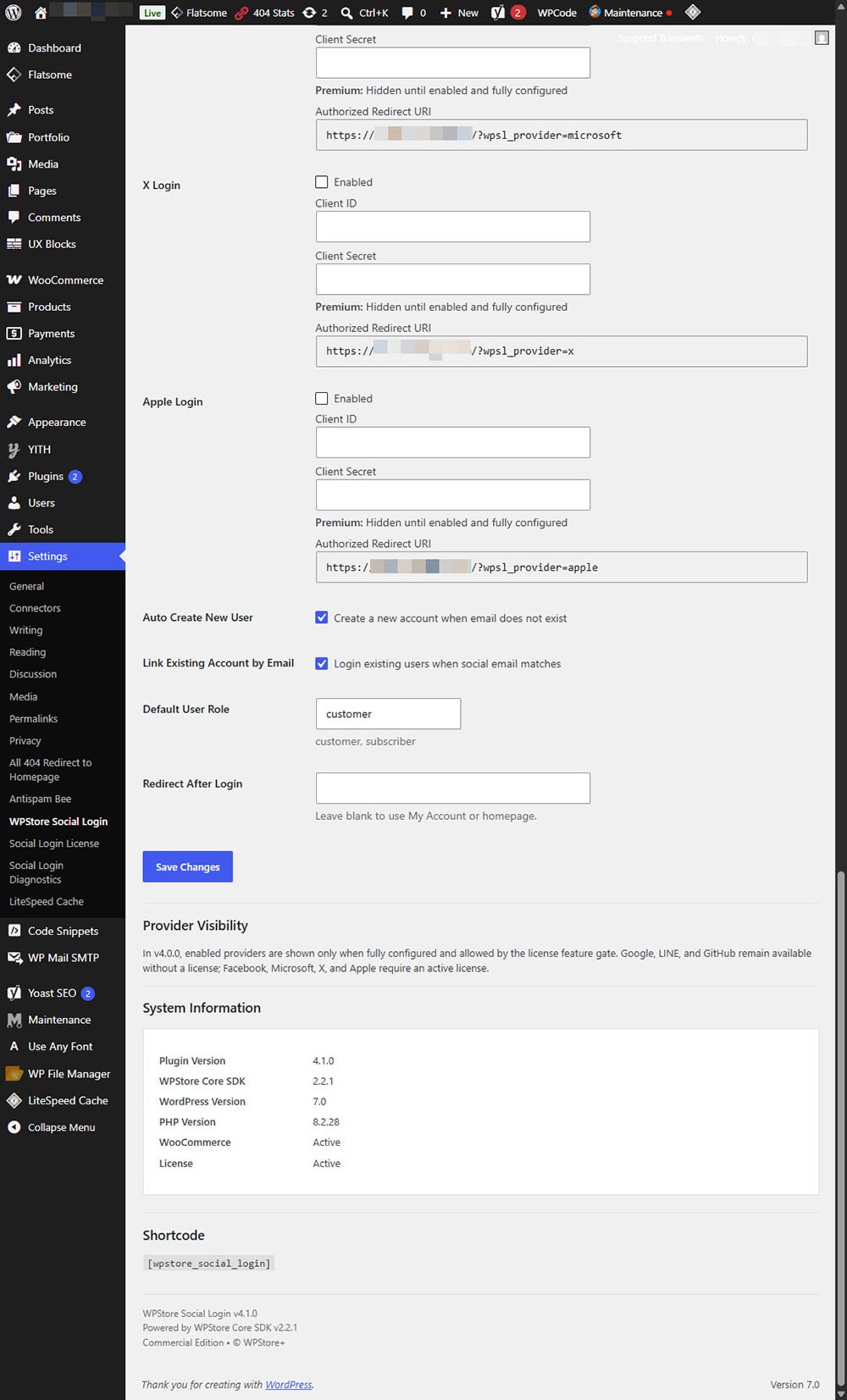
WPStore Social Login settings showing X, Apple, account creation, provider visibility, system information, and shortcode.
Additional settings include X and Apple login, account linking, default user role, redirect behavior, provider visibility, and shortcode output.
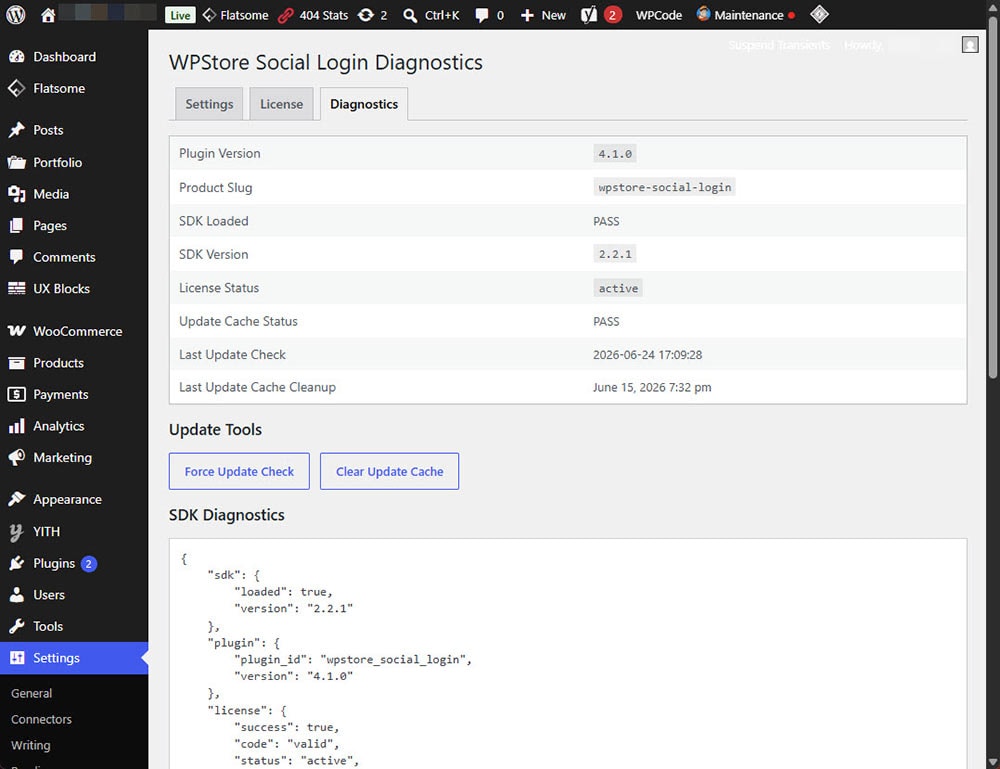
WPStore Social Login diagnostics screen showing plugin version, SDK status, license status, and update tools.
The diagnostics page displays plugin health, SDK status, license status, update cache information, and troubleshooting data.

Reviews

There are no reviews yet.

Be the first to review “WPStore+ Social Login” Cancel reply


Related products

WPStore+ Live Chat Desk Pro WordPress live chat plugin with admin inbox, LINE chat integration, WooCommerce sales tools, reports, and transcript export
Add to wishlist
Quick View

WordPress Plugins

WPStore+ Live Chat Desk Pro

$39.00
Sale!
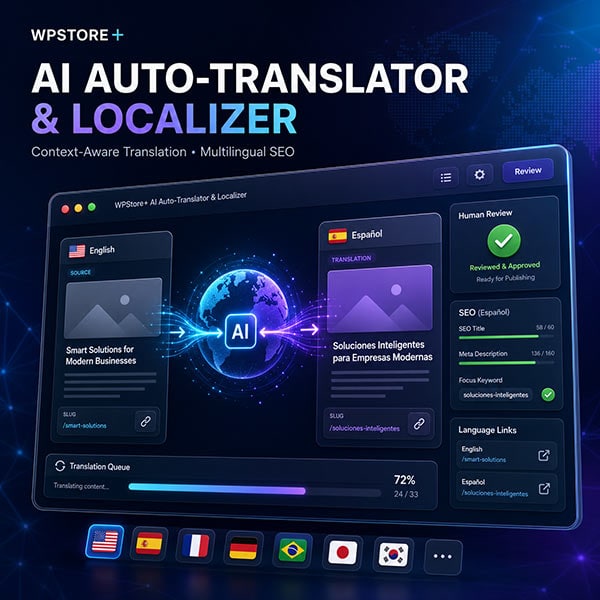
WPStore+ AI Auto-Translator & Localizer with context-aware translation, human review, multilingual SEO, translation queue, and language switcher.
Add to wishlist
Quick View

AI Tools

WPStore+ AI Auto-Translator & Localizer

$59.00 Original price was: $59.00.$39.00Current price is: $39.00.
Sale!
Wide promotional banner for WPStore+ Intrusion Alert Guard showing a WordPress security dashboard, real-time LINE alerts, file integrity scanning, risk score engine, honeypot traps, license shield, and emergency lockdown protection.
Add to wishlist
Quick View

LINE Integration

WPStore+ Intrusion Alert Guard

$39.00 Original price was: $39.00.$29.00Current price is: $29.00.
Sale!
WPStore+ Core Web Vitals Monitor dashboard showing LCP, INP, CLS, performance trends, alerts, and Mobile and Desktop results
Add to wishlist
Quick View

Core Web Vitals Monitoring

WPStore+ Core Web Vitals Monitor

$49.00 Original price was: $49.00.$29.00Current price is: $29.00.
ภาพกราฟิกสีสันสดใสแสดงหน้าจอแดชบอร์ดของปลั๊กอิน WPStore+ SEO Health Checker บนแล็ปท็อป ล้อมรอบด้วยไอคอนเครื่องมือวิเคราะห์ SEO, รายการตรวจสอบ (Checklist) และกราฟแสดงผลการเติบโต สำหรับเว็บไซต์ WordPress
Add to wishlist
Quick View

SEO Tools

WPStore+ SEO Health Checker

$19.00
Sale!
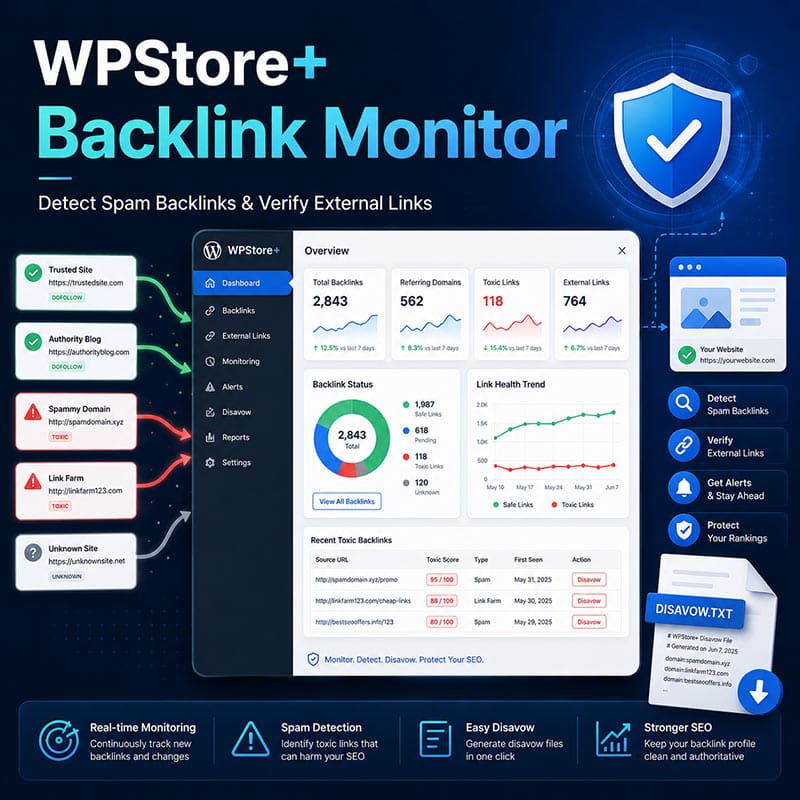
WPStore+ Backlink Monitor plugin dashboard for detecting spam backlinks and verifying external links in WordPress
Add to wishlist
Quick View

WordPress Plugins

WPStore+ Backlink Monitor

$39.00 Original price was: $39.00.$29.00Current price is: $29.00.
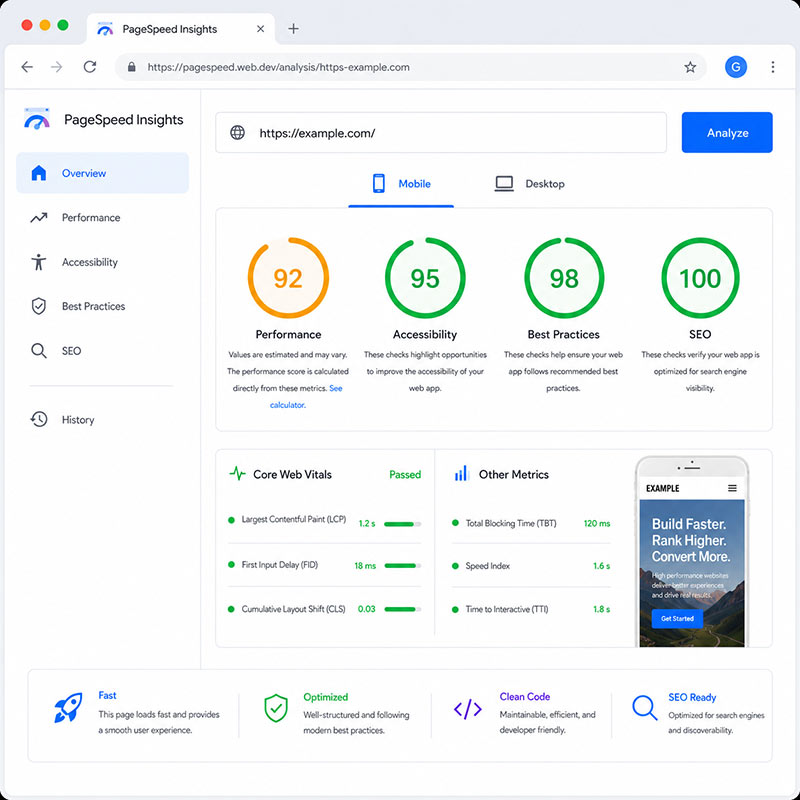
WPStore+ Cache Optimizer featured image showing WooCommerce-safe caching, speed optimization, and secure cache management for WordPress.This Google PageSpeed ​​Insights results dashboard displays scores of 92 for performance, 95 for reach, 98 for best practices, and 100 for SEO.
Add to wishlist
Quick View

WordPress Performance

WPStore+ Cache Optimizer

$39.00
Sale!
WPStore+ Safe Media Cleaner product image showing a safe WordPress media cleanup dashboard with protected media, cleanup candidates, and review-first workflow.
Add to wishlist
Quick View

Media Management

WPStore+ Safe Media Cleaner

$29.00 Original price was: $29.00.$19.00Current price is: $19.00.

Follow WPStore+

Stay updated with new plugins, WordPress tutorials, WooCommerce tips, and exclusive product releases.

WPStore+ Logo
Get Support
WPStore+
  • About Us
  • Our Services
  • Products
  • Knowledge
Products
  • Woo LINE Order Notifier Pro
  • WPStore+ PromptPay QR Gateway
  • WPStore+ Social Login
Services
  • WordPress Fix
  • Malware Removal
  • WooCommerce Support
  • Plugin Installation
Support & Help
  • Documentation
  • Support Center
  • FAQ
  • Contact Support
Legal
  • Privacy Policy
  • Terms & Conditions
  • Refund Policy
  • Data Deletion Instructions
Currency
USD THB
Visa
PayPal
Stripe
MasterCard
Cash On Delivery
WordPress Plugins, WooCommerce Solutions, Technical Support & Digital Tools.
Copyright 2026 © WPStore+. All Rights Reserved.
  • Home
  • Shop
    • WordPress Plugins
    • WooCommerce Plugins
  • Services
    • WordPress Fix
    • Malware Removal
    • WooCommerce Support
    • Plugin Installation
  • Pricing
  • Knowledge
  • Support
  • Affiliate
Loading...

Login

G Continue with Google


Lost your password?

Register

G Continue with Google

A link to set a new password will be sent to your email address.


Your personal data will be used to support your experience throughout this website, to manage access to your account, and for other purposes described in our privacy policy.

Insert/edit link

Enter the destination URL

Or link to existing content

    No search term specified. Showing recent items. Search or use up and down arrow keys to select an item.